
Link in Zwischenablage kopieren
Kopiert
After installing the latest Windows 10 update (20H2) on 2 different computers (with completelty different hardware) some of the tiles of Adobe products are displayed with brighter colors than the rest. I'm not sure if this is Adobe error or Microsoft error.
In the attached sreenshot you can see that Illustrator, Premier, AE, Audition have wrong background (lighter and the correct is darker like Photoshop).
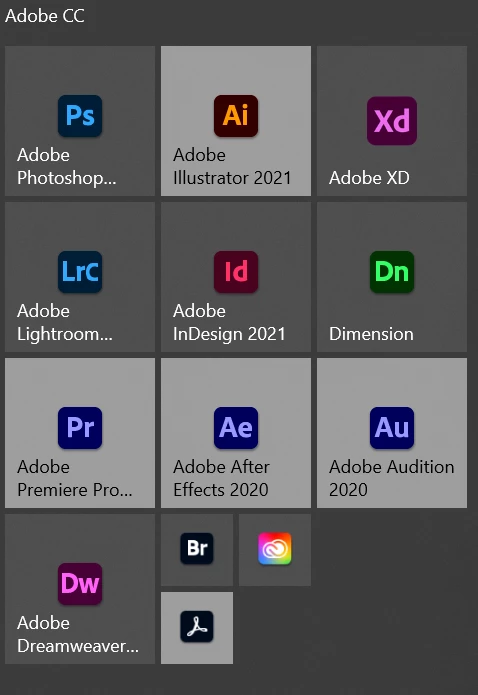
How I tried fixing it: Removing the tiles and re-adding them. Updated to the latest version from the CC app. Multiple restarts. Re-installing the CC apps. Nothing helped. The problem persists on both my desktop PC (AMD CPU + nVidia 1080) and on my notebook (core i7 + AMD GPU).
This was a deliberate design change by Microsoft with the Windows 10 20H2 update where tiles with dark iconography automatically have a lighter background added for contrast.
Please see the MS thread kglad mentioned for additional context
Link in Zwischenablage kopieren
Kopiert
Link in Zwischenablage kopieren
Kopiert
I have the same problem, so I posted a question on Microsoft's official forum. You can find the response by accessing the link. Can you help me?
Link in Zwischenablage kopieren
Kopiert
So it seems to be an Adobe issue, not a Microsoft one.
Let's see what they say.
Link in Zwischenablage kopieren
Kopiert
still no reply?
Link in Zwischenablage kopieren
Kopiert
i replied
Link in Zwischenablage kopieren
Kopiert
One week later the problem is still not fixed and still no reply from Adobe.
Link in Zwischenablage kopieren
Kopiert
these are user-to-user forums and the op was answered within hours (if not minutes) of his/her post.
if you don't like the answer and if you think this is an adobe bug, post here https://www.adobe.com/products/wishform.html
Link in Zwischenablage kopieren
Kopiert
Thank you. I submited the bug. But I will keep this thread opened, maybe someone will come up with a solution.
Link in Zwischenablage kopieren
Kopiert
As your post has nothing to do with Downloading & Installing Adobe software I moved this conversation over to a different forum.
Link in Zwischenablage kopieren
Kopiert
Thank you!
Sorry, didn't really know where to put it.
Link in Zwischenablage kopieren
Kopiert
Update: 15 days after posting about the issue we still have no response and no fix from Adobe.
Link in Zwischenablage kopieren
Kopiert
It's still the same 😞
Link in Zwischenablage kopieren
Kopiert
that's because you're still using 20h2?
Link in Zwischenablage kopieren
Kopiert
Hi, I have the same issue as the author of this thread since updating Windows 10 to 20h2 last year.
This is happening to every PC i own (Dell XPS desktop, Surface Pro 7, etc.)
I tried to resize apps tiles, removing and re-adding them, and even uninstall the apps from the PC didn't solve the problem.
I waited to see if Adobe was aware of this issue and solved this but not even the last update today didn't solve this : Premiere 15.2, After Effects 18.2, Illustrator 25.2.3
Changing the Windows Theme color to light mode makes this problem invisible but when switching back to dark mode or mixed dark Windows / light windows, the problem comes back.
Both my PC are now running on Windows 21H1 Insiders (Release Preview ring) for a few days now and the update didn't change anything regarding this issue.
I hope that this thread and reply will help the Adobe Design / Dev Team to solve this issue. 🙂
Link in Zwischenablage kopieren
Kopiert
This was a deliberate design change by Microsoft with the Windows 10 20H2 update where tiles with dark iconography automatically have a lighter background added for contrast.
Please see the MS thread kglad mentioned for additional context
Machen Sie sich bereit! Im Januar erwartet Sie ein verbessertes Adobe Community-Erlebnis.
Mehr erfahren