
ADE Authorization Error - E_ADEPT_SIGNIN_CONNECTION_EXCEPTION with Google
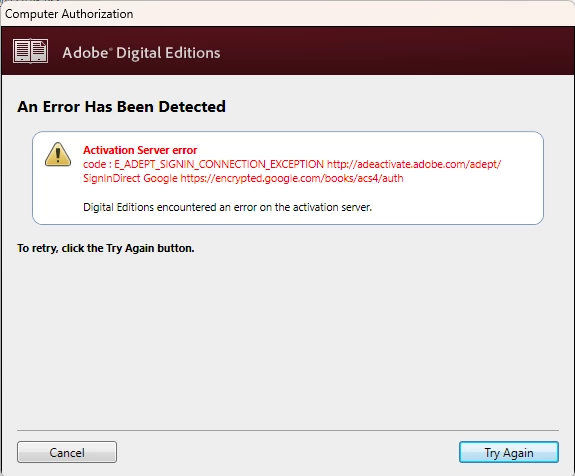
"Digital Editions encountered an error on the activation server." (This message must indicate the problem is with the Adobe activation server, correct?)
Hello,
I'm trying to switch from purchasing my ebooks from Amazon to Google, however I can't authorize ADE with my Google account on my new PC. I had originally setup ADE on a system about and made my last Google Play Store ebook purchase in 2016. Since then, I've switched to Amazon.
However, I've attempted to install ADE on my new system so that I can access my old Google ebook purchases, but also so I can switch from Amazon to Google for my future ebook purchases. I've tried many of the recommended fixes posted here and elsewhere and the Activation Server Error is the same regardless of what I try. This includes;
Trying ADE 2.0, 4.0, and 4.5
Turning off Google 2 Factor Authentication
Changing, (and shortening), my Google PW to all letters (no number or symbols)
I deleted the Windows Adobe entries with Regedit between attempts and I even tried linking my Google account with my Adobe account in the Adobe account profile section, but nothing I tried worked, (after this failed I deleted the Google account link as well). In fact, nothing I tried generated a different error message.
There is no prior authorization enabled on this computer, as this is a brand new installation, so there's no activation file on it to delete, or reset. I also made sure that I deleted the "Third-party apps & services" link for my Adobe account, in my Google account profile, to fully clear everything on both sides.
If anyone has some suggestions for things I haven't tried yet, please feel free to respond. I'm really surprised that this has turned out to be such an unworkable situation. I'm literally locked out of all of my Google Play book purchases until this gets resolved.
TIA..
 AdChoices