
adaptable_Ray98C6
Participant
March 3, 2015
Question

ADE is not opening my .ACSM files and not letting me DEAUTHORIZE

So I am trying to download an e-book from my university's library and am unable to open it on Digital Editions. I downloaded Abode Digital Editions as it was instructed to do so on my library website. So I downloaded the file and tried to open it on ADE but was met with "Error. Check Activation!" notification. After looking up online I tried everything from deauthorizing/reauthorizing, uninstalling, unblocking the files and downloading an older version and I restarted the computer too.
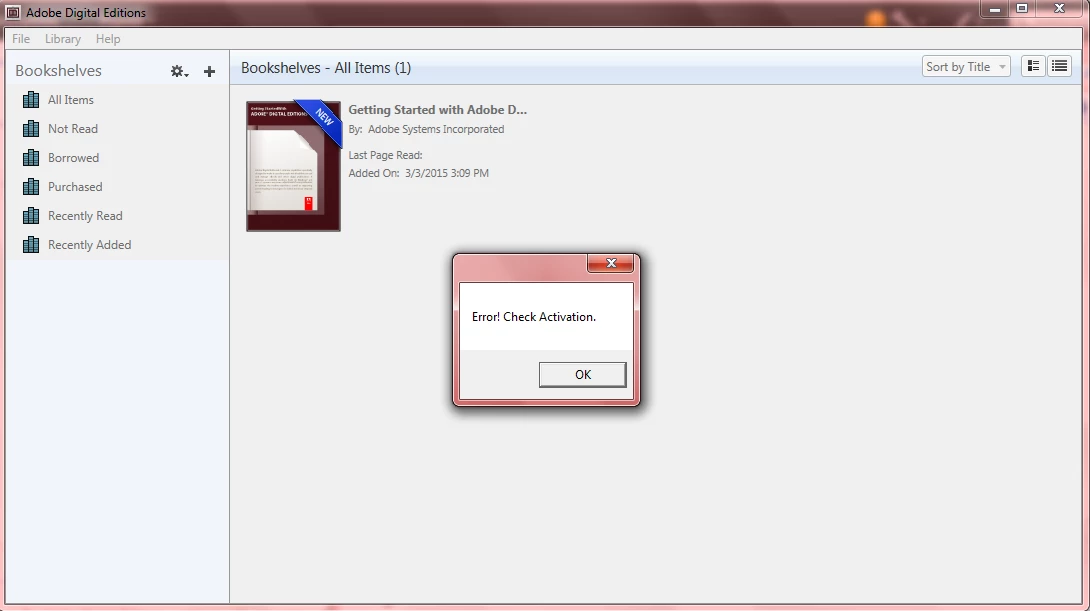
Nothing worked so I kept searching. Many users kept insisting that Ctrl+Shift+D worked for them and so I gave it a go another time but unfortunately, I find myself am unable to deauthorize. Because every time I time my password it says "Unable to Erase Authorization.


Please try after some time." Please I really need some help because I don't want to fail and the textbook prices are sky high.


Please and thank you! -hugs-

Ce sujet a été fermé aux réponses.

6 commentaires

Participant
May 20, 2020

For Mac:  Try deauthorizing and reauthoring. If you can't reauthorize, try this from SandeepP23073769:

May 22, 2019

Copy link to clipboard


Navigate to /Users/Library/Application Support/Adobe/Digital Editions and drag the activation.dat file to the trash.

April 26, 2015

bluefire worked for me as well.

Participant
March 8, 2015

One option is to download and use Bluefire Reader instead. Its working ok with that program.

Participant
April 5, 2015

Do you know of Mac alternatives to Bluefire Reader (or ones that can open .acsm files, since Adobe Digital Editions crashes anytime you try opening/transferring such a file)

ernstz51537703
Participant
March 7, 2015

I do have the same problem after installing update to 4.0.3 !!!!!! By opening a acsm- file I am getting "Error! Check Activation". De-authorizing as described in articel "Error  E_AUTH_NOT_READY I Digital Edoitions" does not work. I also check file association and it is fine.

Update 11.03.2015: De-authorizing and new authorizing has been succesful. Everthing is fine!!!!

Participating Frequently
March 6, 2015

To all those who are using V 4.0.3 and are unable to de-authorize using the de-authorization window and keep getting the message , please try de-authorizing in the article mentioned in the below link:

Error "E_AUTH_NOT_READY" | Digital Editions 

(step 5 if using mac and step 8 if using win are the important steps)

Important Note: Please DO NOT follow the steps mentioned in the link if you have authorized your computer with multiple ID's and you don't remember all the passwords. Following the steps mentioned in the above link will de-authorize all authorized accounts on your computer. So, do not proceed if you don't remember the password(s).

Participating Frequently
April 7, 2015

I had the exact same problem and had to manually deactivate as explained by agnivadebnath‌ above. Just went to Error "E_AUTH_NOT_READY" | Digital Editions and manually deactivated by deleting the relevant info from the registry (there are similar instructions for mac users). Thanks!

Participant
March 6, 2015

I have exactly the same problem if anyone can help.

Participant
March 7, 2015

I am having this problem as well and the "help" doesn't help.  For some reason the program suddenly won't open .acsm files.  Yes, I have already checked to make sure file association is correct.