
Participating Frequently
February 15, 2018
Question

ADE won't load on Windows 10; runs in background process; worked perfectly before

  • February 15, 2018
  • 4 replies
  • 1674 views

Immensely frustrating waste of time: ADE 4.5.7 (32-bit) was working perfectly yesterday but won't load today. I had to do a forced shutdown last night, but no other programs are affected.

When I try to open ADE, Windows' Task Manager shows it running in a background process but nothing of ADE appears on the screen. I've rebooted and re-installed (from a freshly downloaded installer). No success.
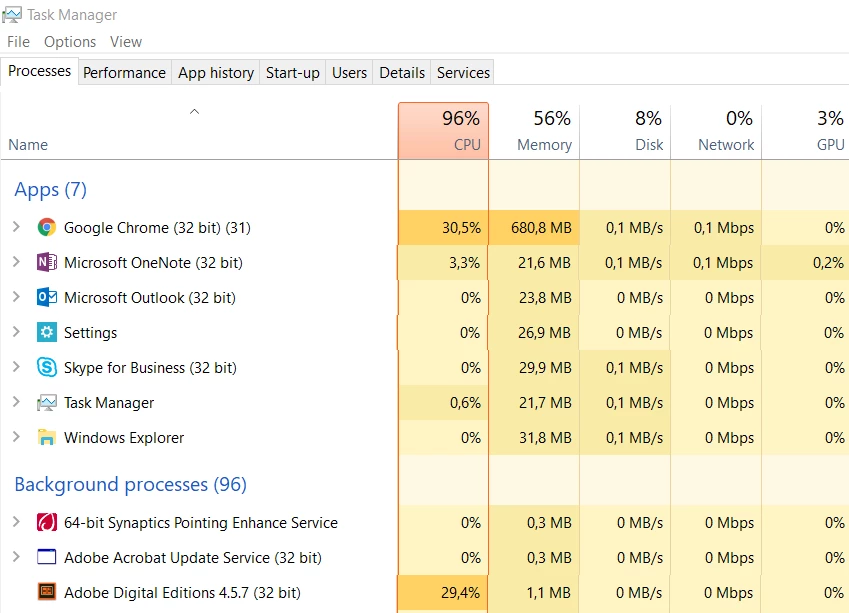
The forums show lots of other similar issues but no consistent solution. One person said the problem just went away by itself!

    This topic has been closed for replies.

    4 replies

    Participant
    February 18, 2018

    I had the same problem; I too after a forced shutdown.

    After many, many, many attempts, I solved by uninstalling ADE 4.5.7 and installing ADE 3.0 and now I can read my ebooks again

    However I hope that Adobe will solve this problem.

    Participating Frequently
    February 19, 2018

    Glad that worked for you. Sadly it didn't work for me, so it can't be a general solution

    Participating Frequently
    February 20, 2018

    Here's something else.

    Some how I was able to solve my problems, but I'm not sure how.  But a local librarian whom I asked for help was able to get this reply from Overdrive which may help:

    "On Mac, Adobe Digital Editions (ADE) stores an encryption key (to make sure our client-to-server calls are secure) in the OS X Keychain. If there is a problem creating this key, then the error "E_AUTH_BAD_DEVICE_KEY" appears.

    To fix this issue, try changing keychain access for ADE:

    1. Open Keychain Access, under Finder > Applications > Utilities.
    2. Select Passwords from Category.
    3. Select Digital Editions from the list of passwords, and press Command + I.
    4. Click the Access Control tab, and select Confirm before allowing access.
    5. Press the + button, choose Applications in the left-hand menu, and choose Adobe Digital Editions from the list.
    6. Click Add, then Save changes.
    7. Launch ADE."
    Participating Frequently
    February 18, 2018

    My ADE is working fine now.  Don't know what I did that was right.  Is it possible that Adobe messes around with ADE (and maybe other programs) for its own reasons, which puts them out of commission for a while?  Would be nice to know that: an error message about having short term technical problems would be good customer relations, I think.

    Participating Frequently
    February 18, 2018

    I need to reinstall version 3.0 but I can't dind a good link.

    Cordialement,

    Jocelyne Brousseau

    Participating Frequently
    February 19, 2018

    Try reinstalling 4.5, and see what happens.  It worked for me this morning.


    I tried about 100 times.

    Cordialement,

    Jocelyne Brousseau

    Participating Frequently
    February 16, 2018

    J'ai le même problème depuis une semaine.

    Participating Frequently
    February 16, 2018

    Il me semble bon de contacter votre bibliothèque/librairie-source-de-livres-électroniques pour qu'elles brassent le cage chez Adobe.  Personne en ce moment ne semble d'avoir un solution du problème.

    Participating Frequently
    February 16, 2018

    J'ai contacté ma bibliothèque qui ont contacté les responsables chez prêts numériques.

    Cordialement,

    Jocelyne Brousseau

    Participating Frequently
    February 15, 2018

    PS: if I try again to load ADE without using the Task Manager to "End process" (quitting the instance already running in the background), I just end up with two ADE background processes. Each time I launch ADE, I get another one in the list. Since I don't see them on the screen, the only way to cull them is via the Task Manager.

    PPS: If I double-click a book in .epub format, it launches another ADE process but again there is no ADE on the screen. (I've used Alt+Tab to check it's not in the background.)

    Participating Frequently
    February 16, 2018

    I have almost the same problem, but with Mac OS High Sierra-ADE worked fine until I upgraded my system, but now I can't get anywhere.  Is it possible there is a glitch at Adobe that is suddenly causing all these problems?

    ADOBE GUYS, PLEASE CHECK THESE PROBLEMS OUT AND DO SOMETHING ABOUT THEM!!!!!

    Participating Frequently
    February 16, 2018

    And I saw in another discussion someone report it happened on Ubuntu Linux.

    I have a meeting in an hour and have to demonstrate a course where students will rely on ADE (with books from EBSCOhost). In desperation I fired up my old laptop (also Windows 10, a Dell Vostro), reinstalled and authorised ADE, downloaded the books and it works fine. But not at all on my new HP Probook.

    There are over 2600 students in my institution and we're starting to roll out new courses designed to use ADE with EBSCOhost. (I guess we can try other software, like BlueFire Reader, but we've already started training staff to use ADE.)

    Surely this calls for an intervention by Adobe--please let us know what is going on there and what we can do on our side!