
Known Participant
February 10, 2016
Answered

Trying to download ebook to Digital Editions but its going to Acrobat Reader DC.

  • February 10, 2016
  • 2 replies
  • 1186 views

I've been using Kobo for years now and every single time there is an update by Adobe I waste a hell of a lot time trying to make Digital Editions work again.

This time around - I download the ebook and instead of going to Digital Editions , Acrobat Reader DC opens and I get the following message
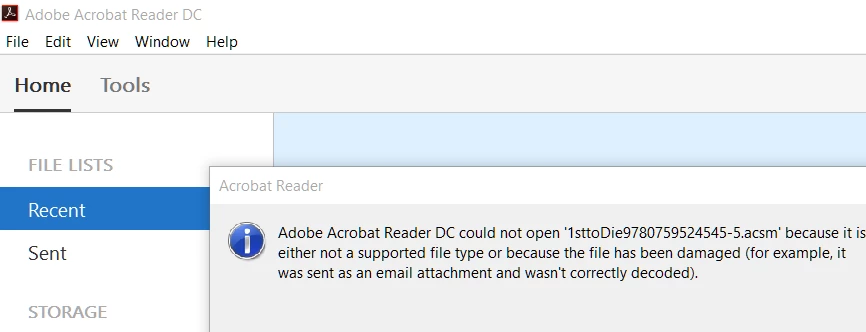
Of course it won't open - damn it!!!   I can't see how I can get it to open and load into Digital Editions.

Any ideas - anyone?!

I thinking very bad thoughts about Adobe right now!

    This topic has been closed for replies.
    Correct answer RogerOsborn

    It sounds like your "association" of .acsm files with ADE has been lost.  In windows 7 Click Start then Default Programs then Associate a file type or protocol with a program.  select acsm and change the default program to ADE.

    2 replies

    Participant
    October 15, 2018

    I can't figure out how to do those instructions for Window 10.  Is there a secret?

    Nanaky
    Participating Frequently
    February 10, 2016

    Open Digital Edition.
    Go to File > Add to Library and choose the eBook.

    puchalaAuthor
    Known Participant
    February 10, 2016

    Tried Nanaky - but I can't download into Digital Edition directly from the website. 

    I would have to download from the internet and it won't let me it because it is a .acsm file

    So this is no help

    RogerOsbornCorrect answer
    Inspiring
    February 10, 2016

    It sounds like your "association" of .acsm files with ADE has been lost.  In windows 7 Click Start then Default Programs then Associate a file type or protocol with a program.  select acsm and change the default program to ADE.