
alexandere9971667
Participant
August 26, 2020
Answered

AAM Registration Notifier, and other programs, can I upgrade to MacOS catalina?

  • August 26, 2020
  • 2 replies
  • 3952 views

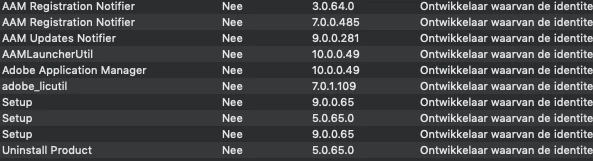
I want to upgrade  to MacOS Catalina. I have Adobe CC 2020 installed and all the programs and the launcher are up to date. I still see this in system stats. These programs are 32 bit. What do I do? just leave them be? I read somewhere these programs are antiquated and not used by CC 2020. is that right?


PS: this is the System Information app, not Activity Monitor.
 

This topic has been closed for replies.
Correct answer Nancy OShea

No, it's not the same. Catalina can neither run nor uninstall 32-bit apps.  You should uninstall old software  BEFORE you load your new OS. 


2 replies

Nancy OShea
Community Expert
Community Expert
August 26, 2020

I recommend a fresh install.  Before you upgrade to Catalina, remove all Adobe Apps & utilities. 

https://helpx.adobe.com/creative-cloud/kb/cc-cleaner-tool-installation-problems.html


After upgrading to Catalina, re-start computer & install Creative Cloud.


Nancy O'Shea— Product User & Community Expert
alexandere9971667
Participant
August 28, 2020

Good Idea! cant I also do the opposite,  install Catalina first then reinstall Adobe CC if I encounter problems? Or is that different? 

alexandere9971667
Participant
August 28, 2020

No, it's not the same. Catalina can neither run nor uninstall 32-bit apps.  You should uninstall old software  BEFORE you load your new OS. 


Good to know! Couldn't the CC cleaner tool still uninstall 32 bit CC programs even on Catalina? Isn't that it's purpose?


https://helpx.adobe.com/x-productkb/global/fix-macos-64-bit-compatibility-errors.html 

kglad
Community Expert
Community Expert
August 26, 2020

unless you're running parallels or something similar, catalina can't run 32 bit programs.


ntl, you can always experiment and terminate processes to see if there are any undesired consequences.