
MacAwesome88
Known Participant
July 20, 2019
Question

About 32 Bit Adobe Apps on Mac

  • July 20, 2019
  • 4 replies
  • 3166 views

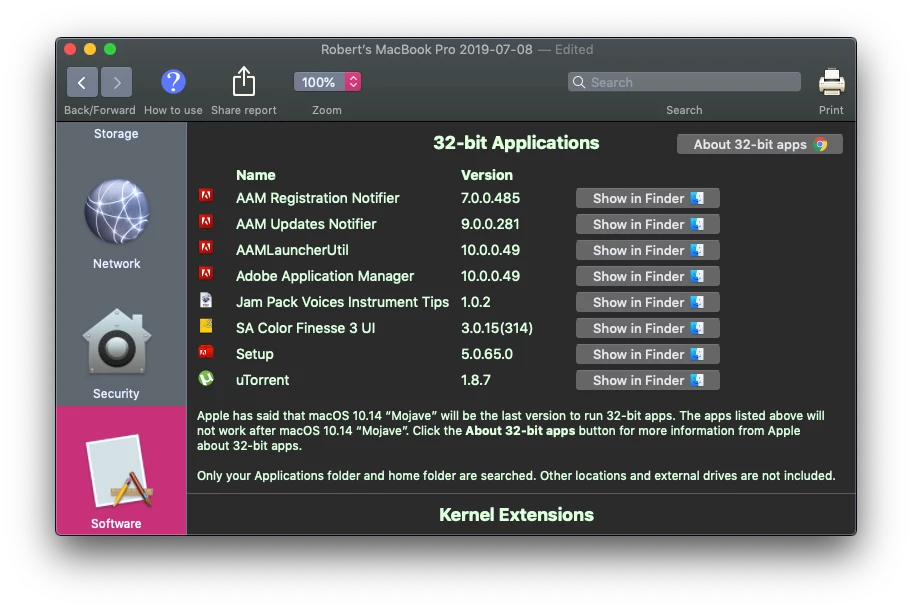
I am wondering when Adobe is going to take care of the 5 (32 bit) Apps that my CC 2018 Installation shows.. I Cannot upgrade to 2019 CC APPS since they run Much Slower on my 2012 MacBook Pro and require newer graphics cards. Mac Users Need 64 Bit versions of these Sub-Apps for "Catalina" this fall. Adobe is the the Only developer left WHO HAS NOT pushed 64 bit versions... I can only conclude That Adobe Has Intentionally done this in order to force us to upgrade to CC 2020 in order to use the New Mac OS this Fall 2019. My 2018 CC Apps will not Load if these Sub-Apps are not 64 bit. I will fight this with the NYS Attorney General and Better Business Bureau if I am stuck not being able to Use my 2018 CC with Mac OS Catalina, unless I get some answers and solutions. As a Disabled Veteran I cannot afford a new $2K Macbook Pro just to be able to continue what I have installed now. Any Ideas and suggestions are welcome.
    This topic has been closed for replies.

    4 replies

    Known Participant
    September 26, 2019

    As noted by others. Stay on Mohave, don't upgrade to Catalina. Problem solved.  Technology and time march on though and eventually you'll be out of touch and self-limited.  I had no issue running the latest version of Adobe software on either my late 2015 iMac or my 2012 MacBook Pro, so not sure what you have going on there.

    Nancy OShea
    Community Expert
    Community Expert
    July 25, 2019

    Adobe only upgrades the latest versions of their sofware.  They don't retrofit older versions to be compatible with new OSs.    DO NOT upgrade to Catalina until you are fully committed to 64-bit apps.

    Nancy O'Shea— Product User & Community Expert
    Participating Frequently
    July 23, 2019

    Hi! As time progresses, so does technology. Sometimes at a quicker pace then we'd like for it to (especially when it comes to purchasing a new machine). I think it's normal for any software or technology company to want you to upgrade. In your case, I would recommend sticking to the OS that will run the software you're wanting to run. Best of luck

    John T Smith
    Community Expert
    Community Expert
    July 20, 2019

    If you must use old programs, stick with the matching operating system

    I don't work for Adobe, but I do know from reading a LOT of forum messages that Adobe historically does not go back and update old programs to work on new operating systems... so don't install Catalina