Andrewjmarino
Known Participant
December 7, 2020
Answered

Accidentally Updated to Older Version of Photoshop

  • December 7, 2020
  • 1 reply
  • 296 views

Hello


I updated to Photoshop 22.0.1.

And, then, after accidentally updated to 21.2.4 (older version). Creative Clous showed that this version was still available for installation/update.

System info shows that I am running 21.2.4.

I have also Photoshop 2020 and 2021 installed on my laptop.

How do I get to running 22.0.1 and Photoshop 2021?


I assume that I can just uninstall everything and reinstall the latest version (22.0.1)
Unless that there is another workaround/fix???


Thanks

Andrew

 

This topic has been closed for replies.
Correct answer Just Shoot Me

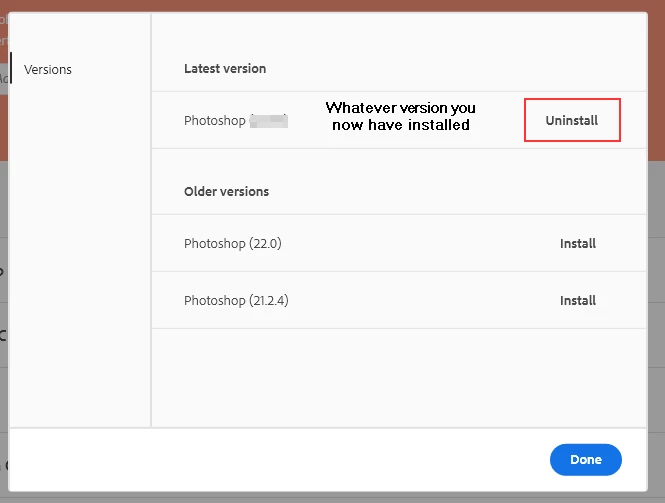
Open the CC Desktop app and click the 3 dots to the far right and select "Other Versions". Then Uninstall whatever Current version you have installed and install the newest.


Then reinstall 22.0.1.


As to your notebook (which I take as a different computer) the process is the same.

1 reply

Just Shoot Me
Just Shoot MeCorrect answer
Legend
December 7, 2020

Open the CC Desktop app and click the 3 dots to the far right and select "Other Versions". Then Uninstall whatever Current version you have installed and install the newest.


Then reinstall 22.0.1.


As to your notebook (which I take as a different computer) the process is the same.

Andrewjmarino
Known Participant
December 7, 2020

Thank you. That was the easy fix 🙂