


Participating Frequently
February 20, 2013
Answered

Adobe application manager fails to update/install

  • February 20, 2013
  • 5 replies
  • 58262 views

Please help me resolve this error and update App Manger properly.

I have downloaded and am running Creative Cloud CS6 versions of Illustrator and Photoshop that I installed back in Decmember.  Now I'm trying to download more applications and am encountering this error:

I click 'download' on InDesign (for example)

Download initiates launch of Application manager, App manager opens main window then "initializing installer window"

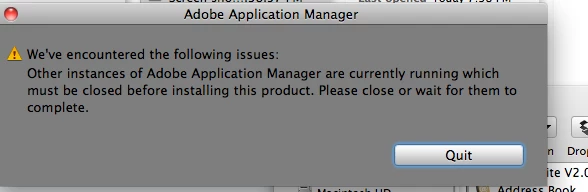
Application manager flashes this warning for a split second: "other instances of adobe application manager are currently running which must be closed before installing this product. Please close or wait for them to complete." (see image). This warning closes on its own after just a second.
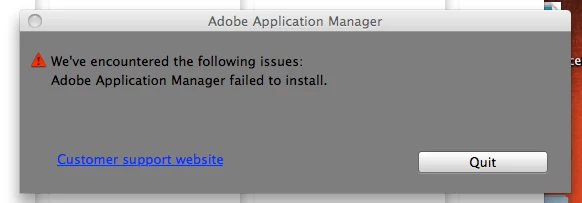
Then it continues to install for a few minutes, asks for my password then fails with the message, "We've encountered the following issues, Adobe Application manager failed to install" (no error number, see image)
Photoshop and Illustrator still run fine, but none of my Adobe apps (including Air) will update properly now. I have tried deleting the App Manger files from applications > utilities and re-installing, but that also creates an error.

I have searched for duplicate app manager files but have come up empty.  I've run the support advisor app and it checks out fine.  I have a token from that if it helps. 

I'm running iMac 10.6.8 and I also have CS5 installed on this computer if it makes a difference.

Any help would be appreciated.   I'd like to be able to run the apps I'm currently paying a monthly fee for.

This topic has been closed for replies.
Correct answer garyots

see if this fix works for you:  http://forums.adobe.com/message/4362587


I tried updating abobe application manager manually from adobe website.. and this resolved my issue.. and then able to update photoshop cc as well.

try this. 

for windows : http://www.adobe.com/support/downloads/detail.jsp?ftpID=4773

for mac  :  http://www.adobe.com/support/downloads/detail.jsp?ftpID=4774

5 replies

Bennerman
Participant
July 10, 2016

I found that if you quit the installer when it says "failed to initialize" and go into your c drive, click on "program files x86", go into "common files", then into "adobe", then rename the file OOBE to "OOBE.old" This worked for me on windows

Participant
August 13, 2020

bro i know I'm 4 years late, but thanks! you're a lifesaver!!!

Participant
March 1, 2015

Adobe SUCKS! I hate this incompetent company.

Participant
January 5, 2016

For CS5 it only needs to reinstall the latest Adobe Application Manager (AAM). Download from here: http://www.adobe.com/support/downloads/thankyou.jsp?ftpID=4774&fileID=4438

1. Close all Adobe apps.

2. Install AAM.

3. Update your Adobe apps from the help menu in an Adobe app like InDesign or PS. (double-click on AAM don't works!)

4. Celebrate :-)


Otherwise read this: Error: "Adobe Application Manager is needed" in Adobe Creative Suite 5.5 and CS5

georgecoghill
Participating Frequently
August 11, 2014

Anyone dealing with this issue, I tried all the suggestions short of reinstalling all the apps. I was getting the error for Adobe Application Magager failing to install, the updater failing to initialize, the Creative Cloud app with a blank white screen under the dark header bar, unable to launch CS6 or CC apps, etc.

Here's how I fixed it:

- In the Finder, go to: /Applications/Utilities/Adobe Application Manager

- rename the "Adobe Application Manager" folder to something like "Adobe Application Manager_old"

- run the Adobe Application Manager installer again.

Fixed!

I noticed that the so-called installer was indicating it was an updater, so there must be some corrupt file in the Adobe Application Manager folder that is causing the issue. I was able to log in to the Creative Clud app, and launch all my CS6 and CC apps no problem after installing with this method.

Participant
July 3, 2013

I'm going to write this information cause it was so darn frustrating and after two days I finally got it - so here goes - resolution:

I'm running windows 7, and was trying to download cloud which apparently I was forced to do based on my subscription base (was on CS6 before that)

Step 1: start task manager and close ALL adobe running apps including akami session

Step 2: click on the windows icon and type in search bar %appdata%, enter

Step 3: in browser bar above of folder, click on "appdata" (my file directory when i typed step two was C:\Users\study\AppData\Roaming, and I need to be be at C:\Users\study\AppData)

Step 4: Click Local, then Adobe, then oobe, delete the oobe file

Step 5: Go the the following to download the "cleaner tool": http://download.macromedia.com/pub/creativecloud/cleanertool/win/Adobe_Creative_Cloud_Cleaner_Tool.zip

Step 6: Unzip the file and click on the AdobeCreativeSuiteCleanerTool.exe, that was in my directory as follows (dependent on where you download and unzip of course) C:\Users\study\Downloads\adobe_creative_suite_cleaner_tool (1)\win

Step 7: select (e) in the black box for "english", select (y) for yes, select creative cloud (whichever option # that is) and again anything with creative cloud (this did NOT delete my other adobe files, which I feared may - but I was simply instructing it to clean/delete the creative cloud.

Step 8: close the black window

Step 9: Click here: http://www.adobe.com/support/downloads/detail.jsp?ftpID=4773  and download the creative cloud adobe application manager

Step 10: Run the application

Step 11: Log in and download the software you want

If that doesn't work, what I did is between steps 4 and 5 I restarted my computer, then I went into task manager and closed all adobe apps.  I'm not sure I had to do this step but I was desperate after 2 days doing whatever.  Each tech person gave me different information.  The last person helped me best, but I spoke with her via chat AFTER I had rebooted the computer.  If you need support click http://helpx.adobe.com/contact.html and I personally did the "chat" so I wouldn't have to wait.

Hope this helps anyone who hasn't figured it out! 

kglad
Community Expert
Community Expert
February 20, 2013

restart your computer.

then, before doing anything else, launch adobe application manager.  if that launches ok, update the programs that you want to update.

Participating Frequently
February 20, 2013

I repaired permissions, removed any login items from my startup folder (just in case) and restarted. 

Encountered the exact same behavior as above. AAM won't finish update so I can't install or update any new Adobe applications.

What are my next steps?

Participating Frequently
February 20, 2013

Also Note that I have CS4 installed, as well as Creative Cloud CS6, not CS5. I was mistaken.