
Exit
  • Global community
    • Language:
      • Deutsch
      • English
      • EspaƱol
      • FranƧais
      • PortuguĆŖs
  • ę—„ęœ¬čŖžć‚³ćƒŸćƒ„ćƒ‹ćƒ†ć‚£
  • ķ•œźµ­ ģ»¤ė®¤ė‹ˆķ‹°
0

Adobe Application Manager Update Failed, AAM corrupt

Community Beginner ,
Dec 21, 2012 Dec 21, 2012

When trying to run Adobe Application Manager I received this message:
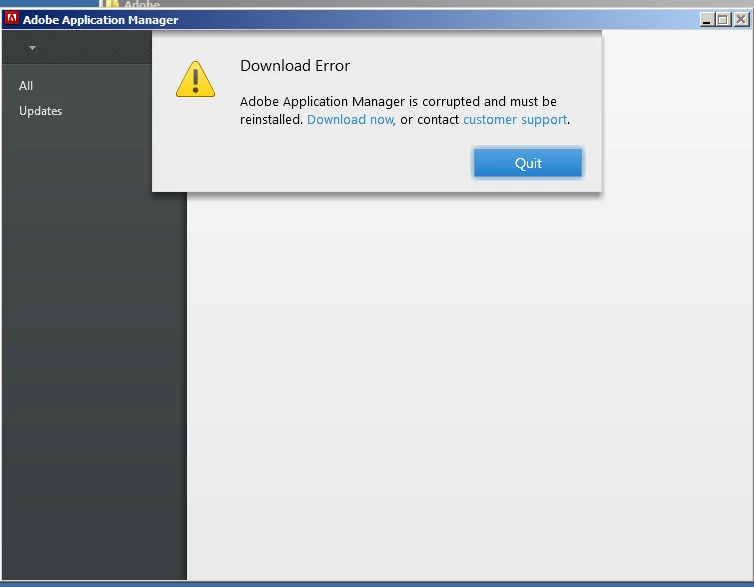
AAM-Full.jpg

I downloaded and installed the AAM update from Adobe web site. Same message.

I also get this message from CS5 and CS6 programs when trying to find updates:
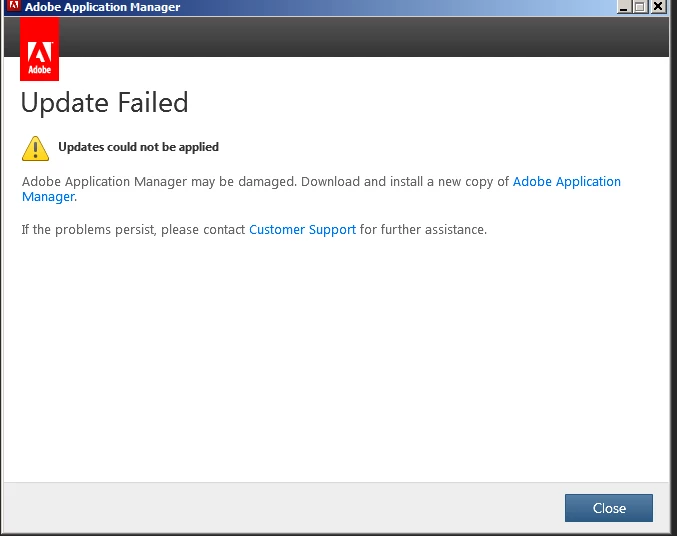
AAM-from-PS.jpg

The worst part of this  is that I get this same message after manually downloading and attempting to install the latest Photoshop CS6 update. Thus I cannot update any CS6 programs!

After over an hour with Customer support their suggestion was that I uninstall ALL CS5 and CS6 programs, then try an re-install. This is a fix?

Suggestions?

12.3K
Translate
Report
Community guidelines
Be kind and respectful, give credit to the original source of content, and search for duplicates before posting. Learn more
community guidelines
Adobe Employee ,
Dec 21, 2012 Dec 21, 2012

Can you please try reinstalling the Adobe Application Manager from http://www.adobe.com/support/downloads/detail.jsp?ftpID=4773.

Translate
Report
Community guidelines
Be kind and respectful, give credit to the original source of content, and search for duplicates before posting. Learn more
community guidelines
Community Beginner ,
Dec 21, 2012 Dec 21, 2012

Hi Jeff,

I tried this multiple times. Customer Service Rep even had me delete the PDApp folder and reinstall AAM. All of the symptoms persisted including the inability to install Photoshop_CS6_13_0_1_1_upd.

I have neither the CS5 or CS5 disks with me, so I have not tried to uninstall and reinstall all of my programs.

Thanks and Regards,

Sanford Lavine

Translate
Report
Community guidelines
Be kind and respectful, give credit to the original source of content, and search for duplicates before posting. Learn more
community guidelines
Engaged ,
Dec 22, 2012 Dec 22, 2012

Hi Alameda,

    Sorry that the suggestion by Jeff did not resolve your issue. For any issue with Adobe Application manager, you need to firstly install the latest update. If this did not work, follow the steps mentioned in this below doc:

http://helpx.adobe.com/creative-suite/kb/error-application-manager-needed-cs5.html

You said that you do not have installation files for CS5 or CS6 in order to re-install. You can find the download links for both versions from the below site:

CS6: http://prodesigntools.com/adobe-cs6-direct-download-links.html

CS5: http://prodesigntools.com/tag/cs5

Regards,

Jairaj

Translate
Report
Community guidelines
Be kind and respectful, give credit to the original source of content, and search for duplicates before posting. Learn more
community guidelines
Explorer ,
Dec 28, 2012 Dec 28, 2012

Getting the same problem even reinstalled the OS was told that i had to install the trial to work. AAM is still corrupt even after a fresh reinstall.

Translate
Report
Community guidelines
Be kind and respectful, give credit to the original source of content, and search for duplicates before posting. Learn more
community guidelines
Community Beginner ,
Dec 29, 2012 Dec 29, 2012

My first attempt on removing and reinstalling  CS5 and CS6 failed. After reinstalling them I received the message that AAM was corrupt.

I repeated the process, except I used the Adobe CS cleaner program after uninstalling both CS5 and CS6. After then reinstalling both Suites, I Was able to download all updates. I did not get error messages from AAM and confirmed that I had all of the latest updates.

Of note, when I was talking to one of the online Adobe Customer Service people he said the AAM problem was known to Adobe and they were working on a fix.

Hope this solves your problem.

Sanford

Translate
Report
Community guidelines
Be kind and respectful, give credit to the original source of content, and search for duplicates before posting. Learn more
community guidelines
Adobe Employee ,
Dec 30, 2012 Dec 30, 2012

Alameda_slim can you please post your case number so I can review your interaction with our support team?

Translate
Report
Community guidelines
Be kind and respectful, give credit to the original source of content, and search for duplicates before posting. Learn more
community guidelines
Community Beginner ,
Dec 30, 2012 Dec 30, 2012

0183908290

Translate
Report
Community guidelines
Be kind and respectful, give credit to the original source of content, and search for duplicates before posting. Learn more
community guidelines
Adobe Employee ,
Dec 30, 2012 Dec 30, 2012

Interesting Alameda_slim did the difficulties which you were experiencing happen after running you Malwarebytes application?  Do you make a back up of your registry before utilizing this application?

Translate
Report
Community guidelines
Be kind and respectful, give credit to the original source of content, and search for duplicates before posting. Learn more
community guidelines
Community Beginner ,
Dec 30, 2012 Dec 30, 2012

I do not keep Malwarebytes running as a service and had not run it manually for seven months. I had installed CS6 a few weeks prior with no problem and just clicked AAM to see if there were updates. It failed with the message I posted as did requesting updates from both CS5 and CS6 programs.

I only ran Malwarebytes when the service tech suggested I turn it and AVG off .

I am returning home from a business trip next week and am curious to see if I get the same errors from the identical software installed on my studio PC.

Translate
Report
Community guidelines
Be kind and respectful, give credit to the original source of content, and search for duplicates before posting. Learn more
community guidelines
Adobe Employee ,
Dec 30, 2012 Dec 30, 2012

Ok thank you I was curious as it had been brought up in your interaction.  I might recommend running a back up of your registry in the registry editor before utilizing system optimizers or malware removal software.

Translate
Report
Community guidelines
Be kind and respectful, give credit to the original source of content, and search for duplicates before posting. Learn more
community guidelines
New Here ,
May 19, 2013 May 19, 2013
LATEST

I too have a problem updating apps using the Adobe Update Manager. For me, all updates work sucessfully, except for Premiere Pro and Illustrator. I just ran Adobe Update manager a few minutes ago and it updated its-self first, and sucessfully applied updates for heaps of things, except for these 2.

I downloaded the latest updates for those from the Adobe update website, and confirmed that the updates were applies sucessfully, however Adobe Update Manager insists those 2 programs need to be updated to the version that they are already updated to, and, naturally, fails to update them when reaching 100% progress during the update.

\

In this case, i bet any money that when a newer update is available for them than the 1 i applied manually, it will work properly from thereon. Although all my apps are up to date, Its still annoying that Adobe Update Manager fails to decect that 2 of them were updated manually already using the official adobe update patches.

Translate
Report
Community guidelines
Be kind and respectful, give credit to the original source of content, and search for duplicates before posting. Learn more
community guidelines