
Exit
  • Global community
    • Language:
      • Deutsch
      • English
      • Español
      • Français
      • Português
  • 日本語コミュニティ
  • 한국 커뮤니티
0

Adobe CC Activation Limit on Same Computer??

Community Beginner ,
Jul 29, 2021 Jul 29, 2021

I have Adobe CC on both my laptop and my main studio computer. However, every time I open an Adobe CC program, this dialogue opens up and says I have to deactivate a device before continuing. "This device" is the same computer called "STUDIO". Why does this happen every time I try to use a CC program?


Scott
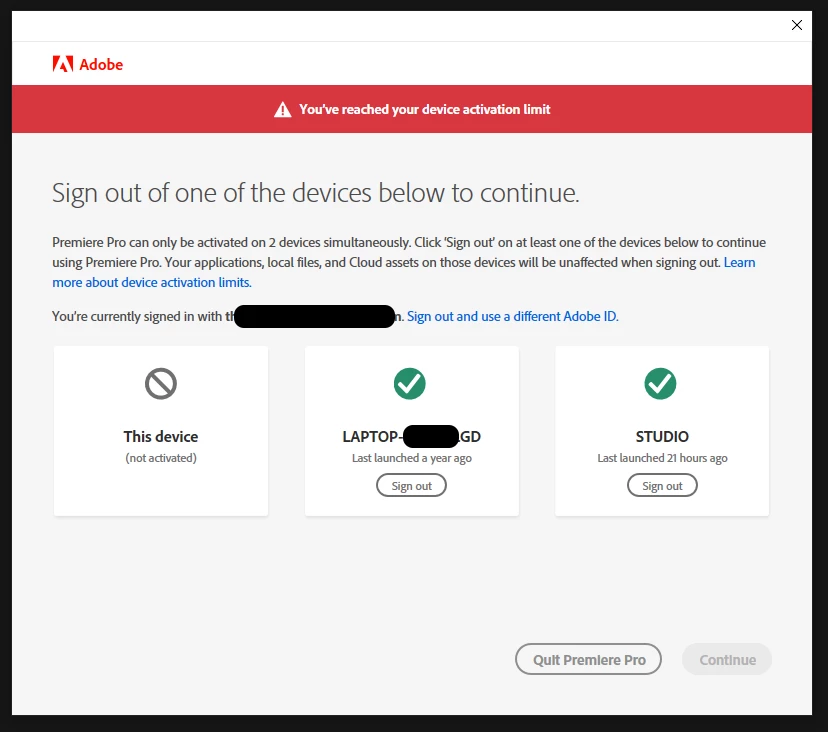
 

Adobe Limit.png

TOPICS
Activation , Creative Cloud
235
Translate
Report
Community guidelines
Be kind and respectful, give credit to the original source of content, and search for duplicates before posting. Learn more
community guidelines
Community Expert ,
Jul 29, 2021 Jul 29, 2021

Are you using a dual boot?

Translate
Report
Community guidelines
Be kind and respectful, give credit to the original source of content, and search for duplicates before posting. Learn more
community guidelines
Community Beginner ,
Jul 30, 2021 Jul 30, 2021

Nope. Regular system.

Translate
Report
Community guidelines
Be kind and respectful, give credit to the original source of content, and search for duplicates before posting. Learn more
community guidelines
Community Expert ,
Jul 30, 2021 Jul 30, 2021
LATEST

Try going to Adobe Customer Service (make sure to sign into your Adobe account first) and ask to have your activations reset:
https://helpx.adobe.com/contact.html?rghtup=autoOpen will automatically open the chat window.
Type "Agent" in the chat box to bypass the chatbot and be connected to a person.

You may also be able to contact Adobe by phone:
https://helpx.adobe.com/contact/phone.html

Translate
Report
Community guidelines
Be kind and respectful, give credit to the original source of content, and search for duplicates before posting. Learn more
community guidelines