Inspiring
May 25, 2019
Question

Adobe CC Desktop installation failed again

  • May 25, 2019
  • 1 reply
  • 1411 views

Trying to install the latest CC Desktop app update and again, as usual, the installation failed (Windows 10 Pro 1803).
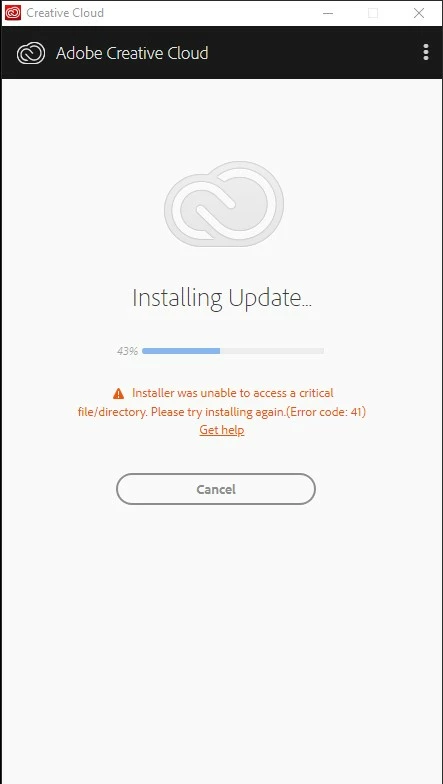
Is it that difficult to specify which file or which folder ?

Thanks.

This topic has been closed for replies.

1 reply

kglad
Community Expert
Community Expert
May 25, 2019

uninstall everything cc including preferences, https://helpx.adobe.com/creative-cloud/help/uninstall-remove-app.html

then uninstall the cc desktop app, https://helpx.adobe.com/creative-cloud/help/uninstall-creative-cloud-desktop-app.html

clean your computer of cc files per http://www.adobe.com/support/contact/cscleanertool.html

restart your computer (don't skip this)

reinstall the cc desktop app, https://creative.adobe.com/products/creative-cloud.

if you're unable to install the cc desktop app at this stage, use an administrator account (solution 4 here, https://helpx.adobe.com/creative-cloud/kb/creative-cloud-missing-damaged.html)

use the desktop app to install your cc programs/trials

SamoreenAuthor
Inspiring
May 25, 2019

Thanks but this kind of automated answer has never helped solve this problem.

My question is clear : I'd like to know what folder or what file could not be accessed so that I can check the permissions. I'm a former developer. When an error occurs because a file or a folder could not be accessed It's not a problem to incloude the filename or the folder name in the error message. This would not be a technical feat.

The first attempt created an empty C:\Program Files (x86)\Adobe\Adobe Creative Cloud folder. I tried again and this time, a very old problem appeared again, as described here : And the CC update mess is starting again... and here :  Photoshop/Lightroom: Error 183 when updating CC Desktop from the Assets tab | Photoshop Family Customer Community

So the problem is clearly identified : the installation proceeds normally until the installer tries to rename the new folder (Adobe Creative Cloud_4.8.2.476) and delete the old one. This is apparently a permission issue but I'm running Adobe CC Desktop as an administrator and the permissions on these Adobe folders are OK. So what ?

The problem was apparently solved with version 4.7 but it reappeared with version 4.8.

--Patrick
kglad
Community Expert
Community Expert
May 26, 2019

you can see if more details are in the install logs, but a reinstall is the correct step: Troubleshoot Adobe Creative Cloud install issues with log files