Exit
  • Global community
    • Language:
      • Deutsch
      • English
      • Español
      • Français
      • Português
  • 日本語コミュニティ
  • 한국 커뮤니티
0

Adobe CC launch error. Already tried several solutions.

Community Beginner ,
May 13, 2017 May 13, 2017

Hi there!

I can't launch Adobe Creative Cloud after installing it:
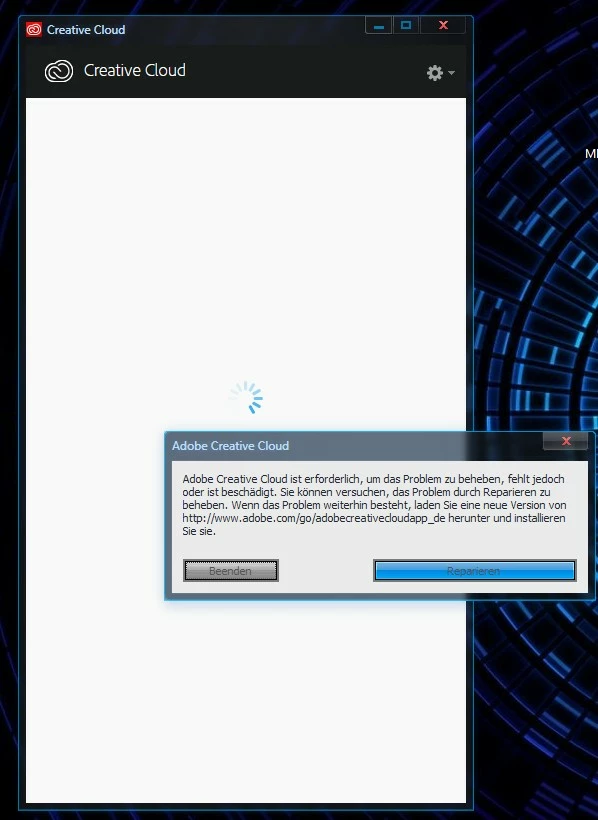
2017-05-13_AdobeCC_Repair.jpg

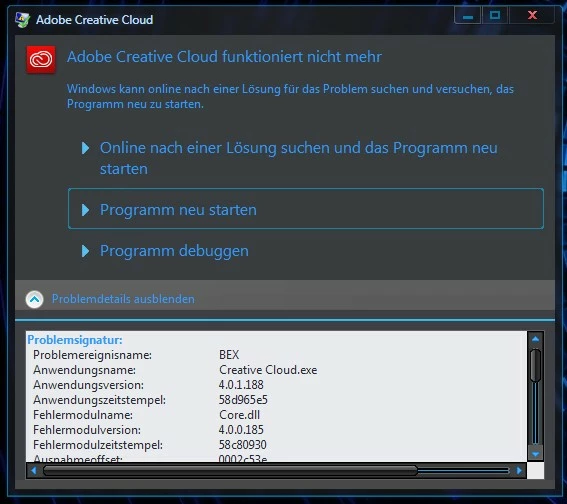
After waiting 2 minutes or so:

2017-05-13_AdobeCC_Crash_Core.jpg

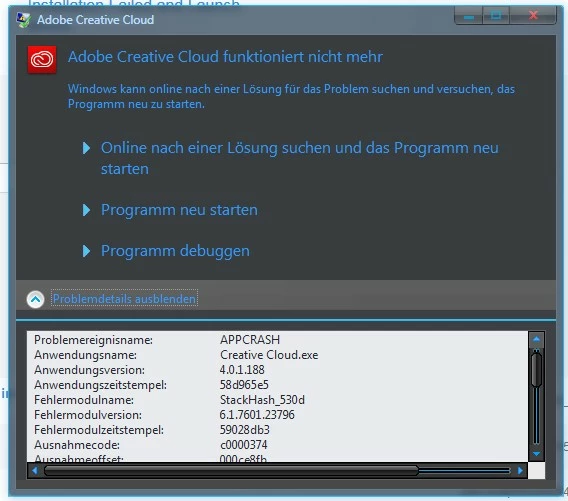
or due to StackHash:

2017-05-13_AdobeCC_Crash_StackHash.jpg

I already tried pretty much everything I've found in other threads, but nothings helps.

Here's what I've tried so far (using admin priviledges of course):

- Followed instructions from Error: "Adobe Creative Cloud is needed to resolve this problem"

- Followed instructions from "Failed to install" error received when installing Adobe Creative Cloud desktop app

- Uninstalled CC and anything else that was developed by Adobe

- Turned off virus/malware protection

- Clean Boot

- Uninstalled CC and anything else that was developed by Adobe

- Adobe Creative Cloud Cleaner Tool (cleaned everything, including Flash Player and resetting the hosts file)

- Deleted the OOBE folders manually after running the uninstall/cleanup tool

- Searched the whole HDD for any folders containing Adobe content (appdata\local, appdata\roaming, program data, program files etc) and deleted them

- Searched the whole windows registry and cleaned up a few Adobe keys I deemed safe to remove

- Created a new Windows user profile (admin of course)

- Several reboots between the steps

I honestly have no idea what else I could try to make CC work.

______________________________________________________________

Some lines I noticed in the log files...

PDApp.log

05/13/17 17:01:01:672 | [INFO] |  | ASU | PIM | PIM |  |  | 4792 | Error occurred executing uninstall modifier at path: 'C:\Program Files (x86)\Common Files\Adobe\OOBE\PDApp\\CCM\Utilities\AdobeApplicationManager(URIHandler).exe'

ACC.log

05/13/17 17:56:32:191 | [ERROR] | 1784 | ACCC | c3containerUI | ApplicationContext |  | c3containerUI | 1628 | adsLaunchCountDueToAckMiss > adsLaunchDueToAckMissThreshold. Looks like ADS s not at all launching even after retries so no point in launching again. Asking the user to reinstall...

[...]

05/13/17 18:44:59:804 | [WARN] | 5508 | ADCS | VulcanWrapper | VulcanInterface |  | VulcanWrapper | 5512 | Vulcan dispatcher couldn't initialize till we waited!

05/13/17 18:44:59:825 | [WARN] | 5508 | ADCS | Core | ExternalGateway |  | Core | 5512 | Message 'GetApplicationVersion': Target applet not loaded.

05/13/17 18:45:00:443 | [WARN] | 5508 | ADCS | OOBEUtils | CommBridge |  | OOBEUtils | 5580 | Aborting read on pipe 0000035C , errno: 109

05/13/17 18:45:00:443 | [WARN] | 5508 | ADCS | OOBEUtils | CommBridge |  | OOBEUtils | 5580 | Aborting read on pipe 0000035C , CBRawReadTry failed for packet info.

05/13/17 18:45:13:754 | [ERROR] | 3332 | ACCC | c3containerUI | ApplicationContext |  | c3containerUI | 5528 | LoadTimeLogs: Inside threadWaitingForADSAck. Wait Timed out...Restarting IPC Broker & ADS

Adobe Creative Cloud Cleaner Tool.log

[Sat May 13 17:49:09 2017] *-*-*-*-*-*- ::START:: - SUMMARY OF Warnings -*-*-*-*-*-*

[Sat May 13 17:48:59 2017] DB does not exist at: C:\Program Files (x86)\Common Files\Adobe\caps\pdb.db

[Sat May 13 17:48:59 2017] DB does not exist at: C:\Program Files (x86)\Common Files\Adobe\caps\Media_db.db

[Sat May 13 17:48:59 2017] DB does not exist at: C:\Program Files (x86)\Common Files\Adobe\caps\caps.db

[Sat May 13 17:49:09 2017] Warning: Failed to remove file,folder trying again

[Sat May 13 17:49:09 2017] Warning: Failed again to remove file,folder [Error 2] Das System kann die angegebene Datei nicht finden: u'C:\\Users\\NPC\\AppData\\Local/Adobe/AAMUpdater/1.0':

[Sat May 13 17:49:09 2017] Warning: Failed to remove file,folder trying again

[Sat May 13 17:49:09 2017] Warning: Failed again to remove file,folder [Error 2] Das System kann die angegebene Datei nicht finden: u'C:\\Users\\NPC\\AppData\\Local/Adobe/AAMUpdater/1.0':

[Sat May 13 17:49:09 2017] Warning: Failed to remove file,folder trying again

[Sat May 13 17:49:09 2017] Warning: Failed again to remove file,folder [Error 2] Das System kann die angegebene Datei nicht finden: u'C:\\Program Files (x86)\\Common Files\\Adobe/OOBE':

[Sat May 13 17:49:09 2017] Warning: Failed to remove file,folder trying again

[Sat May 13 17:49:09 2017] Warning: Failed again to remove file,folder [Error 2] Das System kann die angegebene Datei nicht finden: u'C:\\Program Files (x86)\\Common Files\\Adobe/OOBE':

[Sat May 13 17:49:09 2017] Warning: Failed to remove file,folder trying again

[Sat May 13 17:49:09 2017] Warning: Failed again to remove file,folder [Error 2] Das System kann den angegebenen Pfad nicht finden: u'C:\\Program Files (x86)\\Common Files\\Adobe/AAMUpdaterInventory/1.0':

[Sat May 13 17:49:09 2017] Warning: Failed to remove file,folder trying again

[Sat May 13 17:49:09 2017] Warning: Failed again to remove file,folder [Error 2] Das System kann den angegebenen Pfad nicht finden: u'C:\\Program Files (x86)\\Common Files\\Adobe/AAMUpdaterInventory/1.0':

[Sat May 13 17:49:09 2017] Warning: Failed to remove file,folder trying again

[Sat May 13 17:49:09 2017] Warning: Failed again to remove file,folder [Error 2] Das System kann die angegebene Datei nicht finden: u'C:\\Program Files (x86)\\Common Files\\Adobe/AdobeApplicationManager':

[Sat May 13 17:49:09 2017] Warning: Failed to remove file,folder trying again

[Sat May 13 17:49:09 2017] Warning: Failed again to remove file,folder [Error 2] Das System kann die angegebene Datei nicht finden: u'C:\\Program Files (x86)\\Common Files\\Adobe/AdobeApplicationManager':

[Sat May 13 17:49:09 2017] Warning: Failed to remove file,folder trying again

[Sat May 13 17:49:09 2017] Warning: Failed again to remove file,folder [Error 2] Das System kann die angegebene Datei nicht finden: u'C:\\Users\\NPC\\AppData\\Local\\Adobe\\OOBE':

[Sat May 13 17:49:09 2017] Warning: Failed to remove file,folder trying again

[Sat May 13 17:49:09 2017] Warning: Failed again to remove file,folder [Error 2] Das System kann die angegebene Datei nicht finden: u'C:\\Users\\NPC\\AppData\\Local\\Adobe\\OOBE':

[Sat May 13 17:49:09 2017] Warning: Failed to remove file,folder trying again

[Sat May 13 17:49:09 2017] Warning: Failed again to remove file,folder [Error 2] Das System kann den angegebenen Pfad nicht finden: u'C:\\ProgramData\\Adobe\\SLStore_v1':

[Sat May 13 17:49:09 2017] Warning: Failed to remove file,folder trying again

[Sat May 13 17:49:09 2017] Warning: Failed again to remove file,folder [Error 2] Das System kann den angegebenen Pfad nicht finden: u'C:\\ProgramData\\Adobe\\SLStore_v1':

[Sat May 13 17:49:09 2017] *-*-*-*-*-*- :: END :: - SUMMARY OF Warnings -*-*-*-*-*-*

______________________________

My system specs

OS: Windows 7 SP1 (x64)

RAM: 16 GB

Motherboard: B150M-D3H

CPU: i5-6600

GPU: GTX 1080 Ti

TOPICS
Creative Cloud
3.3K
Translate
Report
Community guidelines
Be kind and respectful, give credit to the original source of content, and search for duplicates before posting. Learn more
community guidelines

correct answers 1 Correct answer

Community Beginner , May 15, 2017 May 15, 2017

Quick Update

I just took a look at the processes currently running on my machine via Process Explorer (a better Task Manager) and noticed the following:

"C:\Program Files (x86)\Common Files\Adobe\Adobe Desktop Common\ADS\Adobe Desktop Service.exe" was started with the command-line argument "--waitForRegistration=true". When restarting the process with the same switch the issue persists, so it shouldn't have to do with the internet connection not being ready right after booting or whatever. However

...
Translate
Community Expert ,
May 13, 2017 May 13, 2017

uninstall everything cc including preferences, https://helpx.adobe.com/creative-cloud/help/uninstall-remove-app.html

then uninstall the cc desktop app, https://helpx.adobe.com/creative-cloud/help/uninstall-creative-cloud-desktop-app.html

clean your computer of cc files per http://www.adobe.com/support/contact/cscleanertool.html

restart your computer (don't skip this)

reinstall the cc desktop app, https://creative.adobe.com/products/creative-cloud.

if you're unable to install the cc desktop app at this stage, use an administrator account (solution 3 here, https://helpx.adobe.com/creative-cloud/kb/creative-cloud-missing-damaged.html)

use the desktop app to install your cc programs/trials

Translate
Report
Community guidelines
Be kind and respectful, give credit to the original source of content, and search for duplicates before posting. Learn more
community guidelines
Community Beginner ,
May 15, 2017 May 15, 2017

Thank you for taking the time to respond, kglad.

I followed all your instructions, including doing the whole process in a new admin account.

Still doesn't work. Same situation as stated in my original post 😕

Translate
Report
Community guidelines
Be kind and respectful, give credit to the original source of content, and search for duplicates before posting. Learn more
community guidelines
Adobe Employee ,
May 15, 2017 May 15, 2017

Nc14908471 if you have already tried the suggestions offered by Kglad then I would recommend contacting our support team directly at Contact Customer Care for direct assistance.

I would recommend also backing up any documents and settings, for your current installation of Windows, in case the error is unable to be resolved.

Translate
Report
Community guidelines
Be kind and respectful, give credit to the original source of content, and search for duplicates before posting. Learn more
community guidelines
Community Beginner ,
May 15, 2017 May 15, 2017

Quick Update

I just took a look at the processes currently running on my machine via Process Explorer (a better Task Manager) and noticed the following:

"C:\Program Files (x86)\Common Files\Adobe\Adobe Desktop Common\ADS\Adobe Desktop Service.exe" was started with the command-line argument "--waitForRegistration=true". When restarting the process with the same switch the issue persists, so it shouldn't have to do with the internet connection not being ready right after booting or whatever. However, if I kill all Adobe processes and start up the service myself with the command-line switch "--waitForRegistration=false", Adobe CC seems to run as intended. The blue wait indicatior is gone, the login form is shown in the desktop app and I can log in.

So it looks like the waitForRegistration switch is to blame here. Any idea what's going on here and what to do about it?

@Jeff_A_Wright:

The support page doesn't list Adobe CC Desktop App - at least I couldn't find it. There are entries such as Adobe Creative Cloud for Android / iOS in the Mobile category but since it's free, only community support is available anyway.

Translate
Report
Community guidelines
Be kind and respectful, give credit to the original source of content, and search for duplicates before posting. Learn more
community guidelines
Adobe Employee ,
May 15, 2017 May 15, 2017

Nc14908471 do you have an active Creative Cloud membership?  If so then choose the software title you wish to install from Contact Customer Care.  If you are not seeing an option to chat with a member of our support team then please use an alternate web browser, smart phone, or tablet to begin the interaction.

Nc14908471 in regards to your post regarding needing to manually launch the services and having to adjust the registry entries.  This process should not be necessary.  I would recommend temporarily suspending whatever security software you are utilizing to see if it causing you to implement these unusual steps to launch the Creative Cloud desktop app successfully.

Translate
Report
Community guidelines
Be kind and respectful, give credit to the original source of content, and search for duplicates before posting. Learn more
community guidelines
Community Beginner ,
May 15, 2017 May 15, 2017

Nc14908471 do you have an active Creative Cloud membership?  If so then choose the software title you wish to install from Contact Customer Care.  If you are not seeing an option to chat with a member of our support team then please use an alternate web browser, smart phone, or tablet to begin the interaction.

Unfortunately I don't have a CC membership. Like I said before:

The support page doesn't list Adobe CC Desktop App - at least I couldn't find it. There are entries such as Adobe Creative Cloud for Android / iOS in the Mobile category but since it's free, only community support is available anyway.

2017-05-15_AdobeCC_SupportPage_NoChat.jpg

_________________________________

Nc14908471 in regards to your post regarding needing to manually launch the services and having to adjust the registry entries.  This process should not be necessary.  I would recommend temporarily suspending whatever security software you are utilizing to see if it causing you to implement these unusual steps to launch the Creative Cloud desktop app successfully.

I just restarted and tried again after fully deactivating Avast, Malwarebytes and CryptoPrevent. Windows Defender and Windows Firewall are disabled by default anyway.

Still the same issue: Once "Creative Cloud.exe" is started (either at OS startup or after killing the processes and starting it manually), Adobe Desktop Services.exe is started with the --waitForRegistration=True parameter, causing the app to become idle and fool around for a few minutes and eventually crash.

Translate
Report
Community guidelines
Be kind and respectful, give credit to the original source of content, and search for duplicates before posting. Learn more
community guidelines
Adobe Employee ,
May 15, 2017 May 15, 2017

I am sorry Nc14908471 I don't have any additional suggestions. Guided support is available for Creative Cloud members.

If you have already implemented all of the steps you have listed then there are no additional steps to try.  I would recommend evaluating Creative Cloud software on a different computer.  You can find complete details regarding the installation process at Download and install Creative Cloud apps​.

Translate
Report
Community guidelines
Be kind and respectful, give credit to the original source of content, and search for duplicates before posting. Learn more
community guidelines
Community Beginner ,
May 15, 2017 May 15, 2017

Bummer! Thanks for trying, though!

Since this issue appears to affect quite a lot users, maybe you could file a bug report about this?

After all, modifying the command-line arguments seems to be an intricate but functioning workaround, so It's not like my computer couldn't handle the app. And eventually crashing with buffer overflow exceptions (BEX) and access violations inside StackHash_xxx might be something the devs will want to look into.

Translate
Report
Community guidelines
Be kind and respectful, give credit to the original source of content, and search for duplicates before posting. Learn more
community guidelines
Adobe Employee ,
May 15, 2017 May 15, 2017
LATEST

Nc14908471 the steps you have been through have allowed for numerous individuals to resolve the type of errors you were experiencing.  The necessity of needing to modify the registry, or launch the Creative Cloud services manually, seem to be unique to the computer you were attempting to evaluate the software on.

For future viewers of this discussion if you are facing difficulty installing, or utilizing, the Adobe Creative Cloud desktop application then please utilize the steps listed in "Failed to install" error received when installing Adobe Creative Cloud desktop app​.

Translate
Report
Community guidelines
Be kind and respectful, give credit to the original source of content, and search for duplicates before posting. Learn more
community guidelines