
Exit
  • Global community
    • Language:
      • Deutsch
      • English
      • Español
      • Français
      • Português
  • 日本語コミュニティ
  • 한국 커뮤니티
0

Adobe creative cloud installer is not working. Keep getting error code 207. Any solutions?

Community Beginner ,
May 08, 2014 May 08, 2014

I have just recently got the adobe creative cloud and so far I am not impress with it. The adobe installer will not download the creative cloud desktop app. It keeps freezing for about a minute and gives me this error message.adobeerror207.png
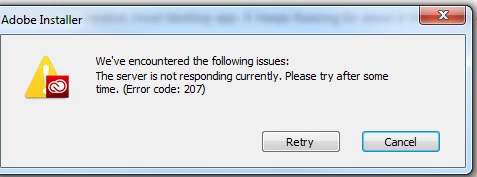
And if you tell me that if I am connecting over a managed network and that I need to be wired connection to make it work, I am. I'm using a wired connection and my internet is working perfectly fine. And I also tried disabling my firewall, antivirus program, basically anything that is might effect the server. Still doesn't work... I have been trying everything and nothing is working.

TOPICS
Creative Cloud
2.0K
Translate
Report
Community guidelines
Be kind and respectful, give credit to the original source of content, and search for duplicates before posting. Learn more
community guidelines

correct answers 1 Correct answer

Community Beginner , May 09, 2014 May 09, 2014

Got it working, it appears it was bitdefender, my anti virus program giving me the issues. However I did disable the virus program when trying to get the installer to work and I still got the error. So I just straight up uninstall bitdefender off my pc and it seems to work just fine. Hopefully this helps to anyone that has the same problem as I did.

Cheers!

Translate
Community Beginner ,
May 09, 2014 May 09, 2014

I tried the creative cloud installer on my old laptop and it seems to be downloading it just fine? So strange because my laptop is connected to wireless network with all my firewalls active on it, even have anti virus program running and creative cloud seems to be working. So obviously its my computer, though I would like to get adobe working on my pc as it gives much more performance. Will give an update see if I can get it working on my pc.

Translate
Report
Community guidelines
Be kind and respectful, give credit to the original source of content, and search for duplicates before posting. Learn more
community guidelines
Community Beginner ,
May 09, 2014 May 09, 2014

Got it working, it appears it was bitdefender, my anti virus program giving me the issues. However I did disable the virus program when trying to get the installer to work and I still got the error. So I just straight up uninstall bitdefender off my pc and it seems to work just fine. Hopefully this helps to anyone that has the same problem as I did.

Cheers!

Translate
Report
Community guidelines
Be kind and respectful, give credit to the original source of content, and search for duplicates before posting. Learn more
community guidelines
Adobe Employee ,
May 12, 2014 May 12, 2014

Tronixgfx thank you for the update!  Do you know what specific settings in Bitdefender are causing your difficulties?  Also what specific version of Bitdefender do you have installed?  Finally what version of Windows are you using?

Translate
Report
Community guidelines
Be kind and respectful, give credit to the original source of content, and search for duplicates before posting. Learn more
community guidelines
New Here ,
Feb 27, 2019 Feb 27, 2019
LATEST

J'ai eu moi aussi le même soucis, et c'est le service du support Adobe qui a réglé le problème. Ne pouvant faire les désinstallation, j'ai appelé leurs services, et l'affaire à été résolue. Merci encore.

Translate
Report
Community guidelines
Be kind and respectful, give credit to the original source of content, and search for duplicates before posting. Learn more
community guidelines