
dcm29603735
Participating Frequently
August 26, 2018
Question

Adobe CS3 installer conflict

  • August 26, 2018
  • 3 replies
  • 2081 views

After a few weeks away from the Mac I thought I'd do some Photoshop work on some recent photos. Unfortunately Photoshop wouldn't open and I needed to re-register. After a lot of faffing around I managed to download the updating files from Adobe. I got rid of all my old Adobe applications and went to install the the new CS3 Suite, but the screen below is as far as I can get. I am now stuck in limbo with no Adobe products, old or new. Can anyone offer any 'laymans' advice as I am really peeved that by legitimately trying to update I have been left with nothing.
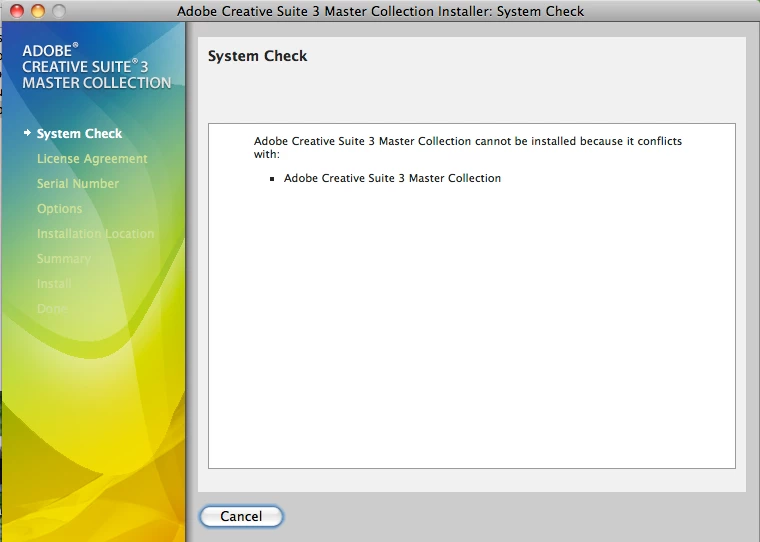
[Here is the list of all Adobe forums... https://forums.adobe.com/welcome]

[Moved... CS3 is not part of Creative Cloud... Mod]

    This topic has been closed for replies.

    3 replies

    dcm29603735
    Participating Frequently
    September 26, 2018

    Okay, so I've eventually managed to follow the instructions provided (thanks).

    All was going well, I seem to have all applications downloaded.

    I now try to open Photoshop and it's asking for my new serial number.

    Schoolboy error; I wrote it down a few weeks ago when I started the process, but now can't find where I have written it.

    Is there a way of retrieving my new serial number? From memory, which isn't too good these days, I think it just appeared on the screen. It wasn't emailed to me?

    Jeffrey_A_Wright
    Community Manager
    Community Manager
    September 26, 2018

    Yes, Dcm29603735, return to the link where you downloaded the new Creative Suite 3 software. Your new serial number will be posted on the page.  If you need to retrieve your old CS3 serial number, to complete the process, then see http://helpx.adobe.com/x-productkb/global/find-serial-number.html .

    dcm29603735
    Participating Frequently
    September 28, 2018

    This isn't going well...

    I don't have a link to the download. (I had to trawl through Adobe website and find a download, register etc)

    Trying to go back through history but nothing there or a 404 error. Problem is I don't have old SN number as I've no idea where the disks are (been fortunate with auto fills so far). Maybe in loft; who knows? Didn't note the new number because assumed I wouldn't need it and could get it once installed.

    Guess Adobe will not let me use something that I have paid a premium for because, for whatever reason, it wanted me to re-register something I already own?!

    A bit like asking you to prove you have the receipt for your TV every-so-often and if you can't find it, not letting you watch TV?

    FUSTRATED is one word to use begining with 'F'.

    dcm29603735
    Participating Frequently
    September 19, 2018

    Apologies for late reply, I have been trying to get in touch with Adobe but they don't seem to be contactable without Skype.

    I am (or was) running it on a Mac with OSX 10.6.8 (2.4GHz Intel Core Duo).

    Jeffrey_A_Wright
    Community Manager
    Community Manager
    September 19, 2018

    Dcm29603735, please be aware that Adobe does not use Skype to interact with our customers.  If you are being asked to connect via Skype then you are not working with an individual or organization that represents us.

    Can you please answer, John's questions.  What version of macOS are you installing CS3 Master Collection on?  What happened to the computer prior to CS3 no longer functioning?  What steps did you take prior to reinstalling Creative Suite 3 Master Collection?

    dcm29603735
    Participating Frequently
    September 19, 2018

    That's a bit worrying as the email is from ....@adobe.com.

    I am running it on a Mac with OSX 10.6.8 (2.4GHz Intel Core Duo).

    I went to open Photoshop to do some image editing after couple of weeks break and got a message that I needed to re-register and Photoshop would not work unless I did. I went onto Adobe and read through instructions, delete existing CS3 Suite and downloaded new version (which I still have the massive .dmg files sitting on my desktop). I then go to install and the screen grab in the first post is a far as it gets.

    John T Smith
    Community Expert
    Community Expert
    August 26, 2018

    Mac or Windows, and exactly which version of the operating system?