katrinar79214045
Participant
November 4, 2016
Answered

Adobe CS6 Not Installing - Failed to Initialize

  • November 4, 2016
  • 1 reply
  • 1339 views

Hello,

We purchased CS6 Design Standard and would like to install the programs on our new laptop. We have gone into our Adobe account and downloaded the files that we purchased and use on our other computer, but it is not letting us install on this new laptop. There are no previous versions of CS6 or CC on this machine.

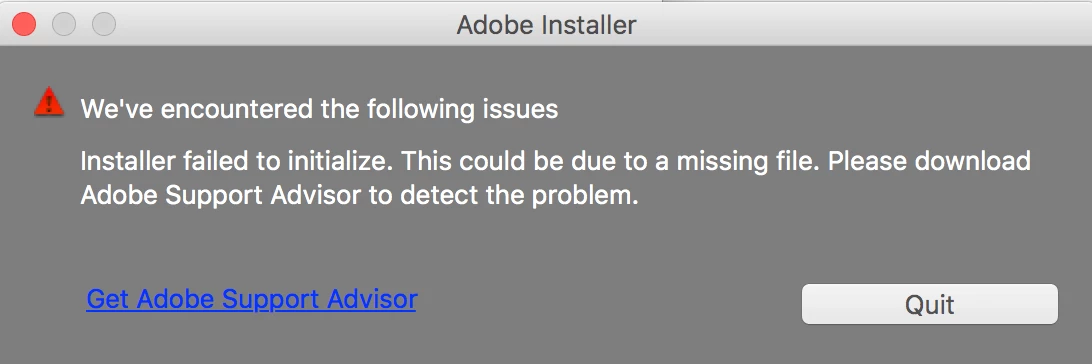
When we try to install this is the window that appears. The Adobe Support Advisor is no longer available.

How we can go about installing and activating our purchased programs.

Thanks!

This topic has been closed for replies.
Correct answer kglad

start at the top and work your way down applying applicable fixes until your problem is resolved.

if cc (win):  https://helpx.adobe.com/creative-cloud/kb/creative-cloud-desktop-application-failed.html

if, your error is:

"Installer failed to initialize. File not found." or "Installer failed to initialize. This could be due to missing files."

first, rename OOBE Folder to OOBE.old.

to find OOBE:

64 bit win OS: Program Files x86\Common Files\Adobe\OOBE

32 bit win OS: Program Files \Common Files\Adobe\OOBE

mac os: HD>library>application support>adobe>caps

mac os: USER>library>application support>adobe>OOB

if that fails or isn't the exact error you see, uninstall, clean (http://www.adobe.com/support/contact/cscleanertool.html) and reinstall.

if you're using a dvd to install:

copy the disc contents to a desktop directory and install from that directory.

if you're using a mac:

1. Try to Create a new user account in Mac with Administrator Priviledges.

2. Login to the New user, Navigate to Mac HD> Application> Utilities> Adobe Installer folder, Locate products like Adobe Reader, Adobe Flash, Adobe Air and un-install them

3. Navigate to User Library> Application Support> Adobe and move Adobe to Trash.

4. Navigate to Mac HD> Library> Application Support> Adobe and move Adobe to Trash.

5. Start the installation again.

if everything applicable above fails, check your installation logs:

http://helpx.adobe.com/photoshop-elements/kb/troubleshoot-install-using-logs-elements.html

1 reply

kglad
Community Expert
kgladCommunity ExpertCorrect answer
Community Expert
November 4, 2016

start at the top and work your way down applying applicable fixes until your problem is resolved.

if cc (win):  https://helpx.adobe.com/creative-cloud/kb/creative-cloud-desktop-application-failed.html

if, your error is:

"Installer failed to initialize. File not found." or "Installer failed to initialize. This could be due to missing files."

first, rename OOBE Folder to OOBE.old.

to find OOBE:

64 bit win OS: Program Files x86\Common Files\Adobe\OOBE

32 bit win OS: Program Files \Common Files\Adobe\OOBE

mac os: HD>library>application support>adobe>caps

mac os: USER>library>application support>adobe>OOB

if that fails or isn't the exact error you see, uninstall, clean (http://www.adobe.com/support/contact/cscleanertool.html) and reinstall.

if you're using a dvd to install:

copy the disc contents to a desktop directory and install from that directory.

if you're using a mac:

1. Try to Create a new user account in Mac with Administrator Priviledges.

2. Login to the New user, Navigate to Mac HD> Application> Utilities> Adobe Installer folder, Locate products like Adobe Reader, Adobe Flash, Adobe Air and un-install them

3. Navigate to User Library> Application Support> Adobe and move Adobe to Trash.

4. Navigate to Mac HD> Library> Application Support> Adobe and move Adobe to Trash.

5. Start the installation again.

if everything applicable above fails, check your installation logs:

http://helpx.adobe.com/photoshop-elements/kb/troubleshoot-install-using-logs-elements.html

Known Participant
September 19, 2022

I seem to be missing the OOBE folder entirely- solutions for this?

Nancy OShea
Community Expert
Community Expert
September 20, 2022

Similar to above, trying to download CS6 web design premium from my adobe account page to a new computer


New computer?

Which operating system?


I ask because legacy CS6 won't install much less run on macOS Ventura, Monterey, Big Sur, Catalina.  And it will never be tested on Win11.


Unless you have an older, supporting computer, the likelyhood that you can keep using decade old CS6 is slim to none.


At some point you will need new software that's compatible with newer equipment.


MODERN OPTIONS:
Photoshop Elements or Premier Elements (approx $100, no subscription needed).
https://www.adobe.com/products/photoshop-elements.html

Creative Cloud Photography Plan (approx $10/month for 12 months). Includes the following:

  • Photoshop CC and Photoshop on iPad
  • Camera Raw
  • Lightroom on desktop, mobile and the web
  • Lightroom Classic
  • Portfolio website + hosting
  • Adobe Express (free starter plan)
  • Bridge
  • 20 GB cloud storage (upgradable to 1 TB).
  • Free upgrades for paid subscribers

https://www.adobe.com/creativecloud/photography.html

Premium Adobe Express ($10/month).

  • Creative Cloud Express app (web and mobile)
  • Premiere Rush (desktop and mobile)
  • Photoshop Express (mobile)
  • Spark Video (mobile)
  • Spark Page (mobile)
  • Adobe Portfolio + hosting
  • 100 GB of cloud storage
  • All premium templates and design assets including the collection of over 160 million royalty-free Adobe Stock photo collection.

https://helpx.adobe.com/express/using/express-overview.html

Creative Cloud All Apps (51 + apps & services) and Single App Plans
https://www.adobe.com/creativecloud/plans.html


Hope that helps.


Nancy O'Shea— Product User & Community Expert