Known Participant
October 23, 2017
Answered

AdobeGCClient.exe - Bad Image

  • October 23, 2017
  • 1 reply
  • 8835 views

Since updating to the latest apps for Creative Cloud, I've been getting this error intermittently:
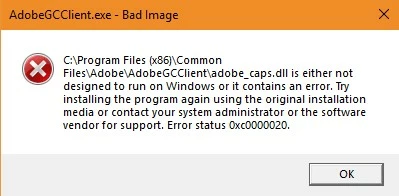
Do I have to uninstall and reinstall all of my apps? Or is there an easier fix?

This topic has been closed for replies.
Correct answer Bani Verma

Thanks for sharing the update TimTimmers, in order to resolve the error you'll need to uninstall all the Adobe apps using their specific uninstallers and after that run the CC Cleaner tool to make sure everything has been removed and then reinstall it: Use the Creative Cloud Cleaner Tool to solve installation problems.

Hope this helps.

1 reply

Bani Verma
Community Manager
Community Manager
October 24, 2017

Hi TimTimmers,

As you have mentioned you are trying to update your Adobe products to the latest Creative Cloud apps and it fails with an error.

In order to assist you better; we need to know the current versions of the Adobe apps installed on your computer.  In addition, what version of Windows do you have installed on your computer?

Kindly reply with the same, awaiting your response.

Known Participant
October 24, 2017

I actually updated all of my apps but this error has occurred since then. All my apps are working, I just get the AdobeGCClient.exe alert from time to time.

Creative Cloud 4.3.0.256

I have tons of apps installed, e.g. Photoshop 19.0

Windows 10 fully updated including the latest Creator's Update:

Version 1709

OS Build 16299.19

Bani Verma
Community Manager
Bani VermaCommunity ManagerCorrect answer
Community Manager
October 27, 2017

Thanks for sharing the update TimTimmers, in order to resolve the error you'll need to uninstall all the Adobe apps using their specific uninstallers and after that run the CC Cleaner tool to make sure everything has been removed and then reinstall it: Use the Creative Cloud Cleaner Tool to solve installation problems.

Hope this helps.