
richardc94267489
Participant
April 14, 2015
Answered

After Effects is missing from the Creative Cloud Desktop application

  • April 14, 2015
  • 2 replies
  • 1078 views

It took over 10min for me to get to this place just to ask a question...REALLY ADOBE, You can't make it easier for people to get help with your products? I'm into my 50th min trying to install a trial version of After effects on a PC. After updating and creating my Adobe Cloud account, After Effects is no where to be found. I'm really frustrated and may switch back to Final Cut Pro! Someone wanna tell me how to install After Effects. Ridiculous!
    This topic has been closed for replies.
    Correct answer Rick Gerard

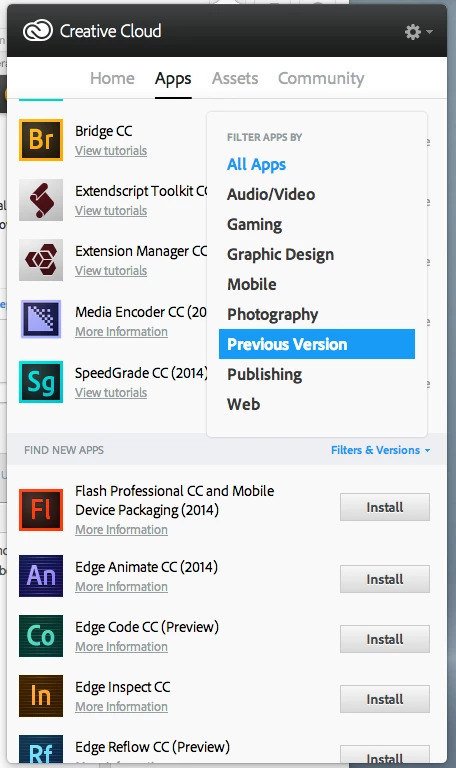
    If After Effects does not show up in the Creative Cloud app then your system does not meet the System requirements | After Effects - Adobe. This question has been ask about two or three times a month since the Creative Cloud was announced. You can't blame Adobe that you didn't read the system requirements before signing up for Creative Cloud. Other apps may be compatible and you may be able to use CS6 by filtering the available apps like so:

    2 replies

    Rick GerardCommunity ExpertCorrect answer
    Community Expert
    April 14, 2015

    If After Effects does not show up in the Creative Cloud app then your system does not meet the System requirements | After Effects - Adobe. This question has been ask about two or three times a month since the Creative Cloud was announced. You can't blame Adobe that you didn't read the system requirements before signing up for Creative Cloud. Other apps may be compatible and you may be able to use CS6 by filtering the available apps like so:

    Mylenium
    Legend
    April 14, 2015

    If the program doesn't show up then your system doesn't meet the requirements. It really is as simple as that.

    http://helpx.adobe.com/after-effects/system-requirements.html

    Mylenium