
Participant
October 20, 2018
Answered

AMM 64bit for mac

  • October 20, 2018
  • 3 replies
  • 6954 views

32-bit app compatibility with macOS High Sierra 10.13.4 and later - Apple Support

My MacbookPro has been updated to macOS Mojave yesterday.

Then, a window noticed me that "Adobe Application Manager Utilities" is not optimized for your Mac and needs to be updated.

hummm.....everyday.....

I check all the Adobe apps but only AMM is still on 32bits.
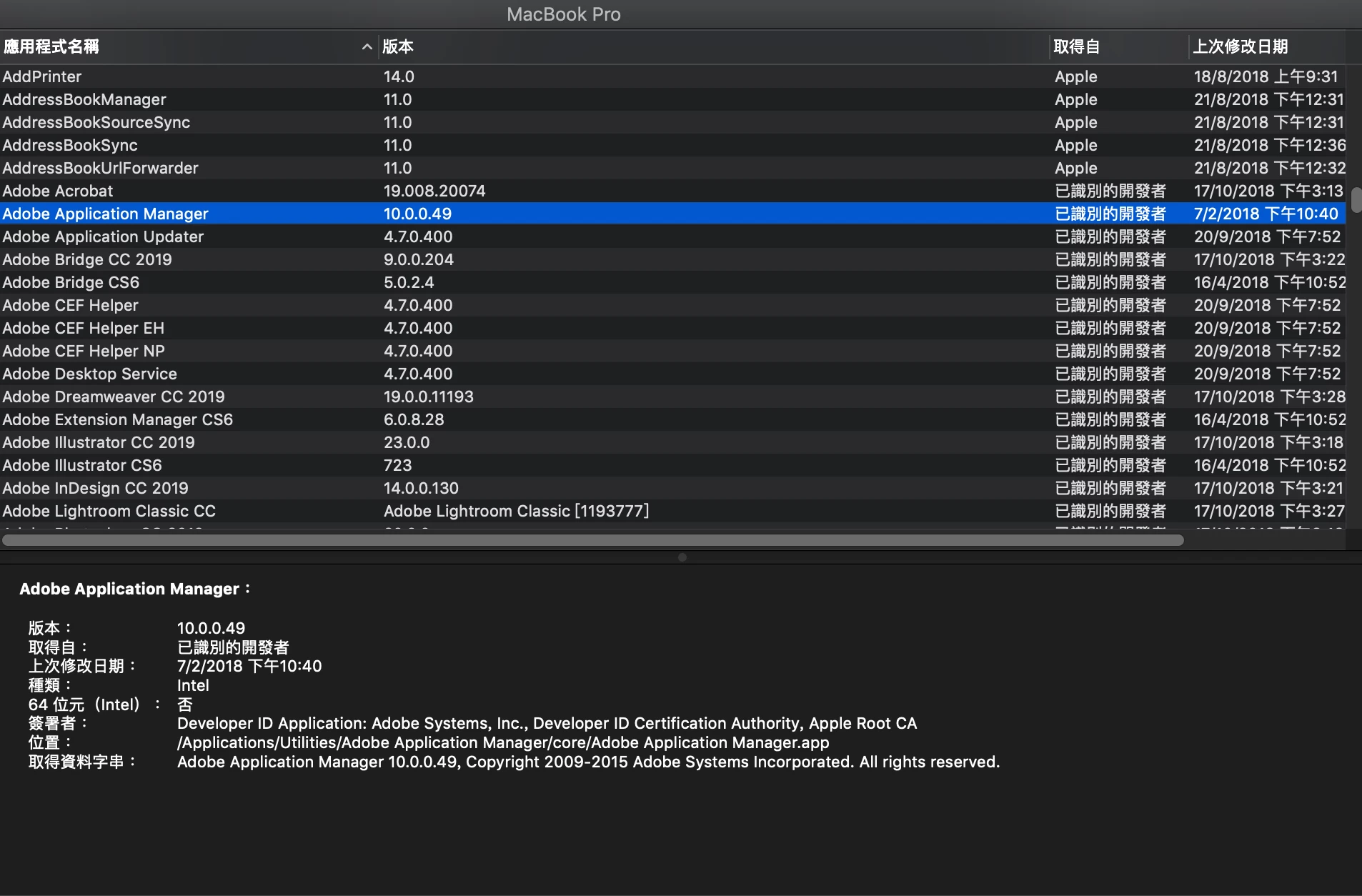
Sorry for the language problem.

On 64位元(Intel): 否 > 64 bit (intel): No

I don't know AAM is the same software as Adobe Creative Cloud?

I checked in the Utilities folder.

I mean, this app ⬇️⬇️⬇️

I confused about those two difference. Can somebody tell me sth about their difference?

Is AMM equal to Adobe Creative Cloud APP?

According to the above website, Apple said that 32-bit software would not be supported in the next macOS system.

So, is time for the update of 64-bit.

ummm.....I worried about my software can/cannot used without AMM.

(I always crossing my bridges before coming to them.)

This topic has been closed for replies.
Correct answer Bani Verma

Hi Loadingnemo and Gunnarlinn,

When you upgrade to the latest version of macOS or launch a Creative Cloud application for the first time on the latest versions of macOS, you may see a warning message that indicates Adobe software needs to be optimized for better performance.

This is due to some 32-bit components that we are working to address in a future Creative Cloud update.

Please note that no action is required from you at this time and your applications will still run as normal.

For more information, see 32-bit app compatibility with macOS High Sierra 10.13.4 and later - Apple Support.

Let us know if you have any more queries.

3 replies

Bani Verma
Community Manager
Bani VermaCommunity ManagerCorrect answer
Community Manager
December 28, 2018

Hi Loadingnemo and Gunnarlinn,

When you upgrade to the latest version of macOS or launch a Creative Cloud application for the first time on the latest versions of macOS, you may see a warning message that indicates Adobe software needs to be optimized for better performance.

This is due to some 32-bit components that we are working to address in a future Creative Cloud update.

Please note that no action is required from you at this time and your applications will still run as normal.

For more information, see 32-bit app compatibility with macOS High Sierra 10.13.4 and later - Apple Support.

Let us know if you have any more queries.

Participant
October 4, 2019
How about now with upcoming macOS 10.15 Catalina ? I have the same configuration as @loadingnemo (a folder with both AAM and ACC). How can I remove all the old AAM stuff without breaking my Adobe installation ? Is there any utility to do that ?
Participant
October 9, 2019
The-dreamer, my apologies for any confusion, but the answer has not changed since Bani responded on December 28, 2018. If you have a Creative Cloud membership, and using the latest release of our applications, then you should not face any difficulties with the download and installation process under macOS 10.15..

And if we don't want to or can't afford to pay Adobe $60 a month to keep using their software, then we're hosed on Catalina. Gee thanks, guys. I mean, all Adobe would have to do is change one setting in the build configuration, launch a build, and then put the resulting bundle out for people to download (I do OS X programming, so I know how simple it is), but it's all about revenue streams.

Kanikas
Community Manager
Community Manager
November 30, 2018
Inspiring
November 27, 2018

I have the same problem. I'm on Creative Cloud, and I wonder if this Adobe Application Manager is contemporary or legacy?

Since I did a clean install of Mojave (no migration assistant) there shouldn't be any old stuff lying around in my computer (although I've been an Adobe customer since the '90s) but you never know, do you.

If AAM is legacy, how do I remove it?

If AAM is contemporary, why is it 32-bit, and how do I upgrade it?