

CJB_001
Inspiring
January 15, 2021
Question

Blank white box when opening any app

  • January 15, 2021
  • 3 replies
  • 675 views

Whenever I open an app from Adobe CC, a blank white box appears. I cannot use any of the apps, when I close the blank white box it shuts the app down.


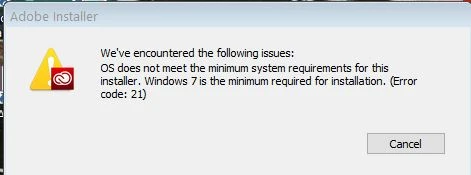
When I attempt to repair Adobe Creative Cloud from the Add/Remove program dialogue, it says my OS does not meet the minimum requirements and that Windows 7 is the minimum. I'm on Windows 10!


Has anyone managed to resolve this? This only happened after updating Adobe CC a couple days ago.

 

This topic has been closed for replies.

3 replies

Nancy OShea
Community Expert
Community Expert
January 24, 2021

This looks like a corrupt installation.


Nancy O'Shea— Product User & Community Expert
CJB_001
CJB_001Author
Inspiring
January 25, 2021

Hi Nancy


What does that mean exactly? When I reinstalled it nothing seemed out of place.


How do I make sue it's not corrupt?

Peru Bob
Community Expert
Community Expert
January 24, 2021
CJB_001
CJB_001Author
Inspiring
January 25, 2021

Hi Peru Rob


I've already done that twice to no avail.

CJB_001
CJB_001Author
Inspiring
January 16, 2021

Hi John


Thanks for the links but I tried the first method to no avail.


I'll see how the 2nd one goes. Weird that it would only act up like this now.