


- Home
- Download & Install
- Discussions
- Broken link to download Extend Script Toolkit 3.5....
- Broken link to download Extend Script Toolkit 3.5....
Broken link to download Extend Script Toolkit 3.5.1 Update

Copy link to clipboard
Copied
I need a valid link to perform a manual update for Extend Script Toolkit 3.5.1 Update for Mac OS.
The links from ExtendScript Toolkit Archives is broken. Can someone provide a source for the update file?
I am installing CS5 on El Capitan and need to perform manual updates as the application manager cannot perform the update.
Thanks


 27
Replies
27
27
Replies
27




Copy link to clipboard
Copied
Hi Melissap80370136,
As you have mentioned you are unable to download the update for Adobe ExtendScript as the link on the page is broken.
Thanks for sharing this with us, I will get this checked by the concerned team and get back to you.
Thanks for your patience.
Copy link to clipboard
Copied
Melissap80370136, the link has been fixed please click here and try the download: ExtendScript Toolkit Archives.
Copy link to clipboard
Copied
I was able to download the update, but an error occurs stating the image couldn't be opened; reason: image not recognized. I am updating on an El Capitan system. Is there a problem with the installer files? I tried both of the following links with the same error.

Copy link to clipboard
Copied
Hi Melissap80370136,
As you have mentioned that you got an error "Image Not Recognised" while installing AdobeExtendeScriptToollit. I would request you to try the steps mentioned in this link: - Installing Creative Suite on macOS 10.12 (Sierra) to install the same.
Please feel free to update this discussion in case you need further assistance.
Thanks,
Atul_Saini
Copy link to clipboard
Copied
I am receiving the "image not recognized" error when trying to open the DMG to mount the installer. In this case I am stuck at step 2 of the instruction for Creative Suite 5.5, 5, and 4 in: - Installing Creative Suite on macOS 10.12 (Sierra)
Copy link to clipboard
Copied
Hi Melissap80370136,
Could you please share the link which you have used to download the application, so that we can try it here at our end and assist you further?
Thanks,
Atul_Saini
Copy link to clipboard
Copied
Here are the installer links I attempted from ExtendScript Toolkit Archives:

Copy link to clipboard
Copied
The problem of AdobeExtendScriptToolkit3.5.0-mul.dmg [image not recognized] still exists.
MacOS Sierra 10.12.6

Copy link to clipboard
Copied
LiMiN, I am sorry you are unable to mount the image. Which Adobe software title are you attempting to use ExtendScript 3.5 with?
The current version of ExtendScript is available for installation within the Adobe Creative Cloud desktop application or from Download Creative Cloud apps .
Copy link to clipboard
Copied
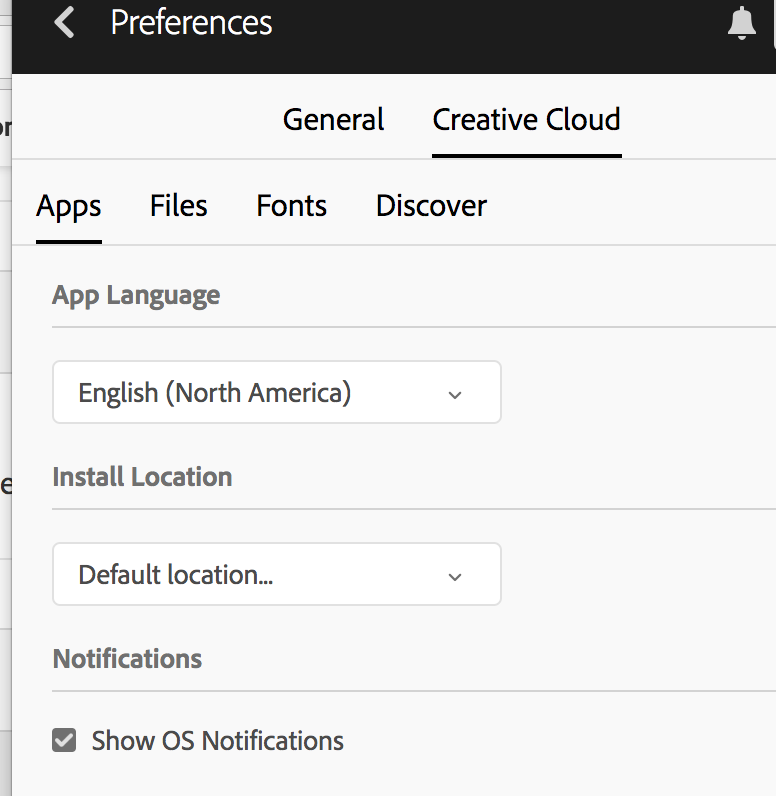
Yes, I can download CC version with my Creative Cloud. I need to go to the "Settings" and check "view old versions".
So I can install the Adobe ExtendScript Toolkit CC. But can users see this information just at this page? Thank you!
Copy link to clipboard
Copied
Thanks for the update, LiMiN. What was prompting you to begin the installation of ExtendScript?

Copy link to clipboard
Copied
Why there is no "view old versions" in my Creative Cloud? I am a newer to ExtendScript and never installed it before...
Copy link to clipboard
Copied
Haojunl79047905, are attempting to install ExtendScript CC or ExtendScript 3.5.1?
Copy link to clipboard
Copied
YES
Copy link to clipboard
Copied
Haojunl79047905 which version are you using of ExtendScript?
For future viewers of this discussion if you are facing difficulties downloading ExtendScript 3.5.1 then if can you please post why you need the older version of ExtendScript, it would be appreciated. Please also include the operating system you are using to begin the download process.

Copy link to clipboard
Copied
Hi Jeff,
I'm currently developing using the Visual Studio Code plugin, which works fine (most of the time).
I'm looking to download the ExtendScript 3.5.1 toolkit because I cant find the sample projects which are mentioned here anywhere else on the web.
Could you please provide a link to download those?
By the way: I tried installing ExtendScript 3.5.1 on Catilina 10.15.3 and got the "image not recognised" error.

Copy link to clipboard
Copied
Same here, dmg not recognized
Copy link to clipboard
Copied
Federicod46888987, what version of macOS are you attempting to mount the image on?
Copy link to clipboard
Copied
Mac OS Sierra 10.12.6
Copy link to clipboard
Copied
Federicod46888987, and other's who are participating in this discussion, which Adobe software title are you attempting to use ExtendScript 3.5 with?
I understand that you are downloading ExtendScript 3.5 on macOS 10.12.6 or later.
Copy link to clipboard
Copied
Adobe After Effects. I was able to use it just fine after I installed it.
Copy link to clipboard
Copied
Federicod46888987, what version of After Effects? The current CC release of After Effects?
Copy link to clipboard
Copied
I could work it out allowing in the adobe creative cloud app (in the top bar) to view old apps, and the ExtendScript Toolkit appeared, so I was able to install it. Pain in the *** though. I mean, how can it be Adobe has a broken .dmg in its own website.
How to install it through the Adobe Creative Cloud App:
Go to
Preferences > creative cloud > Show older applications (I have it in spanish so I don't know the exact translation, but it should be something like that)
Check the box and it should appear in "Apps".
Copy link to clipboard
Copied
Federicod46888987, ExtendScript CC is the current version of ExtendScript. It is likely the DMG will not mount on newer operating systems. Once I determine which Adobe software title individuals are trying to use ExtendSript 3.5 with, then we can determine which OS might be necessary to complete the download.

-
- 1
- 2

Find more inspiration, events, and resources on the new Adobe Community
Explore Now
 AdChoices