
Jpaikin
Participant
August 2, 2019
Question

Can I delete AAMLaunchUtil after upgrade to Creative Cloud?

  • August 2, 2019
  • 2 replies
  • 629 views

Hi

I've just upgraded from Lightroom 6 (perpetual license) to Lightroom Classic (photography plan) - in part because LR6 was 32 bit and would not be compatible with the next version of Mac OSX.

After the upgrade my "system info"-overview still shows a number of Adobe-apps that are 32-bit:
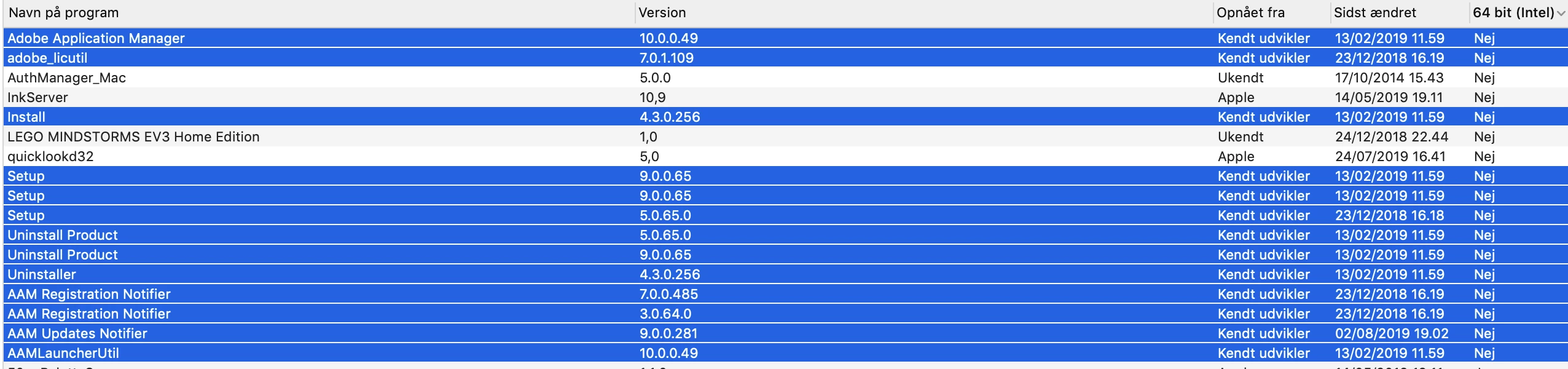
My question is: Can I delete these - and if so, how (other than finding them manually and dragging to trash can)?

It they cannot be deleted: Will they be upgraded to 64-bit soon?

Thank you in advance.

Jakob

This topic has been closed for replies.

2 replies

Jpaikin
JpaikinAuthor
Participant
August 3, 2019

I ended up just uninstalling all Adobe products and re-installing Creative Cloud. That way I hope updates will take care of any 32-bit stuff...

shawn_starc
Inspiring
August 2, 2019

I am not sure about other folders but Adobe application manager is something which can re-create if you launch adobe creative cloud desktop application again or download the AAM from the link :

https://supportdownloads.adobe.com/detail.jsp?ftpID=4774


I suggest to use cleaner tool of Adobe for this to clean the applications and files you don't use.  Use the CC Cleaner Tool for installation issues