
Participating Frequently
October 20, 2017
Answered

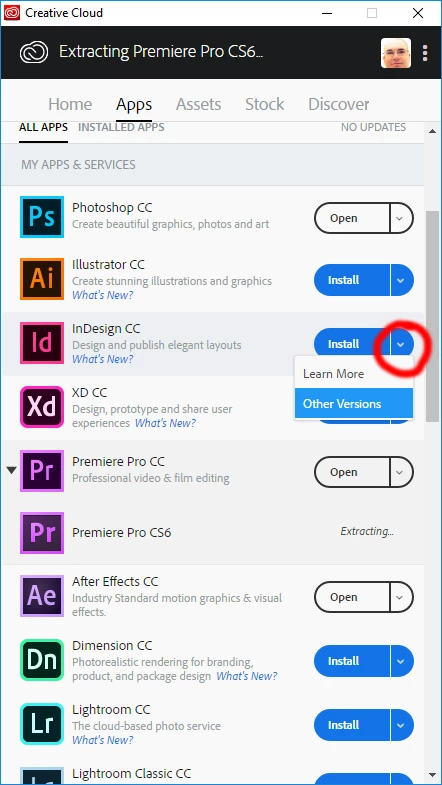
Can no longer install older versions in CC2018

  • October 20, 2017
  • 3 replies
  • 12883 views

Hi I needed to update my Premeire to  cc2017 to open a project created by someone else using this version, currently I  was still on 2015.3. The cc app would not let me install an update to 2017 as it said it needed to update the application. So I updated the cc app  and now all I can install is cc2018 or v7 the first cc or cs6, no other versions seem available. I don't want to use cc2018 yet until its more proven to be stable. Where have all the the older versions? I ended up having to find a direct download link and install it manually bit it does not show up in the CC app at all.
This topic has been closed for replies.
Correct answer mamapajama

In the Creative Cloud app, click on the flyout menu next to "install" to access previous versions.

3 replies

mamapajamaCorrect answer
Participant
November 2, 2017

In the Creative Cloud app, click on the flyout menu next to "install" to access previous versions.

Participant
November 3, 2017

Sorry, but I don't have this feature:

ProDesignTools
Community Expert
Community Expert
February 23, 2018

The option to download other versions has also disappeared from my control panel. 

This is incredibly frustrating that they removed this feature without notification.  I don't have enough room on my HDD to keep copies of all versions, at all times. So I relied on this feature to access the versions I needed, when working with other artists.


Not sure why that is... Just tested and it shows up here. Is it like that for your other apps too, besides Premiere Pro?

What version of the CC Desktop app are you running? (Click the three-dots icon at the upper right of the window, then select "Preferences...") The latest version as of this writing is 4.4.1.298.

If you can't find what you need for older installers via the Desktop app, then by all means you can use the Creative Cloud direct links​ instead to download the installers for almost any major CC release to your computer, archive them to disc media, have available as offline backups, and so on.

This guide covers that option in more detail:

Creative Cloud Version Control: How to Access or Restore Most Any Version of CC

Hope that helps!

Inspiring
October 20, 2017

I have looked at the site recommended for past versions....but NO INDESIGN! What's up with that. Judging by the 2016 and earlier sites there will be no availability...

kglad
Community Expert
Community Expert
October 21, 2017

correct, not all cc programs are available for direct download.  i listed all the ones that are available.

kglad
Community Expert
Community Expert
October 20, 2017

that's scheduled to be fixed in (i believe) the next update of the cc desktop app.

in the meantime, you can use these direct links:

Single user licensee downloadable installation files available:

  • Download and installation help for Adobe links

  • Download and installation help for Prodesigntools links are listed on most linked pages.  They are critical; especially steps 1, 2 and 3.  If you click a link that does not have those steps listed, open a second window using the Lightroom 3 link to see those 'Important Instructions'.

And a big thank you to Jim @ Prodesigntools for helping me with these links!

Participating Frequently
October 20, 2017

Should have been ok on day 1 though they seem to drop the ball with every update. I got the old version hem from those links by googling for them yesterday.