
Roland_Rick
Known Participant
October 21, 2018
Question

Can not start Ps CC 2019 - Looping Login 4ever

  • October 21, 2018
  • 3 replies
  • 5951 views

This problem, I yet didn't face on any update prior to CC 2019.

I am intentionally working with a standard user account on Mac, without admin rights.

I am on HighSierra, latest version.

I am properly logged into most current version of Adobe CC. (Text continues below first image, pls. scroll down)

After clicking on "Öffnen" (Open), Ps 2019 starts, pops up a login screen (even being already logged in correctly to Adobe CC) - of course, I type in the correct password, please do not reply with a suggestion like "check your password", it is fine, I can log into Adobe CC also here on the web for typing this complaint, so there is no password issue caused by me. Now, I click "Anmelden" on the menu of screenshot image below
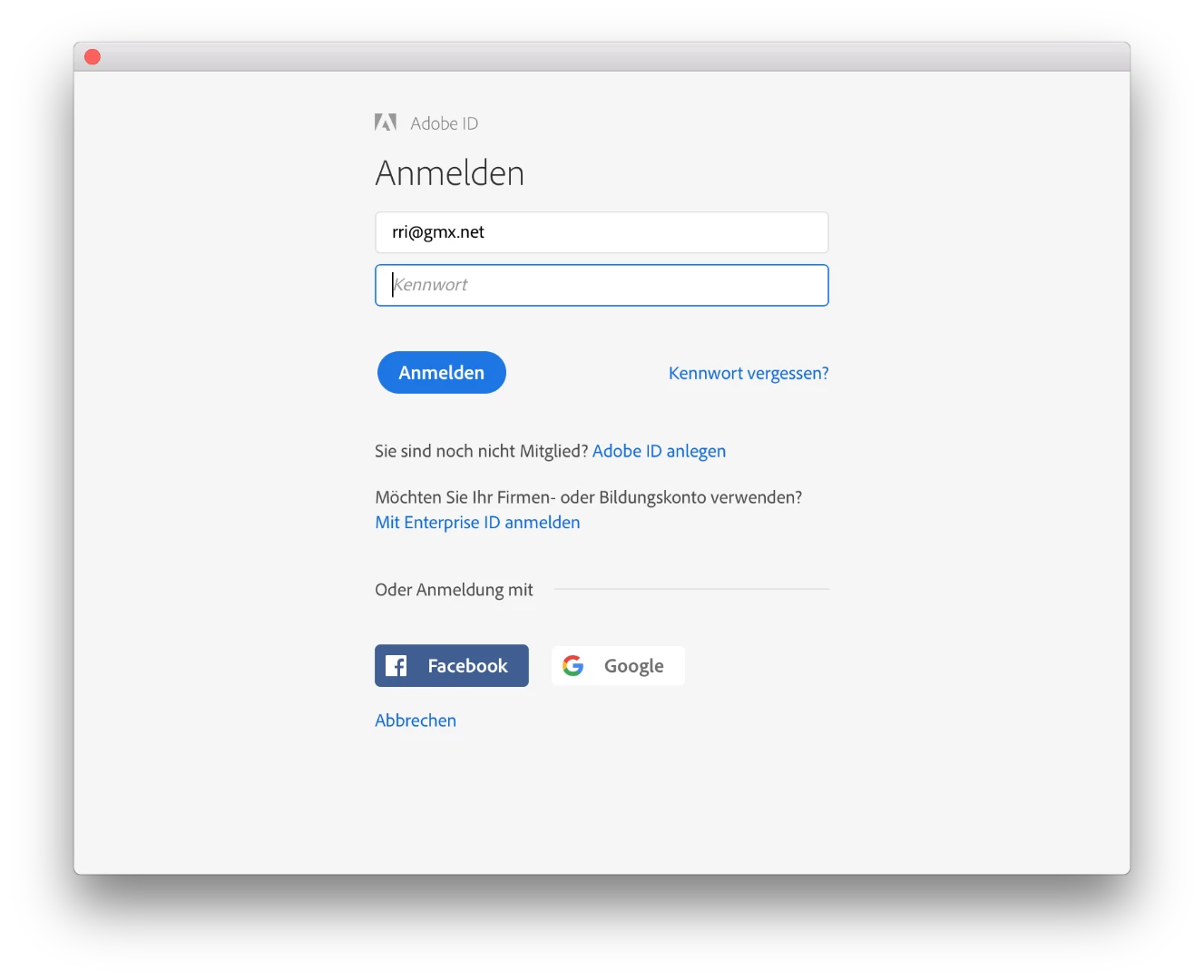
After clicking "Anmelden", a empty box dialog box pops up for a quarter of a second or so, then disappears and also Ps 2019 quits itself.

This is looping forever.

That's the ugly one: Deleting all registered computers from online plan management does not help anything.

Please give step-by-step advice how to solve this problem like e.g. deleting old cache files in users library I am logged in.

This topic has been closed for replies.

3 replies

Roland_Rick
Known Participant
October 23, 2018

PS: If I am writing and talking about creating new accounts, I am talking of user accounts on the Mac - and not Adobe IDs.

Is there any person reading this and understanding what's the problem?

Or are there only clueless low paid people in India or Ukraine, copy & pasting standard answers???

Bani Verma
Community Manager
Community Manager
October 23, 2018

Hi Roland_Rick, did you see any Adobe entries in the host's file on your main user account?

Roland_Rick
Known Participant
October 27, 2018

Please specify what you mean with "main user account". Thanks.

Roland_Rick
Known Participant
October 23, 2018

maxOS is

kglad
Community Expert
Community Expert
October 21, 2018

sign out and then back in to your cc desktop application using the same adobe id used to verify your subscription:  http://helpx.adobe.com/creative-cloud/kb/sign-in-out-creative-cloud-desktop-app.html

if that fails to allow you to open ps,

1. remove your  Adobe PCD folder and SLStore folders (locations shown here, https://helpx.adobe.com/creative-cloud/kb/configuration-error.html)

2. restart your computer

3. sign in to your cc desktop app

4. open ps

Roland_Rick
Known Participant
October 23, 2018

After following your steps, I get

and now, I can no longer start Ps CC 2018 (what has been working fine before executing your "help") nor Ps 2019.

Adobe Support: WORST EVER

Roland_Rick
Known Participant
October 23, 2018

Hi Roland_Rick,

I am really sorry for all the trouble you had to go through to resolve this issue.

As you have mentioned you are able to use Photoshop CC in a new user account without any issues, it means there is something on your main user account blocking it.

To confirm, kindly turn off system firewall, anti-virus, internet/browser security software's or add-ons if installed. After this follow the steps given under "Troubleshoot connectivity issues" given here: Resolve connection errors with Adobe Creative Cloud and Creative Suite applications.

Do let us know if you see any Adobe related entries in the host's file. Awaiting your response.


There must be a problem with Bride 2019. I removed everything I found with "Adobe" from the Mac. I did this by "AppCleaner". After that I cleaned manually the "/Application/Utilities" from all "Adobe" in there. Dito for the users ~/Library folder.

When I didn't find any file with "Adobe" in the name, I rebooted and reinstalled all Adobe products I subscribed again.

First it worked fine.

When starting Bride 2019 for the first time, it asked for access to my Adobe Libraries.

I said yes  - and that moment the looping login screen from initial post in this thread started to pop up at Bridge and for that also again starting Photoshop, what has been running after full cleanup - as good as I can do it.

But there must be da hidden file somewhere, I can not identify by searching for "Adobe" or "adobe".

Access to Adobe products messed again.

Only my personal account is concerned.

All accounts I created new for testing (all standard, no admin rights) work fine.

Please tell me which f*ng hidden file I have to delete in my normal account to bring Adobe back to life again.

I can start Photoshop CC 2018 - that's OK - but NOT Ps CC 2019.

No such issues before installing 2019 labeled products. :(((((((((((((((((((((((((((((((((((((((((