
Exit
  • Global community
    • Language:
      • Deutsch
      • English
      • Español
      • Français
      • Português
  • 日本語コミュニティ
  • 한국 커뮤니티
1

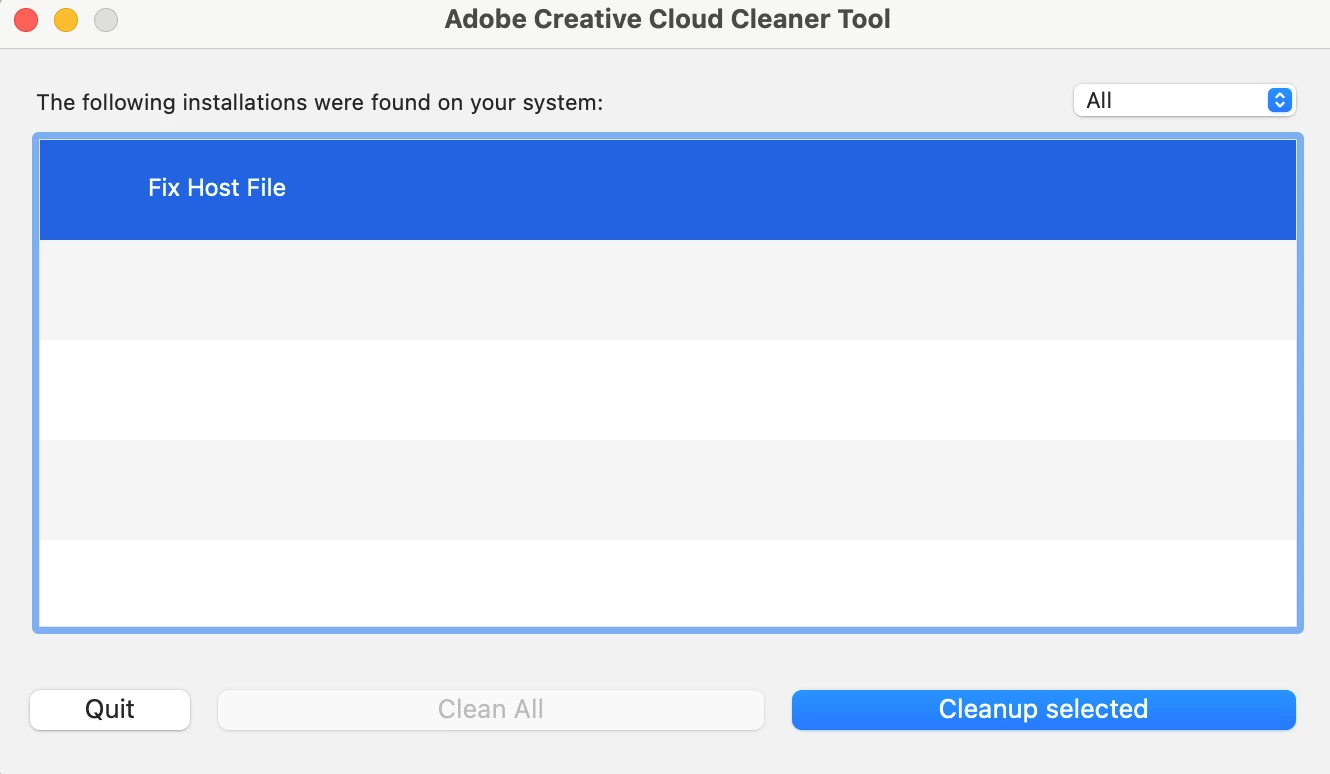
can't delete fix host file from cleaner

Community Beginner ,
Mar 07, 2022 Mar 07, 2022

the adobe not genuine message still appears and it's really annoying 😞 when it was not my fault.

They recommend to use cleaner and I did but fix host file stays all the time.

Any idea why? How can I solve the not genuine message to not appear again? Thank youScreenshot 2022-03-07 at 11.11.37.png
TOPICS
New user
14.0K
Translate
Report
Community guidelines
Be kind and respectful, give credit to the original source of content, and search for duplicates before posting. Learn more
community guidelines
LEGEND ,
Mar 07, 2022 Mar 07, 2022

Did you fix your host file? Or do you need instructions?


Translate
Report
Community guidelines
Be kind and respectful, give credit to the original source of content, and search for duplicates before posting. Learn more
community guidelines
Community Beginner ,
Mar 07, 2022 Mar 07, 2022

Oh! I thought it would also need to be deleted. 


The only steps I took was to clean everything to stop the message coming up but that is all 😞  

Translate
Report
Community guidelines
Be kind and respectful, give credit to the original source of content, and search for duplicates before posting. Learn more
community guidelines
LEGEND ,
Mar 07, 2022 Mar 07, 2022

You MUST NOT delete your hosts file. It is a system file, and vital. BUT sometimes malware puts stuff in there to stop Adobe software licensing from working. Sometimes malware comes with counterfeit Adobe software.


Anyway, editing needs to be done with great care. I suggest that before you try, you tell us what Adobe entries you find there. Here's how to do this (it won't try to fix the file):

Start a terminal (From Utilities in Applications)

Type the next line exactly (you can copy/paste)

grep -i adobe /etc/hosts

Please copy and paste what it says in reply. If it says nothing, type this instead

cat /etc/hosts

and check that your reply has no personal info.

Translate
Report
Community guidelines
Be kind and respectful, give credit to the original source of content, and search for duplicates before posting. Learn more
community guidelines
Community Beginner ,
Mar 07, 2022 Mar 07, 2022

Thank you so much for your reply and trying to help me.

The first line did not do anything, but after trying 

cat /etc/hosts
this is the answer i got:

Screenshot 2022-03-07 at 17.08.14.png

Translate
Report
Community guidelines
Be kind and respectful, give credit to the original source of content, and search for duplicates before posting. Learn more
community guidelines
LEGEND ,
Mar 07, 2022 Mar 07, 2022

There should be three more lines, ending localhost, broadcasthost, and localhost. Were they there, and nothing else?

Translate
Report
Community guidelines
Be kind and respectful, give credit to the original source of content, and search for duplicates before posting. Learn more
community guidelines
New Here ,
May 16, 2025 May 16, 2025

No there was nothing else what now?

Translate
Report
Community guidelines
Be kind and respectful, give credit to the original source of content, and search for duplicates before posting. Learn more
community guidelines
Community Expert ,
May 16, 2025 May 16, 2025

what problem are you having?

Translate
Report
Community guidelines
Be kind and respectful, give credit to the original source of content, and search for duplicates before posting. Learn more
community guidelines
New Here ,
May 16, 2025 May 16, 2025
Trying to remove fix host file for adobe so i can run premiere without the
subscription popup. Cant find it in the host files or anywhere. Using
MacBook m1 pro with sonoma 14.5
Translate
Report
Community guidelines
Be kind and respectful, give credit to the original source of content, and search for duplicates before posting. Learn more
community guidelines
Community Expert ,
May 16, 2025 May 16, 2025

why do you think there's a host file problem?

Translate
Report
Community guidelines
Be kind and respectful, give credit to the original source of content, and search for duplicates before posting. Learn more
community guidelines
New Here ,
May 16, 2025 May 16, 2025

Just help pls

Translate
Report
Community guidelines
Be kind and respectful, give credit to the original source of content, and search for duplicates before posting. Learn more
community guidelines
Community Expert ,
May 17, 2025 May 17, 2025
LATEST

@yan_3621 


what problem are you seeing?

Translate
Report
Community guidelines
Be kind and respectful, give credit to the original source of content, and search for duplicates before posting. Learn more
community guidelines