
Participant
October 19, 2018
Answered

can't download previous versions from creative cloud for Mac

  • October 19, 2018
  • 1 reply
  • 8456 views

I looked on the website and it says that I need to just click on administration and it should shows the old versions but it doesn't and I don't know why, I accidentally update after effects and I really need 2018 not 2019
This topic has been closed for replies.
Correct answer kglad

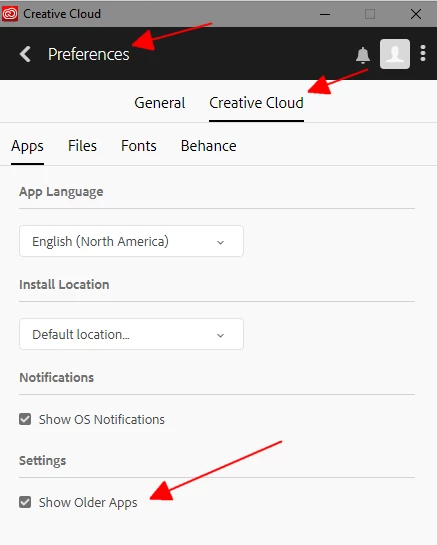
attach a screenshot of your preferences>cc panel

1 reply

kglad
Community Expert
Community Expert
October 19, 2018

do you have a team or enterprise subscription?

if not you can enable previous versions for some programs by clicking the 3 dots>preferences>cc>show older apps and then clicking the arrow to the right of the app you want.

Participant
October 19, 2018

No, I just have a personal subscription but I don't have that option anywhere, I have followed the steps you write but I couldn't found show older apps

Participant
October 22, 2018

attach a screenshot of your preferences>cc panel


can you see? I don't have that option anywhere