
Participant
April 15, 2020
Question

Can't install previous versions of CC apps

  • April 15, 2020
  • 2 replies
  • 806 views

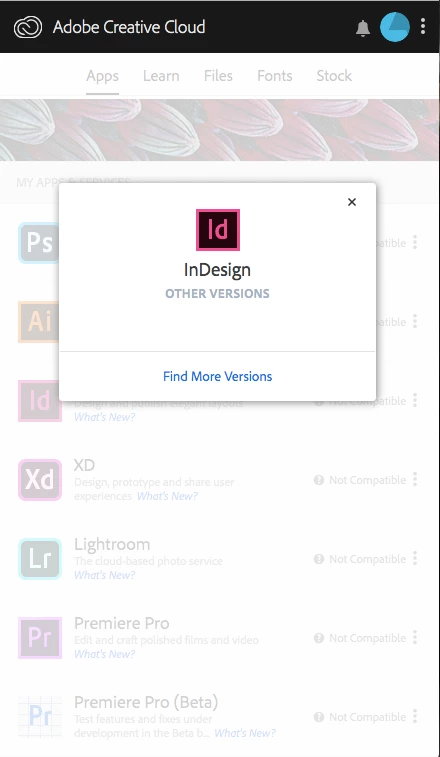
I have a 10.11.6 OS X El Captain Mac, so the newest versions of Adobe apps don't work with my current system. I was trying to download previuos versions of the apps but when I click "other versions" nothing shows up. I have the show older apps option on in preferences, so it's not that.
    This topic has been closed for replies.

    2 replies

    Just Shoot Me
    Legend
    April 15, 2020

    What model year is your Mac and what type of Mac? iMac, Macbook Pro, Mac Mini, Air?


    Even EXTREMELY Older Macs can be upgraded to one of the newer OS X versions than you are using and then you can use the Adobe programs.

    Participant
    April 16, 2020

    I have an early 2015 Macbook Air.

    John Waller
    Community Expert
    Community Expert
    April 16, 2020

    See https://support.apple.com/en-au/HT201475


    Before upgrading to Catalina, first check your MacBook Air for 32 bit apps. They will not work on Catalina.

    https://9to5mac.com/2019/10/07/how-to-get-mac-ready-macos-catalina/

    Nancy OShea
    Community Expert
    Community Expert
    April 15, 2020

    Please ensure your computer meets or exceeds the minimum system requirements to run the latest Creative Cloud Desktop App + all other apps you intend to use.
    https://helpx.adobe.com/creative-cloud/system-requirements.html


    Your OS is too old.  You need High Sierra or higher. Check your computer's compatibility below.

    https://support.apple.com/en-us/HT208202


    Owing to Adobe's new version policy, it's not possible to access pre-2019 versions from the CC desktop App. On my Win10 machine with Show Older Apps selected, InDesign offers v15 and v14 only.


    Nancy O'Shea— Product User & Community Expert