Participating Frequently
February 20, 2014
Question

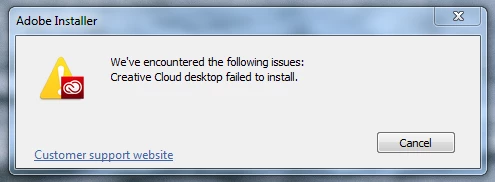
Cannot update creative cloud desktop

  • February 20, 2014
  • 2 replies
  • 2607 views

Creative Cloud cannot update itself:

What now?

Internet connection is fine, computer is absoluuutely fine. No other problems.

Using Windows 7 x64, running as non-admin, UAC enabled, scanner is Avast 2014, internet pipe is 100Mb fiberoptic without outgoing firewall.

/edit

WTF. Frustratingly, this update mechanism hijacks the cloud application. I cannot choose not to upgrade.

/edit2

More info. Whilst UAC is enabled, the updater does properly elevate itself. Disabling the scanner doesn't help either.

Also, it does put a shortcut on my desktop, so it does get to that point in the update process. This also hints that the failed update doesn't even revert things properly. Which is yet another thing for Adobe to fix.

This topic has been closed for replies.

2 replies

AMreso
Inspiring
February 20, 2014

1. Restart your computer, after closing all applications.

2. Rename the OOBE folder

Windows: C>Program files or Program files(x86)>Common files>Adobe>OOBE and rename the OOBE folder to like (OOBEold).

3. Run the Adobe  Creative Cloud Cleaner Tool ( http://www.adobe.com/support/contact/cscleanertool.html ) and choose the option 3( creative cloud and than choose creative cloud desktop/Applications manager )

4. Now try downloading the creative cloud from creative.adobe.com

thanyAuthor
Participating Frequently
February 21, 2014

I just installed CC frshly a month ago. If I uninstall it an clean it out and reinstall, that would be just reinstalling the problem.

I'd rather fix the actual problem.

Moreover, how can I find out what *actually* went wrong. Because all we know is "it didn't work", but there must be some sort of log somewhere.

Jeffrey_A_Wright
Legend
February 21, 2014

Thany you are welcome to review your installation log files for the install.  Please see Troubleshoot install issues with log files | CC - http://helpx.adobe.com/creative-cloud/kb/troubleshoot-install-logs-cc.html for information on how to locate and interpret your installation log files.

Jeffrey_A_Wright
Legend
February 20, 2014

Thany please see Error "Failed to Install" Creative Cloud Desktop application - http://helpx.adobe.com/creative-cloud/kb/failed-install-creative-cloud-desktop.html for information on how to resolve your current difficulties.