
Known Participant
October 10, 2019
Question

CC Icon in Mac Menu bar no longer opens Drop Down menu; instead launches old Desktop App.

  • October 10, 2019
  • 7 replies
  • 3149 views

Was there an update or something? Clicking on the Creative Cloud icon in my Mac's menu bar no longer opens the nicely designed drop-down menu that I've been using the last few years, but instead now opens the archaic and poorly designed Desktop app from long ago! There is no option to switch back to the desired behaviour. I am on Mac OS 10.14.6 Mojave and have NOT (and will not) upgrade to the Catilina OS.


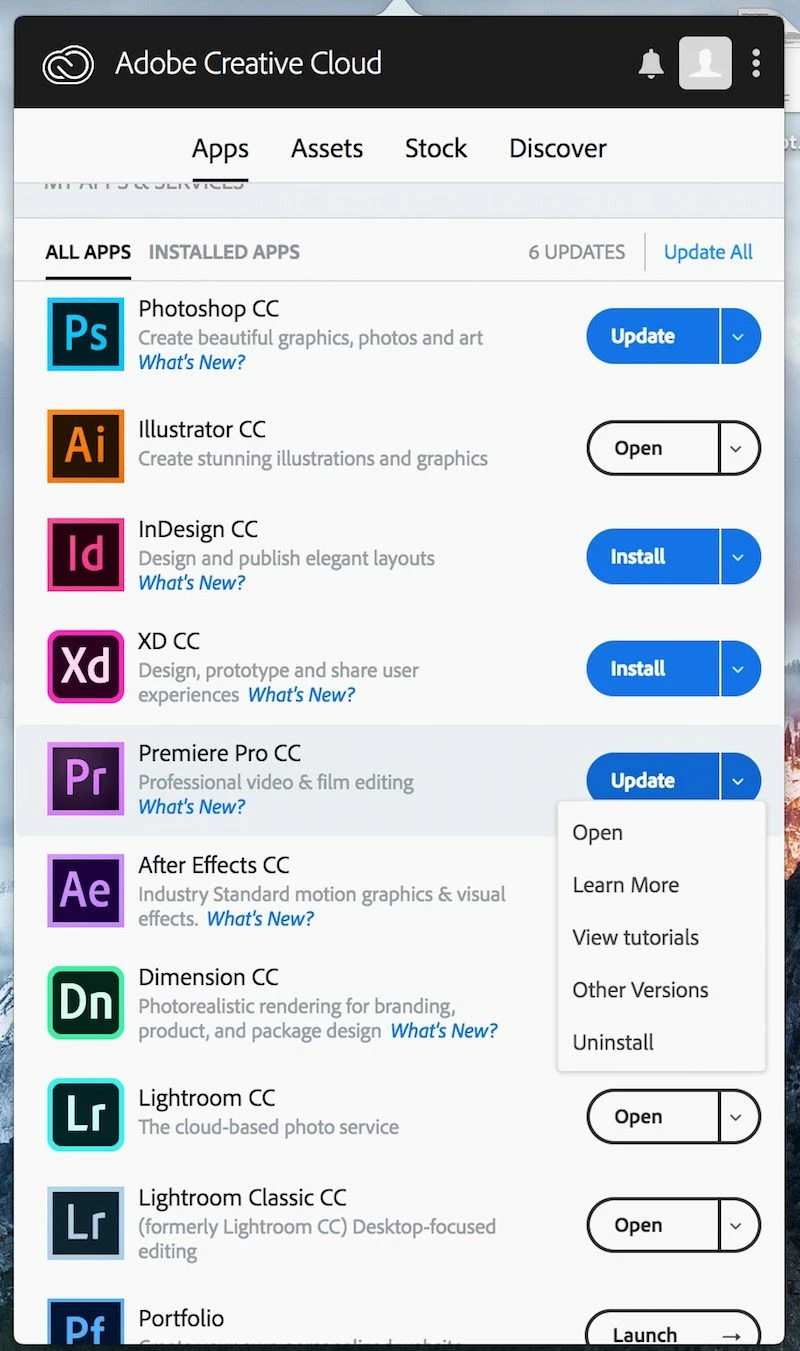
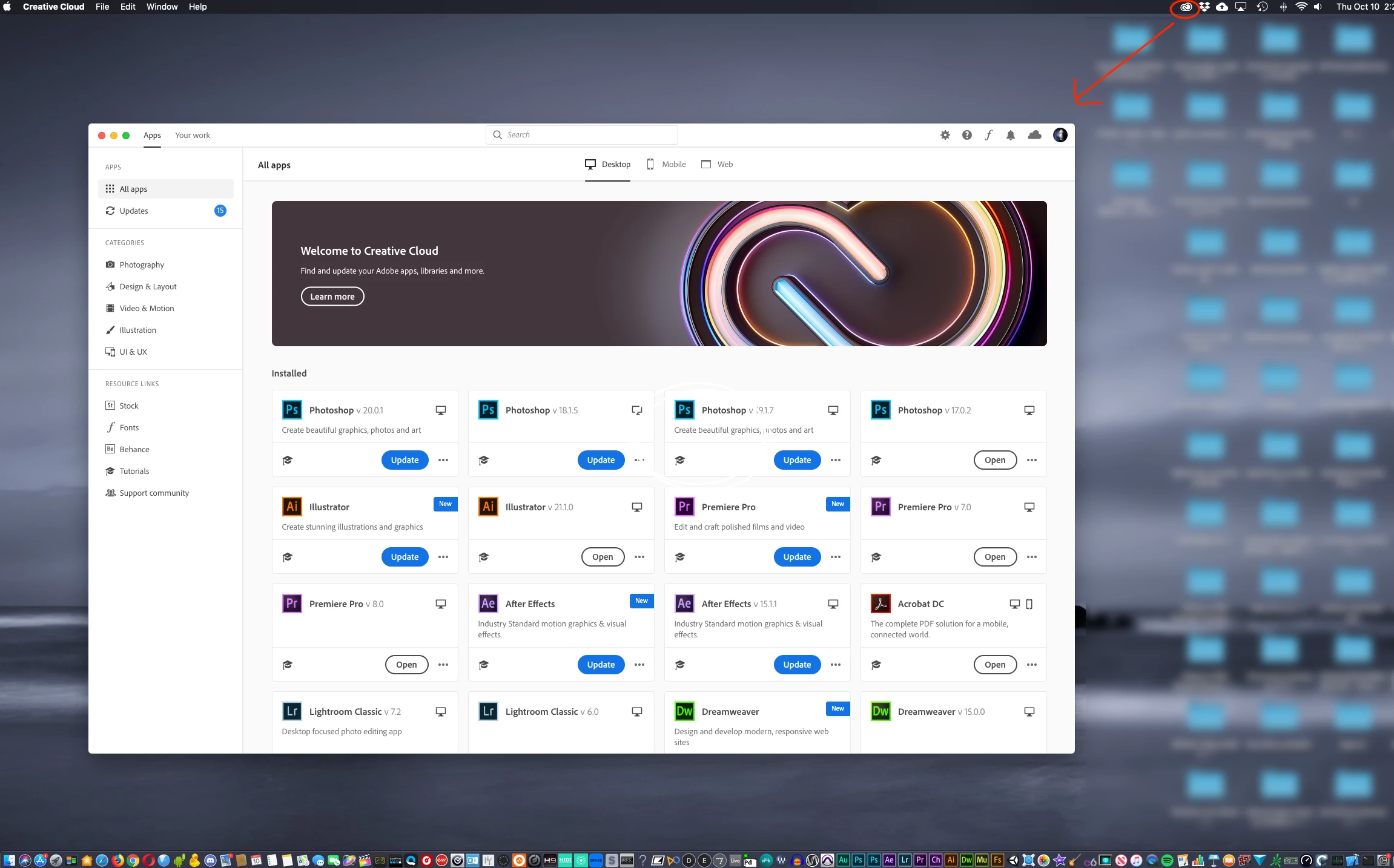
EDIT: Photos added with clarification - Previously, when I clicked on the CC Icon in the Mac's Menu bar, it would open a drop-down menu with all of my CC Apps, Assets, Stock, etc. very clean and well organized (as in first photo.) Now, it opens this big old desktop app that is just outdated (as in second photo.)
 

    This topic has been closed for replies.

    7 replies

    Participant
    February 5, 2021

    thank god someone posted about it... i spent 10 minutes trying to find the button cos i thought i did something wrong...


    worst adobe update.

    wadejennings
    Participant
    May 11, 2020

    I know this thread is old, but I just came across it after searching for an answer. Phew, at least I have some confirmation now. I too loved the mini dropdown. It was succinct and useable. I thought I was going insane. I thought that I did something to change the view and couldn't figure out how to get it back. 

    Participant
    January 18, 2020

    I agree.  I hate this "upgrade".  Adobe please go back to the nice pull-down!!!


    Participating Frequently
    April 14, 2020

    Agreed her as well. 

    Participant
    December 5, 2019

    I agree. I liked it better with the drop down menu. Am I to assume that it is just the upgrade that makes this no longer available?


    Participant
    December 13, 2019

    I agree this is a step backward for the program.  

    Known Participant
    October 10, 2019

    So the helpful user says it is an upgrade, not a bug, but I would still like to hear from somebody at Adobe as to why a company that is all about Design and User Experience would go backward in design and user experience with their own product!? 

    Known Participant
    October 13, 2019
    No one else have a definitive answer?
    Tacafy大尉
    Legend
    October 10, 2019

    Hello. jido_genshi.


    Thank you for the photos.
    It looks like the Creative Cloud desktop app has been updated.

    With the new Creative Cloud desktop app,

    To open uninstall and previous version management,
    Press the "..." part next to the "Open" button


    By the way, as the setting of the new Creative Cloud desktop application, the setting of the “old app” display used when installing Muse, Flash Builder, etc., click the gear mark to enter the setting screen, and select the  “app” item Then it will come out.

    Known Participant
    October 10, 2019

    Thank you for your reply, however, I am not asking about the individual apps within Creative Cloud (i.e., Photoshop, Lightroom, etc.) I am asking about the Creative Cloud app itself. All I want to know is why is it no longer a Drop Down menu like it has been the last few years, and why they've gone back to that old ugly Desktop app? Or is it a bug? Is there a way to get back to the drop down menu version of Creative Cloud? I want it to go back to this when I click on the CC Icon in the Mac's Menue Bar...


    Tacafy大尉
    Legend
    October 10, 2019

    There is no way to go back because it is a version upgrade.

    I am one of those who has upgraded, but the desktop occupancy is high (to be honest, it's annoying), and if it's a launcher function, I think it worked well in the previous version.
    However, we have no choice but to accept the reality that we have upgraded.
    However, if this desktop is not so popular in the future, it may be reviewed in the next update, but you should not expect it too much.

    Tacafy大尉
    Legend
    October 10, 2019

    Hello jido_genshi.

    Do you have screenshots?

    Known Participant
    October 10, 2019
    Let's see if I can clarify and I'll add photos to my original post... Previously, when I clicked on the CC Icon in the Mac's Menu bar, it would open a drop-down menu with all of my CC Apps, Assets, Stock, etc. very clean and well organized (as in first photo.) Now, it opens this big old desktop app that is just outdated (as in second photo.)