
Participant
November 27, 2015
Answered

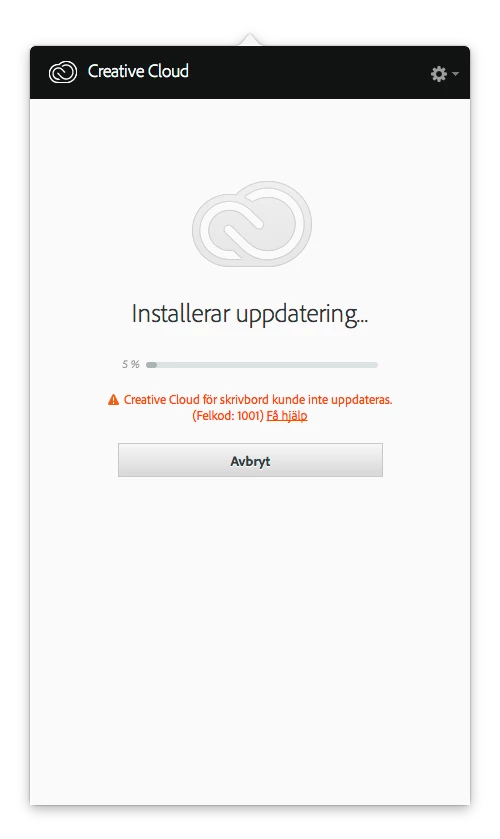
CC update crash! Error code: 1001

  • November 27, 2015
  • 5 replies
  • 23517 views

My CC Desktop Manager crashes when contacting the Cloud for update since a few days back. Running OS X 10.10.5 (swedish version) on a MacPro. Been in contact with Adobe Support yesterday and got very good help and the problem was solved. That is, util now. The same problem is back. I already spent hours searching answers, but nothing seems to work. Anyone with at "Magic" solution? Perhaps I shall just reformat the entire drive and start from scratch?
This topic has been closed for replies.
Correct answer Makrotulpa

Just spent an hour with a support rep who managed to get it working by

1) creating a new user account

2) downloading a specific version of of the Creative Cloud installer (the one from my Creative Cloud account still have the error code 43 but one from a different adobe website seemed to work).

Unfortunately I didn't get where the specific version was from - not sure if support can help with that.

5 replies

Participating Frequently
October 12, 2016

October 12, 2016. I just experienced the same issue. Based on a few of the prior responses, I closed all apps on my 2013 IMac Desktop running the latest version of Yosemite and restarted the machine. It appeared to be in the middle of a CC update and it said having problems with some files. I cancelled, restarted and it went through smoothly. I have not had this problem on my 2 year old 13 in MacBook Air  also running Yosemite

Participant
June 12, 2016

I also get this every few months. There must truly be a better way to for this app to manage itself and it's updates. Adobe, whatever strategy you have employed with this app is persistently not working and it is time to come up with a new strategy. Stop hacking at the existing and change tack. Find a new way. Please.

bclee337
Inspiring
February 28, 2016

Can someone please post a link to the specific version of the installer you need to download under a different account?  I think I've followed all the directions here but I'm still stuck.

  1. Updater stuck at 5% with Error Code : 1001
  2. Download and run uninstaller
  3. Change permissions on both Application Support/Abobe folders and all contents
  4. Follow the link to download the installer, set up a new account, download.
  5. Now I get Error Code: 43 when I try to run the installer.
Sheena Kaul
Community Manager
Community Manager
February 29, 2016

Hi,

Please see Error downloading, installing, or updating Adobe Creative Cloud apps for the details on the errors you are facing.

You may download the latest version of Adobe creative cloud from the link below:

Download Adobe Creative Cloud apps | Free Adobe Creative Cloud trial

Regards,

Sheena

bclee337
Inspiring
February 29, 2016

Hi Sheena,

Knowing now what it took to fix it, if I dig through those pages I can find parts of what the customer service agent took me through, but not all of it.  (See solution #2 on this page: https://helpx.adobe.com/creative-cloud/kb/error-43-installing-creative-cloud.html)  Not knowing that in advance though I never would have found that, and there are many suggestions on that page that I have already tried which do not help.

For everyone else:

I did contact customer service via online chat and the customer service person took me through a series of steps which fixed the problem.  It was considerably more involved than anything that's been described here, the short version is that uninstalling the Creative Cloud app alone is not enough.  When I have time later I might try to condense the instructions, and the link above has part of it, but my best advice for everyone is to ignore anything you read here and contact customer support.  They seem very familiar with the problem now.  One of them should post something here.

Adobe does need to release a simple fix -- this is now two disastrous versions of Creative Cloud in about as many months (after last month's version that would delete stuff from your root directory). 

-- Brian

MakrotulpaCorrect answer
Participant
December 3, 2015

Just spent an hour with a support rep who managed to get it working by

1) creating a new user account

2) downloading a specific version of of the Creative Cloud installer (the one from my Creative Cloud account still have the error code 43 but one from a different adobe website seemed to work).

Unfortunately I didn't get where the specific version was from - not sure if support can help with that.

bobb84012647
Participant
February 14, 2016

I experienced the same problem updating, receiving Error Code: 1001. After reading all of the suggestions I was still reluctant to create a new account and download a new version - that does not sound logical to me. So instead I just restarted my Mac (OSX Yosemite 10.10.5). Upon restart, the Creative Cloud loaded and indicated that updates were available for Photoshop and Lightroom. I chose Update All, and the updates were installed without incident. Both Photoshop and Lightroom load perfectly and indicate they are up to date (release 2015.1.2). Much easier than the support rep's suggestions, and at least worth a try before spending time on the phone.

Participant
February 22, 2016

Your suggestion of restarting computer has worked for me so far.  Thanks.  kept crashing at 0%, restarted and was already to 9% when fully booted.

Sheena Kaul
Community Manager
Community Manager
November 28, 2015

Hi,

Please try the steps below:


Regards,

Sheena

hejraAuthor
Participant
November 28, 2015

Hi Sheena,

Thank You for Your answer. Unfortunately that only works untill the next CC update, when the error-message will reappear.

I already have a case that is marked ”solved”, because last time I was in contact with Adobe Support, it worked. We tried all type of solutions, and one worked. That was to create a new AdminUser and reinstall CC there. However, like I said, it worked only until CC wanted to install an update.

The issue seems to still bee there, and that is the update procedure.

I´m very sorry but this is a dealbreaker for me. Since I work with Lr and Ps professionally, I need them to putting food on the table. For now I´m forced to evaluate other software solutions on the market.

Vänliga hälsningar / Best regards

Janne Hejra

Sheena Kaul
Community Manager
Community Manager
November 28, 2015

It can happen because of the permissions over the Adobe folders or the network firewall/proxy.