
Inspiring
September 2, 2016
Question

Create Cloud app update not downloading properly?

  • September 2, 2016
  • 2 replies
  • 1443 views

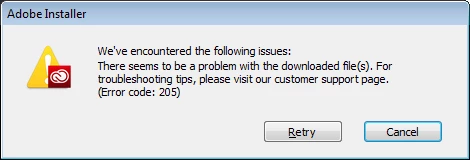
The Cloud desktop app (on my Win7 desktop) tried to update.  It apparently downloaded an update and tried to install it and would stop at 47% saying error in download file?  So I went to Adobe's website and downloaded the newest Creative Cloud App (not the programs, just the app that manages the programs). It downloaded from Adobe's website just fine, but when I run the downloaded file and it installs, it stops and gives me an error, at about 47%, saying problem in download file (see screenshot below)?

I tried the App self-updating and it failed.  I tried to manually update the CC app and it failed.

Did Adobe push out a corrupted file?
This topic has been closed for replies.

2 replies

DelphiZoa
Participating Frequently
September 2, 2016

Hi Soundgarden,

I don't think Adobe pushed out a corrupted file, but a 205 error does indicate that your desktop app download, specifically, is corrupted. This may be due to a number of factors including settings on your computer. I would recommend trying to re-download using an alternate browser and/or internet connection. If you have anti-virus or are behind a firewall, temporarily disable these first. For more info on download errors related to connectivity, please see: Error downloading or updating Creative Cloud apps​.

If that doesn't resolve the issue, please reply to this discussion, and we'll troubleshoot from there.

Inspiring
September 2, 2016

I will try Mozilla in a few, but Adobe downloaded it's own update through the CC app the first time I got the error.  I then used IE to dl the install file directly from Adobe's website. The install file install was slightly different than the CC app update install, but same results (at 47%). I then downloaded the same file again using IE to make sure and the file size was exactly the same and produced the same results.  I don't think it is the file I dl from Adobe because when I run the install, it starts its OWN downloading.  The file I dl from Adobe.com is 783k, when I run that file it launches Adobe's own downloading process to get the real download. See screenshot of install file performing its own downloading... it gives error at roughly 47% of the green bar.

DelphiZoa
Participating Frequently
September 2, 2016

I am not a Windows user, but I do seem to remember someone else with Windows talking about getting around a 205 error by right clicking the setup file and selecting "Run as administrator." Could be worth a shot.

Kanikas
Legend
September 2, 2016