

Creative Cloud Desktop App does not start up - Windows 10
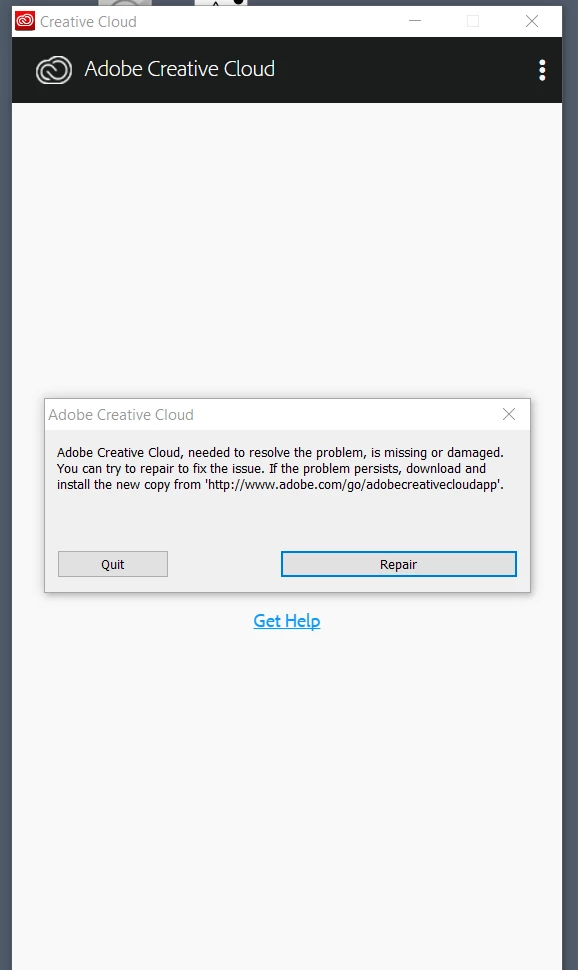
CC desktop app wouldn't start. I removed Lightroom, Photoshop, then CC itself. I ran the AdobeCreativeCloudCleanerTool.exe and redownloaded and reinstalled CC desktop app. Installation seemed to go OK. At the end the Creative Cloud app window comes up and the 'loading...' circle spins for 60 secs, then t flash in the black band, then the circle spins for another 60 secs, then another flash, etc - 3X, then a dialog comes up: Title Bar: 'Adobe Creative Cloud' Body: "Adobe Creative Cloud, needed to resolve the problem, is missing, or damaged. you can try to repair to fix the issue. If the problem persists, download and install the new copy from 'http://www.adobe.com/go/adobecreatecloudapp'. " Two buttons are shown [Quit] and [Repair]. Repair fails. When I click [Quit] the dialog disappears and there is text remaining in the window very briefly, then the window exits. After the exit task manager shows:
CCXProcess (32bit)
Adobe Update Service (32bit)
I have tried: Removing CC with Revo uninstaller,
Installing with AV (Windows Defender) and Malwarebytes off.
Installing in Safe Mode
This is a vanilla Win-10 Enterprise HP Envy x360 m6 laptop, i7-5500U booting off SSD, 8GB memory.
I have an extermal monitor in the HDMI port, and a 2nd external monitor running from a plugable USB interface.
I'm paying for a subscription I can't use. What should I try next?
 AdChoices