
Participant
January 8, 2021
Question

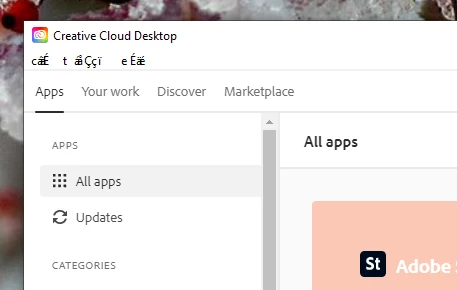
Creative Cloud Desktop App menus appear as jibberish

  • January 8, 2021
  • 1 reply
  • 290 views

Can anyone tell me why my Creative Cloud Desktop App is loading with menus showing up in jibberish?

I've tried the Adobe Help via chat and all they wanted to do was send me a link to change the install language (which I've done several times already to no avail). Uninstall and reinstall don't seem to resolve the issue either.


I'm using WIndows 10 and my OS language and Adobe install language are English, but the menus show up as in the attached photos.


This topic has been closed for replies.

1 reply

Jeffrey_A_Wright
Legend
January 8, 2021

David, do you have any font management utilities installed?  


What about the installed fonts?  Are you using fonts from major font foundries or are you using TrueType or any free fonts on the computer?


You could try following the steps listed in https://helpx.adobe.com/creative-cloud/kb/creative-cloud-missing-damaged.html to reinstall the Creative Cloud desktop app, but I am unsure if it will help in this case.  It seems more like the system is encountering some type of font conflict.