
Participant
August 19, 2013
Answered

Creative Cloud Desktop application installer stalls at downloading

  • August 19, 2013
  • 1 reply
  • 484 views

Hi When I download and run CC installer (CreativeCloudSetup.exe) on Win8 It stalls at about 8% and will not download the files needed. 

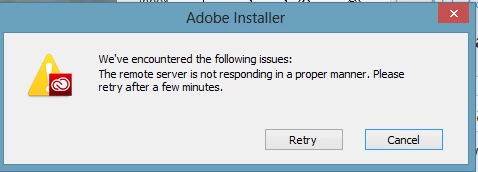
To clarify I can download the CreativeCloudSetup.exe just fine, but when I run it it stalls when trying to download files.    Here is what it says after sitting at about 8% for a minute or 2.

I have tried to restart and re-download the file, as well as the suggestions as noted below:

I will download the new CC installer from the llink below.

https://creative.adobe.com/products/creative-cloud

If the first install attempt fails I'll rename the Adobe OOBE folder (out-of-box experience) to OOBE.old, then will try the install again. {Adobe OOBE folder locations for my system are below. Likely yours are the same.}

C:\Users\[User Name]\AppData\Local\Adobe\OOBE

C:\Program Files (x86)\Common Files\Adobe\OOBE

They didnt work. 


Screenshot of error:
    This topic has been closed for replies.
    Correct answer pillguy

    A chat support person named Shavana (sp?) was very helpful and got my issues resolved.  It was quite involved and required using the Adobe cleaner tool as well as a couple of file locations deep within windows (hosts file, AppData, sending a log from the temp directory....

    It would be nice if Adobe posted these precise steps for all to use.  Anyway, issues resolved! 

    1 reply

    Romsinha-9KMEUt
    Adobe Employee
    Adobe Employee
    August 19, 2013

    Hi pillguy,

    Please let us know the network environment are you in?  Which operating system are you using?  Do you utilize a proxy server or a software firewall?.

    Please try the steps mentioned in the kb: http://helpx.adobe.com/creative-suite/kb/remote-server-responding-installing-aam.html / http://helpx.adobe.com/creative-suite/kb/error-update-server-repsonding-cs4.html .

    You may even try download using different internet connection if possible.

    Regards,

    Romit Sinha

    pillguyAuthorCorrect answer
    Participant
    August 19, 2013

    A chat support person named Shavana (sp?) was very helpful and got my issues resolved.  It was quite involved and required using the Adobe cleaner tool as well as a couple of file locations deep within windows (hosts file, AppData, sending a log from the temp directory....

    It would be nice if Adobe posted these precise steps for all to use.  Anyway, issues resolved! 

    Romsinha-9KMEUt
    Adobe Employee
    Adobe Employee
    August 19, 2013

    That is great.

    Regards,

    Romit Sinha