
jenniferl74090471
Participant
January 29, 2018
Answered

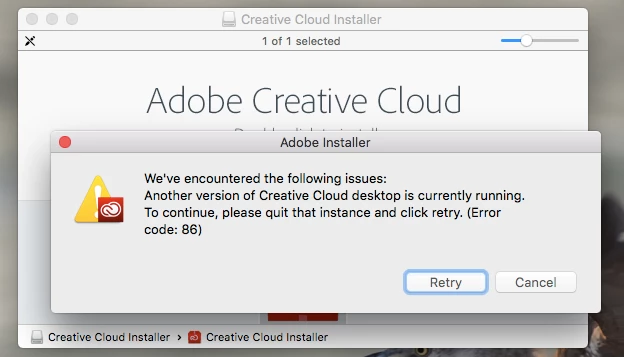
Creative Cloud install Error Code 86

  • January 29, 2018
  • 1 reply
  • 520 views

I successfully installed the app three days ago, and yesterday it decided to mess up. I uninstalled all apps and now cannot re-install cloud. Please help! I am using a mac. I made sure to delete all the files associated with the previous downloads as well.
This topic has been closed for replies.
Correct answer Jeffrey_A_Wright

I am doing a second reboot now and a software update just became available, so maybe that will influence something. 

I had the entire suite on my computer and was able to use each without issue until the CC problem arose. I removed each of those from my computer prior to attempting a reinstall of CC.


Jenniferl74090471, when you removed the Adobe applications, did you utilize the process listed in Uninstall or remove Creative Cloud apps to complete the uninstall process?  If not, what other steps did you implement to remove the software?

1 reply

Jeffrey_A_Wright
Community Manager
Community Manager
January 30, 2018

Jenniferl74090471, sorry you are facing error code 86 when installing the Adobe Creative Cloud desktop application.  Please utilize the steps listed in Error Code 86 | Adobe Creative Cloud to close the conflicting process.  If you continue to encounter Error Code 86 then please reboot the computer.

jenniferl74090471
Participant
January 31, 2018

Hi, Jeff.

I tried all of your suggestions and none were successful. I am not sure what to try now.

Jeffrey_A_Wright
Community Manager
Community Manager
January 31, 2018

Jenniferl74090471, to confirm, even after rebooting the computer you are still receiving Error Code 86, is that correct?

You mentioned you deleted all of the files associated with the previous download, Jenniferl74090471?  What files did you remove?  What were the Adobe applications that were previously installed on the macOS computer?