
Exit
  • Global community
    • Language:
      • Deutsch
      • English
      • Español
      • Français
      • Português
  • 日本語コミュニティ
  • 한국 커뮤니티
0

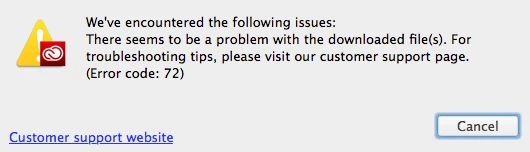
Creative Cloud Install Issue - Error code: 72 - 2013 Mac Pro - Mavericks 10.9.5

Community Beginner ,
Nov 20, 2014 Nov 20, 2014

I'm having the same problem.  I'm on a 2013 Mac Pro running Mavericks 10.9.5.  I unfortunately uninstalled all the Adobe CC applications and ran the CC Cleaner tool.  I also used a utility that enabled me to search for files and folders both hidden and visible.  I searched for and deleted anything related to Adobe, Creative Cloud, and Flash from my computer (except for fonts and ColorSync profiles).  I also tried logging in as the "root" user.  None of these have worked and now I'm without any of my Adobe CC applications.
Adobe_CC_Installer.png

TOPICS
Creative Cloud
5.0K
Translate
Report
Community guidelines
Be kind and respectful, give credit to the original source of content, and search for duplicates before posting. Learn more
community guidelines

correct answers 1 Correct answer

Community Beginner , Nov 21, 2014 Nov 21, 2014

I upgraded to Yosemite and everything works just fine now.

Translate
Community Beginner ,
Nov 21, 2014 Nov 21, 2014

I upgraded to Yosemite and everything works just fine now.

Translate
Report
Community guidelines
Be kind and respectful, give credit to the original source of content, and search for duplicates before posting. Learn more
community guidelines
New Here ,
Jul 18, 2017 Jul 18, 2017

me sale el mismo erro 72 ?¿ aque se debe este error?¿

Translate
Report
Community guidelines
Be kind and respectful, give credit to the original source of content, and search for duplicates before posting. Learn more
community guidelines
Adobe Employee ,
Jul 19, 2017 Jul 19, 2017
LATEST
Translate
Report
Community guidelines
Be kind and respectful, give credit to the original source of content, and search for duplicates before posting. Learn more
community guidelines