Exit
  • Global community
    • Language:
      • Deutsch
      • English
      • Español
      • Français
      • Português
  • 日本語コミュニティ
  • 한국 커뮤니티
0

Creative cloud installation issues,

Community Beginner ,
Jun 20, 2020 Jun 20, 2020

creative cloud installation issues,
it has been several hours since the intalation is blocked at 98.5% without error message, what to do, I have Windows 10 2004 May 2020 Update, 32 GB of memory, a Nitro + Radeon RX580 8GB gddr 5 graphics card Special Edition

TOPICS
Installation
947
Translate
Report
Community guidelines
Be kind and respectful, give credit to the original source of content, and search for duplicates before posting. Learn more
community guidelines

correct answers 1 Correct answer

Community Beginner , Jun 22, 2020 Jun 22, 2020

I solved my problem, by formatting my pc and reinstall windows 10 and install Creative Cloud first and its working
thank you Axel Matt for helping me

Translate
Community Expert ,
Jun 21, 2020 Jun 21, 2020

Please take a look here:

https://community.adobe.com/t5/download-install/creative-cloud-installation-freezing/td-p/11078391?p...


There you'll find an alternate download link. Please check if it's worked.

My System: Intel i7-8700K - 64GB RAM - NVidia Geforce RTX 3060 - Windows 11 Pro 25H2 -- LR-Classic 15 - Photoshop 27 - Nik Collection 8 - PureRAW 5 - Topaz Photo
Translate
Report
Community guidelines
Be kind and respectful, give credit to the original source of content, and search for duplicates before posting. Learn more
community guidelines
Community Beginner ,
Jun 21, 2020 Jun 21, 2020

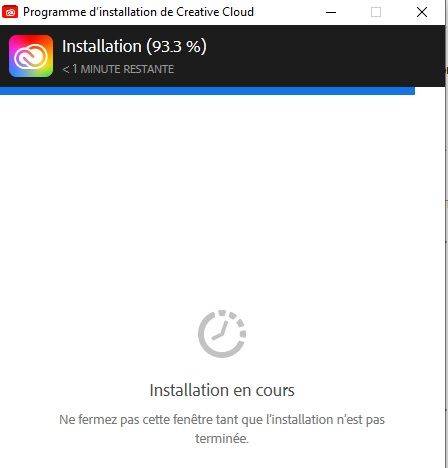
it doesn't work, now blocked 93.3%
after rebooting, I even did before AdobeCreativeCloudCleanerTool (all) and reboot and reinstall Creative cloud, what more

Translate
Report
Community guidelines
Be kind and respectful, give credit to the original source of content, and search for duplicates before posting. Learn more
community guidelines
Community Beginner ,
Jun 21, 2020 Jun 21, 2020

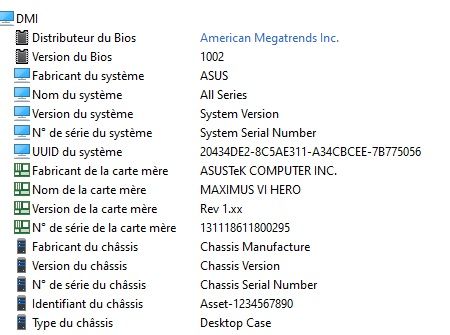
I put in copy of the screenshots of the jpg of my screen and configuration of my pcconfiguration of my pc  1configuration of my pc 1adobe.jpgconfiguration of my pc 2configuration of my pc 2

Translate
Report
Community guidelines
Be kind and respectful, give credit to the original source of content, and search for duplicates before posting. Learn more
community guidelines
Community Expert ,
Jun 22, 2020 Jun 22, 2020

Now it is difficult to say anything from a distance.


Do you are logged is as an Administrator or an user with Admin rights when you try to install?

If no, please logged in as an Administrator or an appropriate user.

Do you have run any protection programs like virus scanner, internet security adaware protection or so?

If yes, please stop these programs and try again.

Please check the Windows Application and System log if there are any entries that can indicates the problem.

My System: Intel i7-8700K - 64GB RAM - NVidia Geforce RTX 3060 - Windows 11 Pro 25H2 -- LR-Classic 15 - Photoshop 27 - Nik Collection 8 - PureRAW 5 - Topaz Photo
Translate
Report
Community guidelines
Be kind and respectful, give credit to the original source of content, and search for duplicates before posting. Learn more
community guidelines
Community Beginner ,
Jun 22, 2020 Jun 22, 2020

I solved my problem, by formatting my pc and reinstall windows 10 and install Creative Cloud first and its working
thank you Axel Matt for helping me

Translate
Report
Community guidelines
Be kind and respectful, give credit to the original source of content, and search for duplicates before posting. Learn more
community guidelines
Community Beginner ,
Mar 09, 2021 Mar 09, 2021

Reformating a PC plus Windows reinstall just to get a product we pay for each month to work? Sorry, just to get a product that controls the other products we pay for monthly just to work? This is insane.
I love watching Creative Cloud hang at 98.5% for over a week after trying all the "normal" steps should a program not install on its own properly.

Translate
Report
Community guidelines
Be kind and respectful, give credit to the original source of content, and search for duplicates before posting. Learn more
community guidelines
Community Expert ,
Mar 10, 2021 Mar 10, 2021
LATEST

I think a reformating the PC and a reinstallation of Windows is rarely necessary.

But sometimes is a reinstallation of the appropriate software is the best and the fasted method to get a software work again. And this does not only apply to  Adobe's software. 

That shouldn't happen but software is a very complex theme and a wrong configuration or an faulty driver or patch or so can make the whole system unstable. 

My System: Intel i7-8700K - 64GB RAM - NVidia Geforce RTX 3060 - Windows 11 Pro 25H2 -- LR-Classic 15 - Photoshop 27 - Nik Collection 8 - PureRAW 5 - Topaz Photo
Translate
Report
Community guidelines
Be kind and respectful, give credit to the original source of content, and search for duplicates before posting. Learn more
community guidelines