
Inspiring
March 25, 2020
Question

Creative Cloud latest update "forgets" installed products

  • March 25, 2020
  • 1 reply
  • 4444 views

Looks like Adobe finally fixed the CC desktop app's persistent hanging when trying to update itself.


However, after the update, CC seems to have forgotten that Photoshop is installed.  PS now apears in the "Available in your subscription" section, with an "Install" action, instead of the "Installed" section.
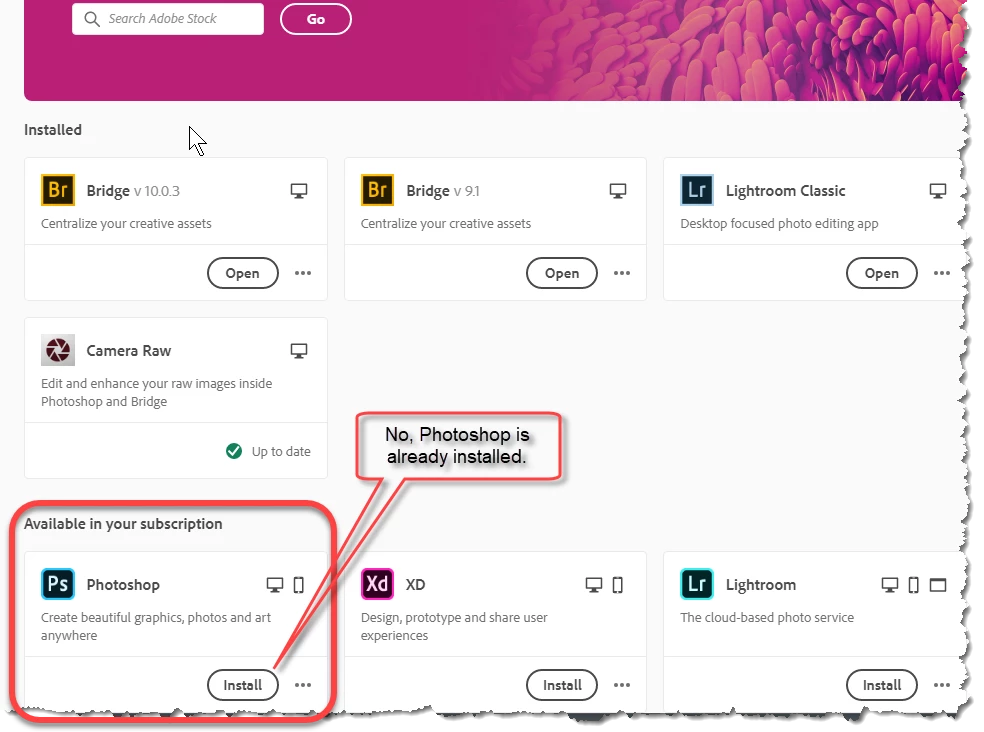


I can still launch PS from its start menu icon, so this is just cosmetic, but glaring enough that you'd think it would show up in testing.


Oh well...

This topic has been closed for replies.

1 reply

Jeffrey_A_Wright
Community Manager
Community Manager
March 25, 2020

Jim, if you implement solution two in https://helpx.adobe.com/creative-cloud/kb/aam-lists-removed-apps-date.html is Photoshop CC then listed as installed?

Inspiring
March 25, 2020

Solution 2 fixed the issue with PS being shown as not installed, and it also showed a pending update for PS, which I allowed it to install.


However, it also wanted to update CC itself, and that resulted in the same old Error Code 184 that's been happening for years when CC attempts to update itself.


Jeffrey_A_Wright
Community Manager
Community Manager
March 25, 2020

Thanks, Jim. To resolve Error 184, you will want to take a look at the log file to determine where the installation is getting blocked.  Info on how to locate the fatal error can be found at  https://helpx.adobe.com/creative-cloud/kb/troubleshoot-download-install-log-files.html.