
Creative Cloud uninstall glitch with illustator
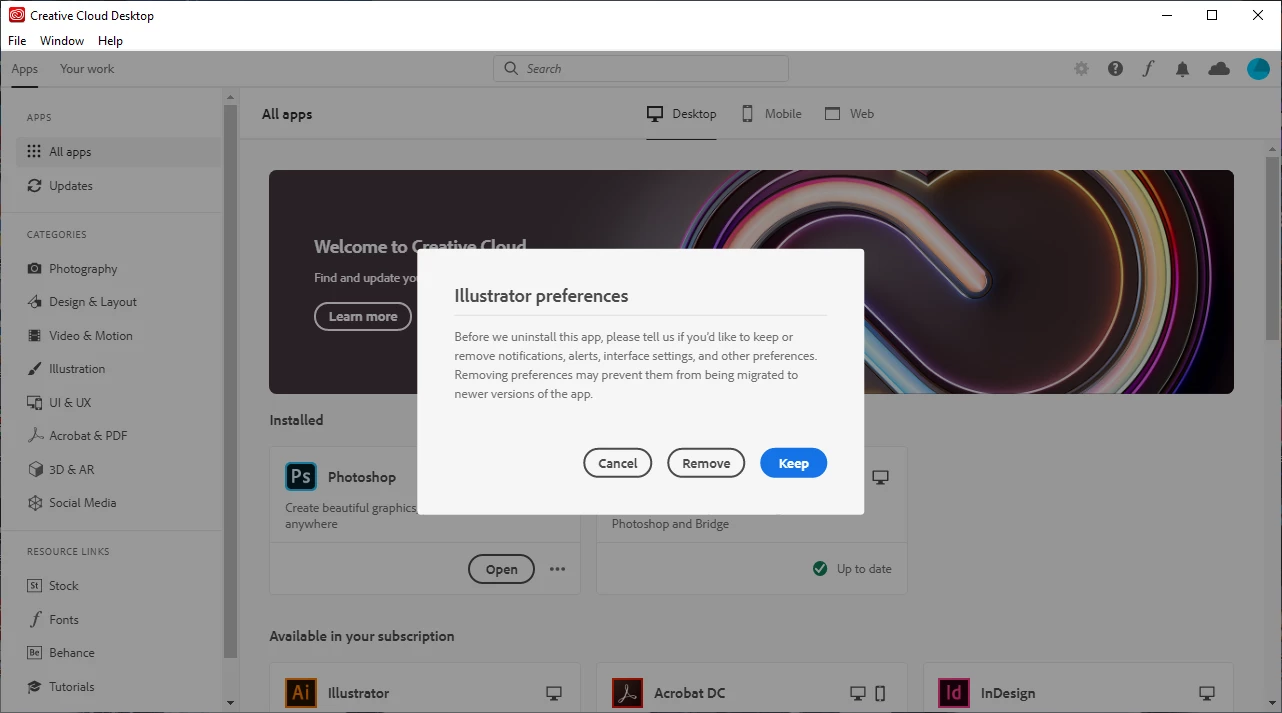
OS: Windows 10
Whenever I have Creative Cloud running in the background, every 20 minutes or so it opens and prompts me about uninstalling Illustrator. In the screenshot above, you can see that I do not even have Illustrator installed on my computer, I used to have it but uninstalled it because of not needing it. I have hit "Cancel, "Remove" and "Keep", and none of them fix it. If I hit "Remove" or "Keep" it attempts to uninstall Illustrator.
I have uninstalled and reinstalled Creative Cloud about 3 times now (to no avail) and even removed all files associated with Adobe in my Program Files, App Data, Temp Files and Windows Registry with Creative Cloud STILL prompting me to uninstall an application that I do not have installed.
Has anyone else had this happen to them? Are there any fixes for this?
March 22nd edit: Still happening. I have attempted to turn off Creative Cloud completely by going into my Task Manager and turning all Adobe processes off, but Creative Cloud OPENS ITSELF with no prompt from anywhere.
April 5th edit: Seems to have fixed itself after downloading Illustrator.
 AdChoices