
Known Participant
May 2, 2013
Answered

Creative Cloud: Update Failed

  • May 2, 2013
  • 2 replies
  • 4539 views

Hello,

I have been using creative cloud for a couple weeks with no issues, but I started to work today and everything seems to have been messed up.

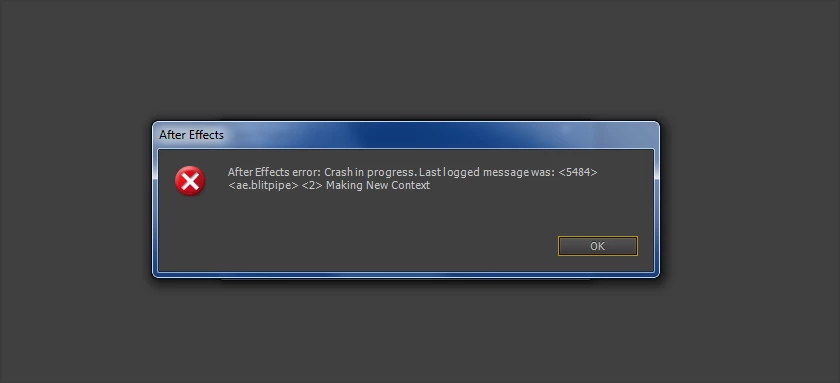
First, After Effects now crashes when I try to open the project file that was working just fine last night.
And now all updates (accept for one) have repeatedly failed.
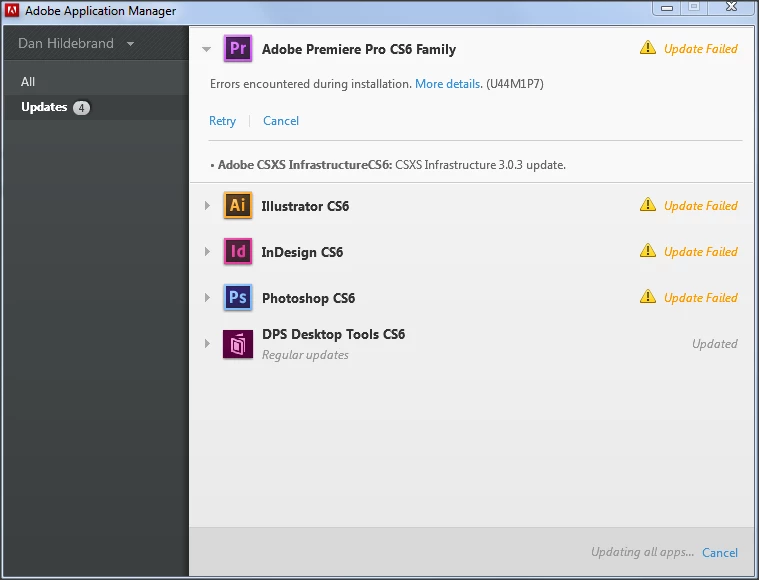
The last lines of the error log:

- 0 fatal error(s), 1 error(s)

05/02/13 18:39:19:337 | [INFO] |  | OOBE | DE |  |  |  | 5504 | Win OS version: 6.1.1.0 64 bit Type: 1

05/02/13 18:39:19:337 | [INFO] |  | OOBE | DE |  |  |  | 5504 |

05/02/13 18:39:19:337 | [INFO] |  | OOBE | DE |  |  |  | 5504 | ----------- Payload: Adobe CSXS Infrastructure CS6_3.0.3_AdobeCSXSInfrastructure3-mul 3.0.3.0 {3871C312-24AC-4FCA-AD09-AD55E3237B98} -----------

05/02/13 18:39:19:337 | [INFO] |  | OOBE | DE |  |  |  | 5504 | ERROR: DF045: File corruption detected. Re-install the product & then apply the patch again. (Can not repair file "C:\Program Files (x86)\Common Files\Adobe\CS6ServiceManager\IMSLib.dll")(Seq 13)

05/02/13 18:39:19:337 | [INFO] |  | OOBE | DE |  |  |  | 5504 |

05/02/13 18:39:19:337 | [INFO] |  | OOBE | DE |  |  |  | 5504 | Please search the above error string(s) to find when the error occurred.

05/02/13 18:39:19:337 | [INFO] |  | OOBE | DE |  |  |  | 5504 | These errors resulted in installer Exit Code mentioned below.

05/02/13 18:39:19:337 | [INFO] |  | OOBE | DE |  |  |  | 5504 | -------------------------------------------------------------------------------------

05/02/13 18:39:19:337 | [INFO] |  | OOBE | DE |  |  |  | 5504 |

05/02/13 18:39:19:337 | [INFO] |  | OOBE | DE |  |  |  | 5504 | Exit Code: 7 - Unable to complete Silent workflow.

05/02/13 18:39:19:337 | [INFO] |  | OOBE | DE |  |  |  | 5504 | Please see specific errors for troubleshooting. For example, ERROR: DF045 ...

05/02/13 18:39:19:337 | [INFO] |  | OOBE | DE |  |  |  | 5504 | *=*=*=*=*=*=*=*=*=*=*=*=*=*=*=*=*=*=*=*=*=*=*=*=*=*=*=*=*=*=*=*=*=*=*=*=*=*=*=*=*=*=*

05/02/13 18:39:19:337 | [INFO] |  | OOBE | DE |  |  |  | 5504 | END - Installer Session

05/02/13 18:39:19:337 | [INFO] |  | OOBE | DE |  |  |  | 5504 | *=*=*=*=*=*=*=*=*=*=*=*=*=*=*=*=*=*=*=*=*=*=*=*=*=*=*=*=*=*=*=*=*=*=*=*=*=*=*=*=*=*=*

The only thing I did differently between yesterday and today is download and install InDesign.

Computer Specs:

Windows 7 Ultimate (updated)

Intell Core i7 3770k

256 gb SSD

16 gb Ram

1.2 gb GeForce GTX 570

If someone could help me out, I would be really appreciateive.

Thanks,

Dan

This topic has been closed for replies.
Correct answer Arpit Kapoor

Dan, it seems like the adobe applications might have gone corupt or may be there is file missing from the installation due to which you are geting this error.

First lets make sure the issue is not with Adobe Application Manager, so download and install the latest version of Adobe Application Manager from the below link and retry.

http://www.adobe.com/support/downloads/detail.jsp?ftpID=4773

If still same issue, I would suggest uninstalling the application using the native uninstaller from Control Panel and then remove the remnants of the installation using the Adobe Creative Suite Cleaner Tool: http://www.adobe.com/support/contact/cscleanertool.html.

Re-install CS6 from AAM and try to update.

Let me know in case you face any issues while following the above suggestions.

2 replies

Inspiring
May 3, 2013

Hi Dan,

As per the snap shot of the last few lines of the logs,

5/02/13 18:39:19:337 | [INFO] |  | OOBE | DE |  |  |  | 5504 | ERROR: DF045: File corruption detected. Re-install the product & then apply the patch again. (Can not repair file "C:\Program Files (x86)\Common Files\Adobe\CS6ServiceManager\IMSLib.dll")(Seq 13)

It states that the files IMSLib.dll has gone corrupt and could not be repaired so Install/Update has failed.

Please delete the CS6ServiceManger folder from the C:\Program Files(X86)\Common Files\Adobe\

Do the re-install of complete CS6 suite to re-create the files/folder inside CS6serviceManager which were corrupt and then try to update.

Please write us back if this doesn't resolve the issue.

ManiRani
Adobe Employee
Adobe Employee
May 2, 2013

Hi, Dan,

Are you still experiencing problems? Creative Cloud applications were unavailable earlier this morning. Service has been restored now.

Please let us know if you still need help.

Thanks,

Rani

dh91Author
Known Participant
May 2, 2013

Hi Rani,

The problem remains. Is there a way to delete the already downloaded updates? Right now all it is doing is attempting to reinstall the update without re-downloading the update. Maybe this would move things along?

Thanks,

Dan

Arpit Kapoor
Arpit KapoorCorrect answer
Participating Frequently
May 2, 2013

Dan, it seems like the adobe applications might have gone corupt or may be there is file missing from the installation due to which you are geting this error.

First lets make sure the issue is not with Adobe Application Manager, so download and install the latest version of Adobe Application Manager from the below link and retry.

http://www.adobe.com/support/downloads/detail.jsp?ftpID=4773

If still same issue, I would suggest uninstalling the application using the native uninstaller from Control Panel and then remove the remnants of the installation using the Adobe Creative Suite Cleaner Tool: http://www.adobe.com/support/contact/cscleanertool.html.

Re-install CS6 from AAM and try to update.

Let me know in case you face any issues while following the above suggestions.