
March 13, 2014
Answered

Creative cloud wants to make changes

  • March 13, 2014
  • 16 replies
  • 48830 views

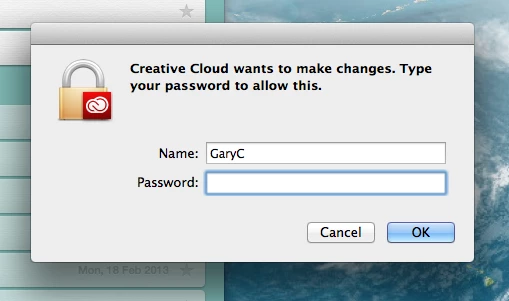
I get an annoying popup that tells me "Creative Cloud wants to make changes" and asks for my CC password. But when I enter the password it won't accept it. But if I press CANCEL, the popup returns in five seconds. I know the password is correct because I can log into CC and also my adobe account.

I thought maybe it was a virus, but if so, it has infected both my work and home Macs. The only way to rid myself of this popup (which sits on top of everything) is to quit creative cloud. I have asked Adobe for help but they've shrugged their shoulders.

Anyone else had this issue?
Correct answer Abhijit_Kr_


Hi Gary,

This screen is asking for your Computer Password to make the necessary changes. It's Mac mechanism to authenticate whether you are the Admin user or not.

Please enter your Mac password to complete the changes.

Regards,

Abhijit

16 replies

Participating Frequently
March 31, 2014

I too am having this problem. It happens every day at work. I am not an administrator on my computer, so I have to wait until our IT guy has time to come over to my desk to authenticate. It's incredibly annoying because it keeps happening with no apparent reason. I have an idea, Adobe, why don't you tell me exactly what you need done instead of a vague "Creative Cloud wants to make changes" prompt? That's how you can really help with security.

Preran
Legend
March 31, 2014

One of our users reported today that the problem was overcome by clearing the user cache in Mac. Can you try and let us know if it works for you?

Participating Frequently
March 31, 2014
Participating Frequently
March 29, 2014

I've gotten this message every time I boot up or restart my Mac since the last Creative Cloud software update I did  a few days ago. It never happened before this last update.

It's a novel change from the AI2EI error I would get whenever the Creative Cloud software gets an update, another phemomenon that persists despite following Adobe's and other Adobe forum users' instructions about how to resolve it. Luckily, neither of these interfere with my use of the Creative Cloud applications like Photoshop, InDesign, etc.

Participant
March 28, 2014

To Abhijit: If it is a “Mac mechanism,” then why does it display the CC logo in the box?

To dSparks: Changing your Adobe password will have no effect because it is asking for your computer password, not your Adobe password. You are right to be worried considering the recent security breach.

To donatelo: “whatever it was up to it slowed my computer to a crawl” — I too work in a fast-paced production environment, and I cannot afford to have my computer slowed down to a crawl. Thank you very much for the warning.

My response: I have quit out of the CC app and will not launch it again until I hear that this has been dealt with or a reasonable explanation is provided for this password request. I cannot recall any other company ever asking for my computer administrator password except Apple. If the dialog box didn’t have the CC logo on the Alert icon, I would have assumed it was my OS trying to protect me, but seeing that in the dialog box freaked me out! No way! Particularly after the breach of security we recently experienced…

Adobe Employee
March 28, 2014

Hi Bytehoven,

I understand your concern regarding the security breach happened sometime back but this issue is totally different.

Yes, you are right this Prompt if of Adobe but this prompt is popping up to Authenticate yourself so you can allow the Adobe applications to make the necessary changes in it.

This option may come on Windows too if the user is not an Admin. On Mac this may come by default if any applications needs Admin right to launch the application or make any necessary changes.

Also you mentioned that after this recent change you Machine is responding very slow. Could you please launch Activity Monitor and check which process is utilising the most of your Memory and Processor and close those which are not necessary after checking what excatly they are for.

Hope this answers your query.

Regards,

Abhijit

Participant
March 28, 2014

This is ridiculous, I am not wasting my time trying to enter a legitimate argument, this is a faulty piece of nagware. I want adobe to remove it from my computer before I send you a bill I am MAD AS HELLL

March 28, 2014

Same problem. Have changed my Adobe password and turned off Creative Cloud, but it keeps popping up. Not interested in crashing my computer. Can someone at Adobe please address this issue?

Participant
March 28, 2014

I would like to add my two cents, I work in  fast paced production enviorment and having to deal with this annoying piece of nag ware for the last two days is pushing the limits, I gave in and let it do what ever it think that needs to to stop bugging me, there is no way to tell what it is doing or when it has stoped but whatever it was up to it slowwed my computer toi a crwal just before everything came crashing down- I have a word for adobe -GET THIS OUT OF HERE-

Adobe Employee
March 13, 2014

Hi ElectricArtist,

Could you please provide us the screenshot of the pop up so we try to find why it is prompting.

Regards,

Abhijit

March 13, 2014

Hi Abhijit,

Screenshot attached.

One thing to note, in the NAME field, my work computer name is Gary Crilley and this is what shows. My home computer name is GaryC and that's what has come up. Obviously my Adobe login in my email address, but changing the name as well as entering the password makes no difference. It just shakes and remains in place. Until I quit CC.

cheers

Gary Crilley

gary.crilley@gmail.com

022 641 9458

Adobe Employee
March 13, 2014

HI Gary,

I am sorry but your attachment is not visible. Please insert the image again.

Regards,

Abhijit