Participant
June 5, 2016
Answered

Creative Cloud won't open

  • June 5, 2016
  • 1 reply
  • 4982 views

Need to figure out why creative cloud won't open. I can double click on it , the loading wheel shows for about two seconds then nothing. I have a stand alone version of Lightroom which remains unaffected. I want to get a Photoshop subscription but can't download  it because the Creative Cloud won't open. I have already tried removing it and reloading it , cleaning registry , etc.... The error I get says incompatible app. Anyone had the same problem ?

This topic has been closed for replies.
Correct answer michaelcharles992

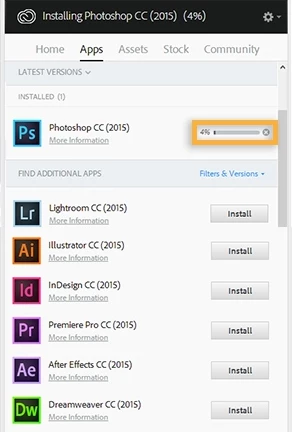
CC apps can be installed from Adobe Creative Cloud desktop application.

Launch Adobe Creative Cloud app and Sign in with your Adobe ID and Password.

Once Signed in ,  Click on Tab named Apps , it will list CC apps available for installation along with Install / Try  button .

Locate Photoshop CC 2015 among the list and then click on Install/ Try button next to it. It will start the installation process.


Finally got it figured out , managed to get Adobe support to help. The biggest problem was the Creative Cloud app that you download when you are doing all of the above steps is outdated and not supported anymore so once you get the app working you have to update it before you try and use it . If you try and use it before you update it , it screws everything up and you have to go through all the steps again. Once I got the app to work and got it updated everything worked fine. Thanks for your help and I hope this helps someone else.

1 reply

Ned Murphy
Legend
June 5, 2016
Participant
June 5, 2016

Tried downloading and opening with all three operating systems , still won't open ?

Govardhan.V
Participating Frequently
June 5, 2016

It will be helpful , if you can post screenshot of error message.