


- Home
- Download & Install
- Discussions
- Re: Reactivation error unresolved after receiving ...
- Re: Reactivation error unresolved after receiving ...
CS3 is a dead program

Copy link to clipboard
Copied
After running CS3 on my new computer (PC) since April 2017, I've had the program since 2007 I started getting the "You must reactivate to use this product" message in November and after contacting support and was told to ignore it, it counted down for a few days and I can no longer use the product.
After checking back with support I was instructed to go through the forums for help, I was instructed to request a new serial number and got one from Adobe, but upon uninstalling and reinstalling CS3, I was not prompted to put in the new serial number. I was then instructed to delete the AdobePCD file on my computer and did so. I was never prompted to put in the new serial number the original "You must reactivate to use this product" message came back as if I had done nothing.
I have read through the instructions for CS3 Reactivation and done each step. After posting in a few other discussions I was told again I need to delete the cache.db file. There is no cache.db file. After uninstalling it again and reinstalling to try again the AdobePCD folder no longer appears in the files. I've done this 8 times now. I noticed some of the files are dated 3/21/2007. Another thing I noticed is it states in the instructions I need to click on two file links (file 1 of 2 and file 2 of 2) but under English - Windows there is only one file listed. Anyone have any more suggestions?? I am so frustrated trying to figure this out.



 9
Replies
9
9
Replies
9




Copy link to clipboard
Copied
Hi Leighsfca,
Sorry for the trouble that you had to face while trying to install and activate your Adobe CS3 on your windows machine.
Please be aware that it is a very old software and Adobe has not tested it with the latest operating systems hence it may or may not work.
However i would recommend you to try few steps and see if that helps, If you don't have anything else on your machine from Adobe then do the below steps:
Delete everything that says Adobe on it from the following folders:
- Program Files > Adobe
- Program Files > Common Files > Adobe
- Program Files (x86) > Adobe
- Program Files (x86) > Common Files > Adobe
- C:\Users\<user_name>\AppData\Local\Adobe( App data & Program Data is hidden folder please see, How to Show Hidden Files and Folders in Windows 7, 8, or 10)
- C:\Program DATA \Adobe
After this try the installation again and see if that works and share the results with us.
Copy link to clipboard
Copied
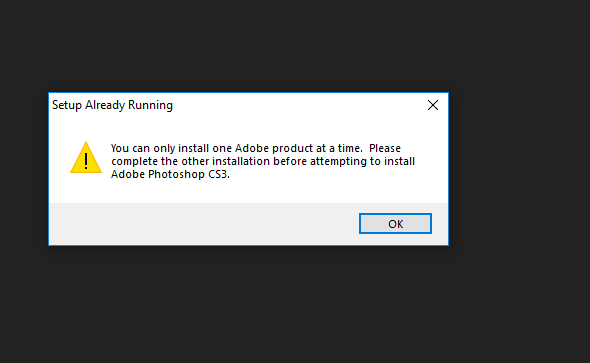
This is what I get now. This is after removing all the files and reinstalling.

Copy link to clipboard
Copied
Leighsfca please provide any additional responses to this discussion.
Bani please see the following discussions where Leighsfca has also posted:
Reactivation error unresolved by new serial number from Adobe
Most recently Leighsfca posted a screenshot of Program Files(x86)\Adobe\Photoshop CS3 in discussion Reactivation error unresolved by new serial number from Adobe so it would appear that Leighsfca was browsing to the wrong directory and has not removed the necessary cache.db file as discussed in Resolve "temporary activation expired" error for CS3 and Acrobat 8 .
Copy link to clipboard
Copied
I have read all the suggestions posted in the forum, I tried everything suggested. At this point nothing works. Photoshop CS3 is still listed in my apps. No Adobe files are listed in my file explorer. But when uninstall it, it's still there. I'm so frustrated at this point. I'm hoping to have an IT friend come over and see if he can help. I tried to reset my computer to previous point. that did nothing. I'm about to wipe my computer to get it off of there!
Copy link to clipboard
Copied
Leighsfca I am sorry that you have faced so much difficulty with this process. When you do have your I.T. friend come over please reference this discussion. This will allow them to have complete details on how they can remove the cache.db file so that you can successfully utilizing Creative Suite 3.
Copy link to clipboard
Copied
Thank you. I have printed out all of the threads here. My main issue now is just getting the program to uninstall.
Copy link to clipboard
Copied
Leighsfca there are hyperlinks with critical information that is not available in your printouts. Please click on the View the full discussion link so that your I.T. friend can view the discussion in the default web browser.

Copy link to clipboard
Copied
Wouldn't just leave all kinds of crap floating forever in your registry?


Copy link to clipboard
Copied
you posted to an old thread with out-dated info. for the past several year, there's been no reason to install anything cs3 (cs4 or cs2) unless you want to use for a maximum of 30 days. ie, it's no longer possible to activate any of those versions.


Get ready! An upgraded Adobe Community experience is coming in January.
Learn more
 AdChoices