


- Home
- Download & Install
- Discussions
- Re: CS3 - Still getting Activation Error Message w...
- Re: CS3 - Still getting Activation Error Message w...

Copy link to clipboard
Copied
My Creative Suite 3 programs recently had an activation error message and wouldn't start. I was lead here: Activation or connection error when starting CS3 or Acrobat 8 . I opted to "Receive a new serial number and installer". I followed the instructions: uninstalled the existing version and downloaded and installed the new replacement installer. After the installation was complete, I restarted my computer. Then I started Photoshop and Illustrator, and still got the same error message ("Temporary Activation Expired"). When I selected "Activate over the telephone" I noticed that the serial number was the old one. However, I never was asked to enter the new serial number with the new installer.
I'm at a loss for what to do. I did try uninstalling and reinstalling with the new installer again. Any help would be appreciated. I tried live chat, and was asked to direct my question here.
Thanks,
Erika


 1 Correct answer

Removing the cache.db file from the following folder seems to have gotten rid of the Activation countdown for me. (didn't even uninstall the new non-activation installation of CS3)
Program Files (x86)/Common Files/Adobe/Adobe PCD/cache/
After removal, i started Photoshop and it requested a serial number. I entered the new serial number generated from my original CS3 serial number from the Adobe site. Obtain a new serial number | CS3, CS4
Next popped up the Registration screen, I selected Never Re
...
 60
Replies
60
60
Replies
60


Copy link to clipboard
Copied
Erika did you completely remove the installed version of Creative Suite 3 before installing the new version available at Activation or connection error when starting CS3 or Acrobat 8 ?
If so what operating system are you installing on? In addition what other Adobe software titles are currently installed?
Copy link to clipboard
Copied
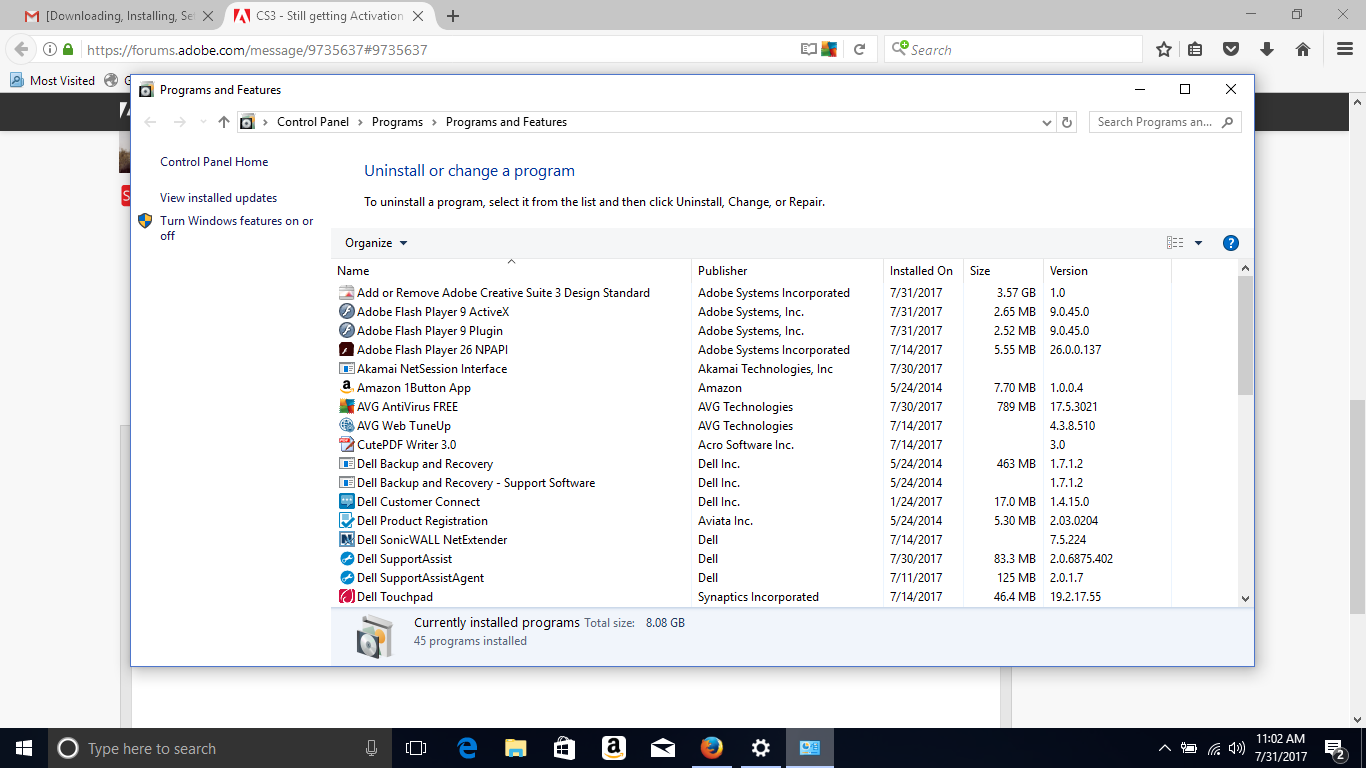
Thanks for your quick response. I'm using Windows 10 (on a Dell Laptop). I have Adobe Flash Player installed. When I go to Control Panel > Programs > Programs and Features (see image), I have selected "Add or Remove Adobe Creative Suite 3 Design Standard" and selected "Uninstall/Change". If there is a different way to uninstall, please let me know.
One more thing, since the activation error message first occurred, I haven't been able to deactivate my product first, before uninstalling.
Copy link to clipboard
Copied
Thanks for the update Erika. Yes please use the uninstaller in Programs and Features control panel. Once you have completed the uninstall process then please also download and run the CC Cleaner Tool available at Use the Creative Cloud Cleaner Tool to solve installation problems. This should help remove any remaining entries from the Creative Suite 3 installation.
You should then be able to utilize the new serial number and installation files at Activation or connection error when starting CS3 or Acrobat 8. The installation files on this page does not include activation technology so you should no longer receive any prompts regarding a need to activate Creative Suite 3.
If you do continue to face an activation error then can you please post a screen shot of the error Erika?

Copy link to clipboard
Copied
Hi Jeff-
I'm having the same problem as Erika where it doesn't prompt me for the new serial number with the new installer - it simply brings up the old activation screen. My problem is that I currently have CS3 Design Standard (which I have the problem with and is currently uninstalled), and CS3 Web Standard (which is working perfectly fine under the old activation system and not prompting me for anything). If I run the CC Cleaner Tool, will it wipe out remaining entries from both installations? I use the Web apps (Fireworks and Dreamweaver) extensively, and cannot afford that going down on me now.
Thanks,
Nick
Copy link to clipboard
Copied
Nick you will need to remove all current installations of Creative Suite 3. You can then enter your existing CS3 serial number to receive access to the new activating installation files for CS3 Design Standard and CS3 Web Standard.
If you still have CS3 Web Standard installed then you will likely continue to receive errors regarding activation being unavailable.
Copy link to clipboard
Copied
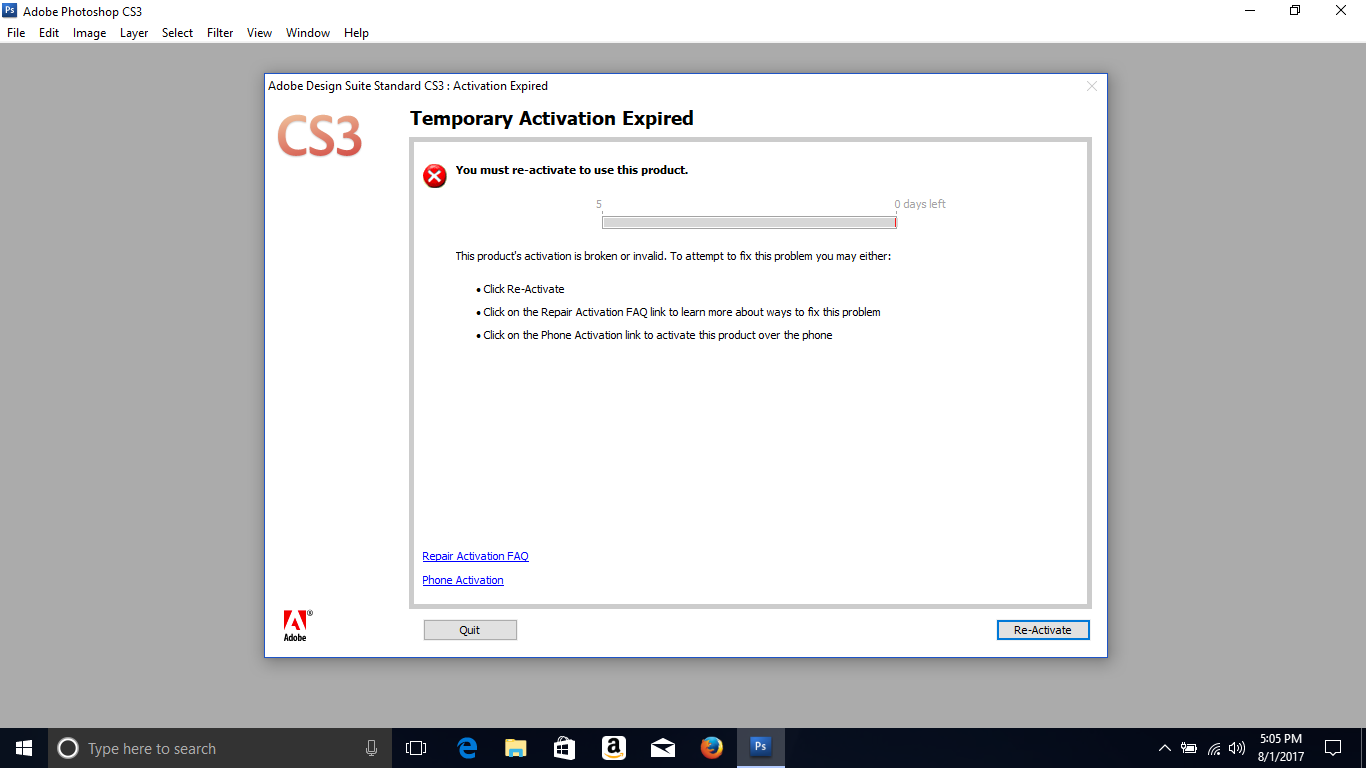
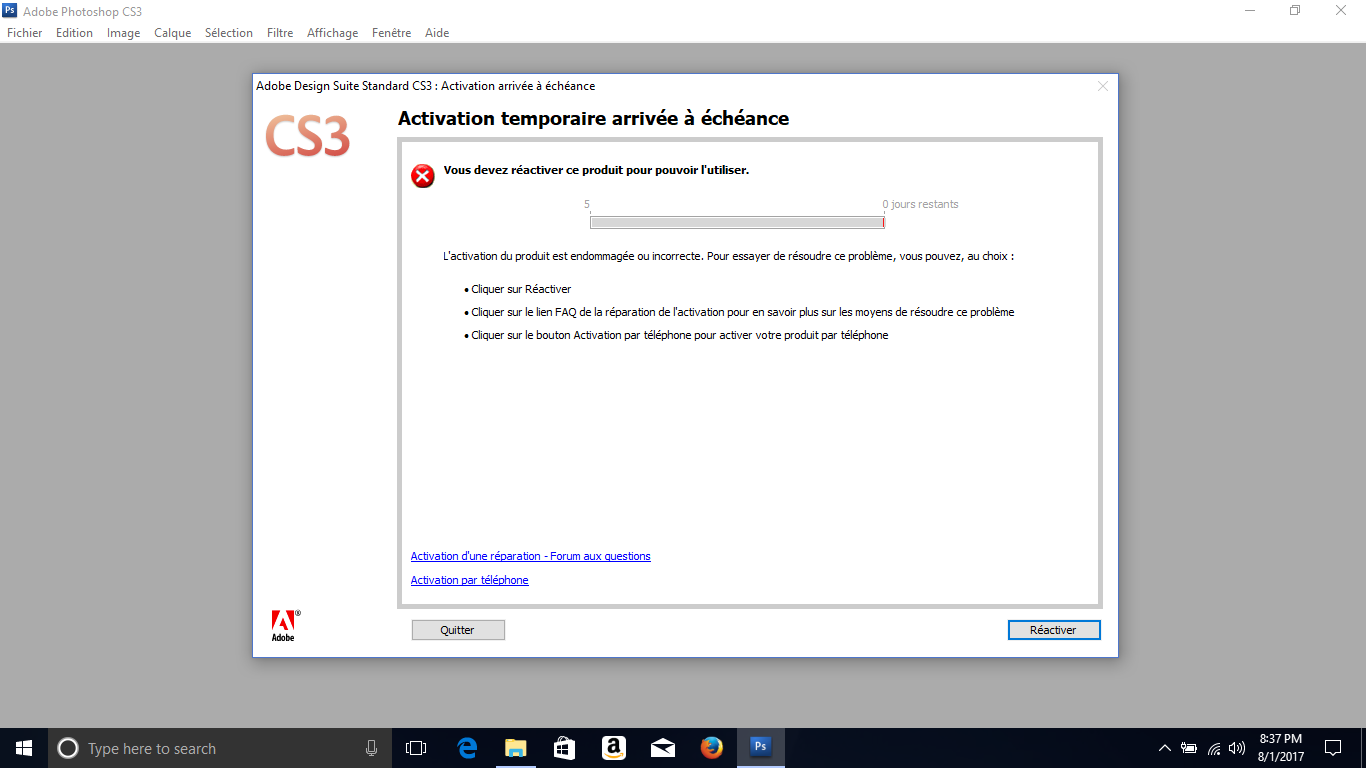
Hi Jeff, I uninstalled the product, used the CC cleaner tool, and then installed the new version. But, I still get the same error message. I also tried downloading the new version in French (after I uninstalled the English version) to see if it would be different, but I still get the same message.(see images below)
I remember getting a similar message about a year ago. When I opened Photoshop it told me to reactivate in 5 days. I kept trying to reactivate thinking something was wrong with my internet connection. After the five day window, it gave me one last message to reactivate. It did not seem to actually reactivate, but it gave me a new message (can't remember what it said) then Photoshop started working again as normal. So when I got the warning last week, I assumed the same thing would happen. But now Photoshop and Illustrator do not open beyond the error message, and neither do InDesign or Adobe Acrobat Professional.
I really appreciate your help, since I know CS3 is a very old version. I've been meaning to reformat the laptop I've been using for a while (or rather my husband will reformat, since he has more technical know-how in that area). I'm wondering if it is something in the operating system? We noticed a few problems with Windows 10 with not wanting to install new programs, but those issues have seemed to resolve themselves over the past few years we've been using it. We are going to try reformatting and then I will reinstall with the new version of CS3.
Thanks,
Erika
Copy link to clipboard
Copied
Ok thanks for the update Erika.
I will attempt to duplicate the errors you are experiencing and will update this discussion. My understanding is that the installation files for the Windows version of Creative Suite 3 Design Standard should no longer require activation.
It may take me a couple of days but I will update this discussion with the results of my testing Erika. Once I have those results I can better advise you if reformatting the Windows 10 computer would be of any benefit.
Copy link to clipboard
Copied
Thank you, Jeff. I've done a lot of software support in the past and can really appreciate your willingness to help on this.
FYI...I've had the CS Design and Web Standard versions installed on my PC for a couple years now and have been working fine. Similar to Ericka, I remember this error message to activate the software originally popped up for me out of the blue for the Web Standard at first awhile back (not sure when, but this year for sure, and it probably would have appeared on the Design one, but I haven't been using it much). I thought it was weird but was able to re-activate it. The Design one I'm not able to due to the activation servers being retired.
My point is that I think there may have been a conflict with a Windows 10 update or something that caused this to originally happen, since I did not install or re-install the application. Regardless, it is bizarre that the old activation screen keeps appearing. Perhaps there's a method to manually locate and delete this screen function?
Thanks,
Nick
Copy link to clipboard
Copied
Nick there may be some confusion with the activation screen, and the opportunity to register a Creative Suite 3 installation.
I am in the process of setting up a Windows 10 virtual machine right now; to test the Creative Suite 3 Design Standard installation. I will grab a screen shot of the screen I am referencing as part of the process.
If you are receiving a message, asking you to register, you can click on Do Not Ask Me Again and the prompt should no longer occur.
Copy link to clipboard
Copied
Good news Erika and Nick. I was able to successfully install CS3 Design Premium without any requests for activation.
Nick the registration screen I was referring to, in post #9, is as follows:

If you click on Never Register you will not be prompted by this dialog again. This Registration service was discontinued several years ago when the ability to register on http://www.adobe.com/ was added. This error is not in relation to the recent activation server shut down.
Copy link to clipboard
Copied
Thanks for your help, Jeff. No, the screen was not a registration, but an activation screen I was referring to in the earlier post for both instances.
To clarify on your test, did you install old CS3 Design on a Windows 10 PC, then uninstall, then run the Cleaner tool, then reinstall with the new installer? Let me know. This is the situation I'm dealing with now - but keep in mind that the activation screen showed up without me doing anything (like uninstalling/reinstalling). I installed this on my work computer 3 years ago, activated successfully, and never did anything else but open it and use it.
My CS3 Web is working fine, and my fear is that I'll lose that and not get it back, since Ericka was not successful in using the Cleaner tool.
Copy link to clipboard
Copied
Nick I tested Design Standard on a clean, updated, virtual machine for Windows 10 Enterprise Edition. It was also a 64-bit version of Windows 10.
There was no licensing files on the computer to possibly cause the activation prompt.
Nick if you can confirm no other Adobe software is installed on the computer then please attempt to manually remove the following folders:
\Program Files\Common Files\Adobe\Adobe PCD\Cache
Please only remove these folders if all other Adobe software titles are removed. Removal of this folder will affect the licensing of any installed Adobe software titles.
Once you have removed the Cache folder then please try the installation of Creative Suite 3 again.
If you have already run the CC Cleaner Tool then you are almost there Nick. I would recommend removing the current installation of Creative Suite 3 before removing cache folder. This should help reduce any unexpected behavior.
Please update this discussion if you continue to face difficulties Nick. Please also let me know if you were able to locate and delete the cache folder successfully.

Copy link to clipboard
Copied
I've been trying ti get my CS3 to work for 3 or 4 days now. It seems that I am going round in circles as is everyone else. Has anyone got CS3 to work after reaching the activation page which does not work anymore?
You say " if you can confirm no other Adobe software is installed on the computer then please attempt to manually remove the following folders: \Program Files\Common Files\Adobe\Adobe PCD\Cache" I have lots of Adobe files, I'm not about to remove them all. What happens if I only remove the Adobe PCD\cache file?
Copy link to clipboard
Copied
If you don't remove the installed Adobe applications Ianf1945 then you will affect the licensing for all installed Adobe software. This could lead to the need to re-enter the serial number, or new unexpected licensing errors, for the installed Adobe software titles.
I would strongly recommend removing all Adobe applications first to prevent that occurrence. You can always reinstall any needed applications again.
If you are uncomfortable with proceeding Ianf1945 then please continue to monitor this discussion to see the results from other individuals.
Copy link to clipboard
Copied
Removing the cache.db file from the following folder seems to have gotten rid of the Activation countdown for me. (didn't even uninstall the new non-activation installation of CS3)
Program Files (x86)/Common Files/Adobe/Adobe PCD/cache/
After removal, i started Photoshop and it requested a serial number. I entered the new serial number generated from my original CS3 serial number from the Adobe site. Obtain a new serial number | CS3, CS4
Next popped up the Registration screen, I selected Never Register. Closed and rebooted. Opened up my installed CS3 apps and they worked just fine with no activation screen popping up. Checked the folder location above, a new cache.db had been created.
I do not have any other Adobe applications on my computer besides the CS3 applications, so can not speak to the impact on other Adobe applications.
So far so good!
Copy link to clipboard
Copied
Thanks for the update Lovetoread456!
Copy link to clipboard
Copied
lovetoread456, I'm glad to hear you were able to get it to work! I think yours is the correct answer, though I did end up reformatting my laptop anyway and installing the new CS3 installer. This is what finally worked for me.
Jeff, As I mentioned to lovetoread456, I ended up reformatting the computer (it was something I had been wanting to do for some time for other reasons, not just my problems with CS3). After that, I downloaded the new CS3 installer, and entered the new serial number. I made sure to click "Never Register" on the screen that popped up after I entered the new serial number. So far so good! I've been using the product for a few days now.
saads55879968, I do not use CS3 for work. I occasionally use it for a few side projects (mostly for family and friends) and personal use. So in other words, I can't quite justify the cost of CC since I'm not a full time graphic designer, or even a part time one. My understanding is that it is subscription only. If it was a one cost thing, that would be different for me. I'd pay for the most recent version, and use it like I use CS3 until it is too old. I know CS3 is quite old, and I'm sure eventually I will have to make a decision to upgrade when I need a new computer. For now CS3 works for what I need it for. Also I use Photoshop + Illustrator, so I don't want to just get the subscription for Photoshop, but the subscription for Photoshop + Illustrator + Everything else is too much.
Thanks for everyone's help!
Erika
Copy link to clipboard
Copied
Thanks for the update Erika!

Copy link to clipboard
Copied
Just the Cache file or the PCD one as well?
Copy link to clipboard
Copied
OMG THANK YOU THANK YOU THANK YOU, I was having the worst day trying to figure this out until I read this

Copy link to clipboard
Copied
lovetoread456 - This corrected my problem! Thank you!

Copy link to clipboard
Copied
Hi there - I'm an a Mac and have looked everywhere for this folder and file but cannot find it. I've tried everything else. Am I missing something obvious? Ta!

Copy link to clipboard
Copied
I am in the same boat, on a MACBOOK PRO running OS 10.6.8 and am trying to get my CS3 activated again. I have tried uninstalling and re-installing 3x with no luck. I have now deleted all traces of anything Adobe, and have yet to find these cache files they are talking about. Please alert me if you find them. thanks!
Copy link to clipboard
Copied
Hi - looks like you found them - I did too after reading more of the forum posts and it also seems to have worked. I also found some stuff lurking there from an old CS2 installation! The lesson I've learned is that the answer is probably out there - the Adobe staff members are very knowledgeable and helpful.


Get ready! An upgraded Adobe Community experience is coming in January.
Learn more
 AdChoices