



Jon-M-Spear
Legend
November 9, 2018
Answered

Device Activation Limit

  • November 9, 2018
  • 4 replies
  • 10412 views

I have just carried out a clean install of CC (Photoshop CC 2019 wouldn't associate with .psd files) plus a Bios update on my Windows 10 PC.

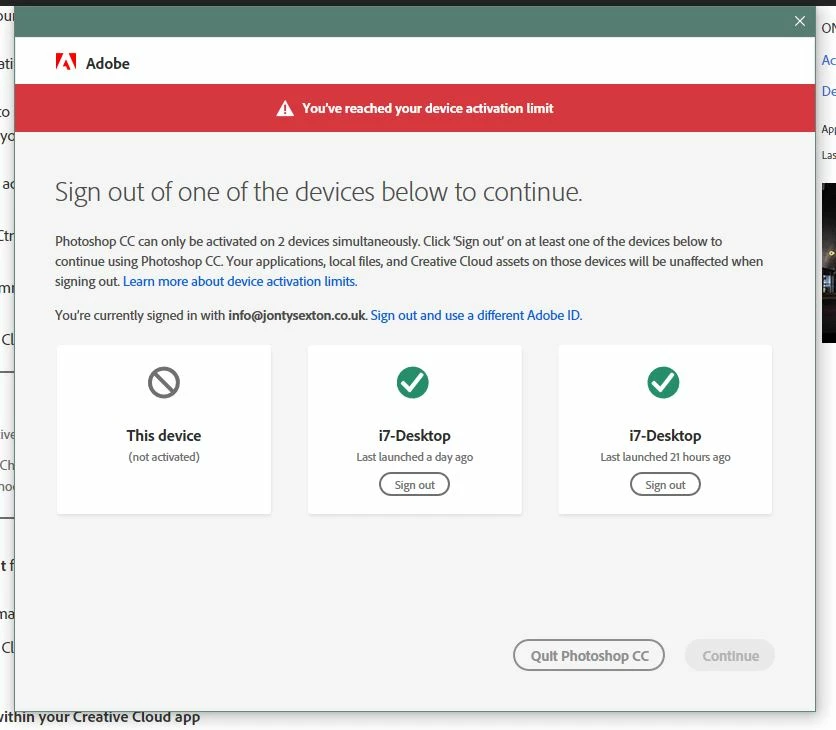
Now, when launching Photoshop or Lightroom, I am informed that I've reached the device activation limit.  What is bizarre, is that it is already showing 2 instances of the PC I'm logging in with.

When I do deactivate them, I can open Photoshop until the next time it decides I have reached the activation limit.  In addition, when it does open, I get a momentary flash of a blank (white) Adobe dialogue box.  This did not happen before these difficulties.

Any suggestions would be welcome. 
This topic has been closed for replies.
Correct answer danr7

In case you hadn't ever found a fix for this - Creative Cloud "Activation limit reached" or "Sign-in failed" error

the last suggestion on this page worked for me.

4 replies

Droxine
Known Participant
February 1, 2021

Ran into same problem today .. signing out fixed. Same deal .. all devices were the same comp. This kind of hassle should be expected from Adobe whom is unable to write good code outside any of their programs. They can't even housekeep the temp directory. CC app .. awful.

Participant
February 9, 2021

Likewise this also happened to me last week. Seems like an ongoing bug, but I wouldn't expect any less from Adobe.

danr7Correct answer
Participant
March 14, 2019

In case you hadn't ever found a fix for this - Creative Cloud "Activation limit reached" or "Sign-in failed" error

the last suggestion on this page worked for me.

Jon-M-Spear
Legend
March 14, 2019

Thanks danr7.

I was looking for the 'Master' activation page, but couldn't find it anywhere.  Strange how it listed as activated my PC twice and laptop twice!  Something odd going on methinks.

Participant
March 25, 2019

Yes I've found that in the last few days as well, the main activation page says that I'm logged in twice on the same laptop! definitely something odd happening. But I'm glad I found the activation page.

wrutter
Participant
March 8, 2019

This happened to me today as well--one computer shows up twice under "activated devices" online. Contacted support--they suggested it was a problem with the web page. Not too much of a help, unfortunately.

If you figure out what's going on, I'd love to hear what you find.

Jon-M-Spear
Legend
March 9, 2019

Which web page would that be?

Abambo
Community Expert
Community Expert
March 9, 2019

I had the same problem. Just signed out the additional activations. It got solved on its own after a while.

ABAMBO | Hard- and Software Engineer | Photographer
arij2010
Inspiring
November 9, 2018

It means that Adobe system see 3 machines and the 2 machines with the same name for Adobe system are referring to 2 different machines .

Do you have a dual boot or virtual machine on this "I7-Desktop" ?

Jon-M-Spear
Legend
November 9, 2018

No dual boot or virtual machine.  Just a bios update on my Win 10 box. 

In the early days of Win 7, Microsoft would see that as new hardware and want to re-license accordingly.