
Participating Frequently
April 16, 2020
Answered

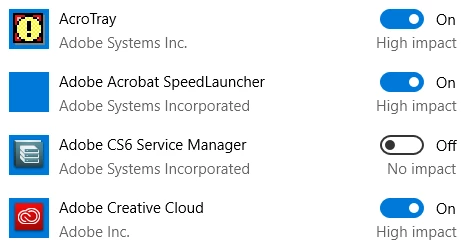
Disable auto start: AcroTray, SpeedLauncher, Creative Cloud

  • April 16, 2020
  • 1 reply
  • 1476 views

Hello,

Whenever I disable the autostart of these applications in the start up settings they keep switching back to On the next time I boot my computer.

How can I prevent these applications from starting at start-up?
 

This topic has been closed for replies.
Correct answer John T Smith

Is this what you are doing?

How to disable a program in Windows startup
-Right click the 'window pane' in the very bottom left corner of the Windows desktop
-Select Task Manager in the pop up option window
-Click More details if you don't see startup
-Select the Startup tab inside Task Manager
-Select the program you want to disable
-Click Disable in the bottom right corner
-BE VERY CAREFUL WHAT YOU DISABLE SO YOU DON'T STOP WINDOWS FROM RUNNING

1 reply

John T Smith
Community Expert
John T SmithCommunity ExpertCorrect answer
Community Expert
April 16, 2020

Is this what you are doing?

How to disable a program in Windows startup
-Right click the 'window pane' in the very bottom left corner of the Windows desktop
-Select Task Manager in the pop up option window
-Click More details if you don't see startup
-Select the Startup tab inside Task Manager
-Select the program you want to disable
-Click Disable in the bottom right corner
-BE VERY CAREFUL WHAT YOU DISABLE SO YOU DON'T STOP WINDOWS FROM RUNNING

Participating Frequently
April 16, 2020

ah you're right and now it works. Last time I received some updates from Adobe and these must have turned all those autostarts back on.