
Inspiring
February 4, 2018
Answered

Dismiss Notifications

  • February 4, 2018
  • 2 replies
  • 3072 views

In the new Creative Cloud Desktop App I have two old notifications. One is a few months old, the other is from 4 years ago. If I click the x it dismisses the notification window but the notification are still there when I click on the bell.

Is there any way to dismiss or remove these old, unneeded, and unwanted notifications?
This topic has been closed for replies.
Correct answer kglad

nevermind.

i was solving a different problem where the cc app notifies you incorrectly that updates are available.

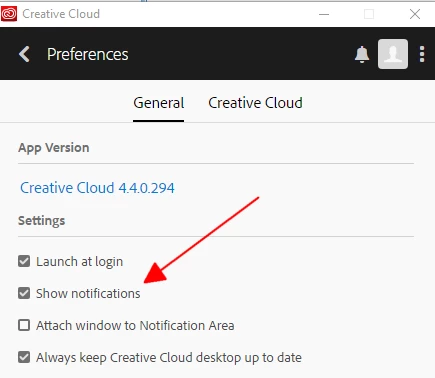
i don't know anything you can do about that except don't click the bell or untick 'show notifications' in your preferences

2 replies

Inspiring
February 27, 2018

Still no answer to this question...

"In the new Creative Cloud Desktop App I have two old notifications. One is a few months old, the other is from 4 years ago. If I click the x it dismisses the notification window but the notification are still there when I click on the bell.

Is there any way to dismiss or remove these old, unneeded, and unwanted notifications?"

kglad
Community Expert
Community Expert
February 4, 2018

quit the cc app

in coresync delete any file that has *.db (or a variation such as *.db-wal)

Restart the Creative Cloud desktop app.

Mac:

<Mac Hard Drive>/Users/<username>/Library/Application Support/Adobe/CoreSync

Windows:

C:\Users\<username>\AppData\Roaming\CoreSync

Inspiring
February 4, 2018

I did as you suggested but had to stop the coreSync.exe process to release the files The following files were found in the coreSync directory located in C:\Users\<useraname>\AppData\Roaming\Adobe as you described:

a17037e8ca74877415b250736a72864f.db

a17037e8ca74877415b250736a72864f.db-shm

a17037e8ca74877415b250736a72864f.db-wal

coresync.db

I deleted them and then restarted the CC Desktop App. New versions of the deleted files were created. Unfortunately the old notifications are still present. Clicking the Bell or the X dismisses the window but the notifications return when I click the Bell again. Here is a screenshot for your information.

kglad
Community Expert
kgladCommunity ExpertCorrect answer
Community Expert
February 4, 2018

nevermind.

i was solving a different problem where the cc app notifies you incorrectly that updates are available.

i don't know anything you can do about that except don't click the bell or untick 'show notifications' in your preferences