valentinb208691
Participant
March 13, 2017
Beantwortet

Download After Effects CC 2014

  • March 13, 2017
  • 3 Antworten
  • 9578 Ansichten

Hello,

I started with CC 2015 and would like to download After Effects CC 2014. It is not showing in the "previous versions"-section in the CC app. Can you please help?

Thanks,
Valentin

    Beste Antwort von valentinb208691

    Thanks Jeff A Wright for mentioning my id in this public forum. I am well aware, that this is public.

    I thought Kglad is not able to validate whether or not I have a membership, then why is he pointing to only that without helping?

    As I understand it, it is more interesting to talk about the subscription topic, even though no one viewing this public post is interested in it, but has to read through everything now.

    Long story short Jeff A Wright and kglad, I have found the solution myself. Maybe someone stumbles upon the same "problem" and finds this helpful:

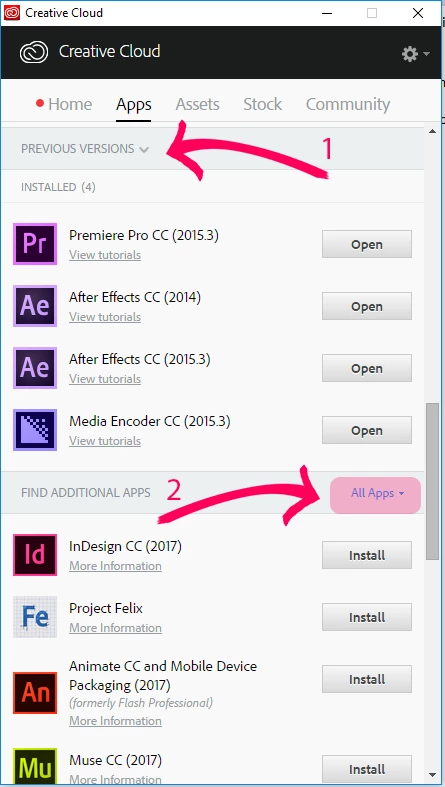
    In the CC app (which btw crashes very often) there is this "Previous Versions" section (Arrow 1 in the screenshot). To actually get to the download buttons for the previous versions you have to go to Arrow 2. When you press All Apps > View Previous versions, only then the install button in the 2nd section changes to an install button with multiple possibilities to choose from. There you can find all versions available to the account you are logged in with.
    3 Antworten

    valentinb208691
    Participant
    March 14, 2017

    What do you want to know so you will be able to help me find the cc 2014 version of AE? As I said: I started with CC 2015, have switched to CC 2017 and want to try AE CC 2014. Do you want to know if I have a subscription? Why would I ask a completely clear question as above, if i didn't have a subscription? What would be the sense of that.

    Just for some more redundance:

    Would you please be so kind and tell me where to find the link the AE CC 2014 in the CC App?

    Jeffrey_A_Wright
    Community Manager
    Community Manager
    March 14, 2017

    Valentinb208691 please be aware that you are posting in a public forum.  Kglad is another Adobe user who volunteers his time to answer questions from our community.  He does not work for Adobe and is unable to validate if you have a membership or not.  If you would like direct support, from an Adobe employee, then you can begin a chat session at Contact Customer Care​.

    As Kglad was indicating, in post #1, access to previous version of Creative Cloud applications is only available to active members.  You can access older versions by choosing Previous Versions in the Apps tab within the Adobe Creative Cloud desktop application.  For more details on how to install previous versions see Download and install Creative Cloud apps​.

    Valentinb208691, if you have a Creative Cloud for Teams or Enterprise account then you will want to work with your plans administrator.  Depending upon how your membership is managed they may need to provide you and installation package to install and license your Creative Cloud applications.

    I did review the account you utilized to post to this public forum.  I do not see an active membership tied to that e-mail address.  This will prevent you from accessing the Previous Version option of the Creative Cloud desktop app.

    If you have any additional questions you are welcome to update this public forum discussion.

    valentinb208691
    valentinb208691AutorAntwort
    Participant
    March 15, 2017

    Thanks Jeff A Wright for mentioning my id in this public forum. I am well aware, that this is public.

    I thought Kglad is not able to validate whether or not I have a membership, then why is he pointing to only that without helping?

    As I understand it, it is more interesting to talk about the subscription topic, even though no one viewing this public post is interested in it, but has to read through everything now.

    Long story short Jeff A Wright and kglad, I have found the solution myself. Maybe someone stumbles upon the same "problem" and finds this helpful:

    In the CC app (which btw crashes very often) there is this "Previous Versions" section (Arrow 1 in the screenshot). To actually get to the download buttons for the previous versions you have to go to Arrow 2. When you press All Apps > View Previous versions, only then the install button in the 2nd section changes to an install button with multiple possibilities to choose from. There you can find all versions available to the account you are logged in with.

    valentinb208691
    Participant
    March 14, 2017

    Where do I mention Trial in my post?

    kglad
    Community Expert
    Community Expert
    March 13, 2017

    you must have a subscription, not a trial to install earlier versions.