Exit
  • Global community
    • Language:
      • Deutsch
      • English
      • Español
      • Français
      • Português
  • 日本語コミュニティ
  • 한국 커뮤니티
0

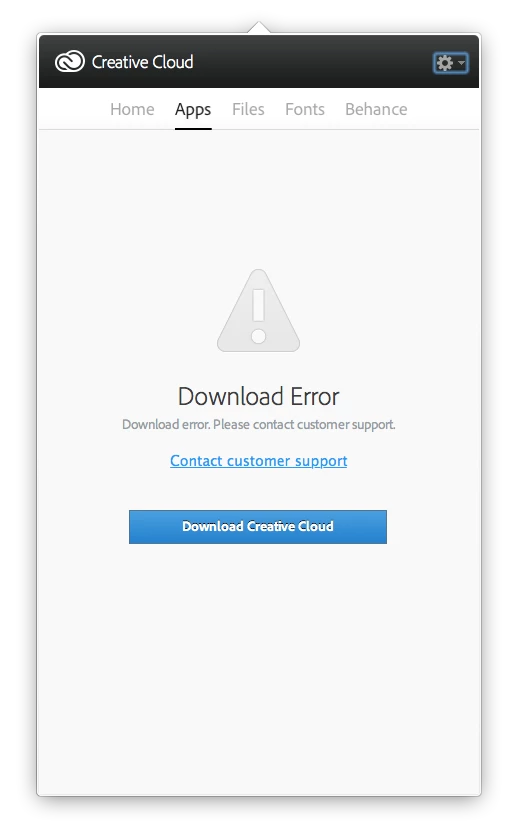
Download Error. Please contact customer support.

Engaged ,
Jul 11, 2013 Jul 11, 2013

CC has been running fine, but suddenly the CC app is showing Download Error. Clicking the button to contact customer support just brings up the FAQ, which is next to useless. Plus there's a button to Download Creative Cloud, which is confusingly recursive. On the other hand, the apps I've tried seem to be working okay.

Meanwhile, I wonder if there will be some sort of benefit offered to those of us paying to be beta-testers?

Screen Shot 2013-07-11 at 13.25.18.png

TOPICS
Creative Cloud
4.5K
Translate
Report
Community guidelines
Be kind and respectful, give credit to the original source of content, and search for duplicates before posting. Learn more
community guidelines

correct answers 1 Correct answer

Engaged , Jul 11, 2013 Jul 11, 2013

All seems back to normal following a system restart. Not something I normally do between system upgrades, but I tried it in this case and it seems to have fixed it, in the traditional switch-it-on-and-off-again manner.


Translate
Adobe Employee ,
Jul 11, 2013 Jul 11, 2013

Hi Philip,

Please follow the below given instruction.

On Windows :

Rename OOBE to OOBE_old from

C:\Program Files (x86)\Common Files\Adobe

C:\Users\(UserName)\AppData\Local\Adobe

On MAC:


Rename OOBE to OOBE_old from :

/Library/Application Support/Adobe/

~//Library/Application Support/Adobe/

Then try and launch Creative cloud once again

Ankit

Translate
Report
Community guidelines
Be kind and respectful, give credit to the original source of content, and search for duplicates before posting. Learn more
community guidelines
Engaged ,
Jul 11, 2013 Jul 11, 2013

Thanks Ankit, I did what you said but still get the same problem.

I tried launching Creative Cloud desktop app from another user account on the same machine and it worked fine, but from my usual account it shows this problem.

Translate
Report
Community guidelines
Be kind and respectful, give credit to the original source of content, and search for duplicates before posting. Learn more
community guidelines
Adobe Employee ,
Jul 11, 2013 Jul 11, 2013

Please check this link http://forums.adobe.com/message/5112549 to find out more troubleshooting steps.

Also please check http://forums.adobe.com/message/5109299#5109299#5109299.

Ankit

Translate
Report
Community guidelines
Be kind and respectful, give credit to the original source of content, and search for duplicates before posting. Learn more
community guidelines
Engaged ,
Jul 11, 2013 Jul 11, 2013

Thanks again. If I read it right, your links suggest deleting all the CC apps and reinstalling. This is likely to take half a day and not something I would do lightly, especially as the apps themselves seem to be working fine.

Until this problem occurred a couple of hours ago I had been using the CC desktop app without too much problem, and the issue only arose after I used the CC app to install the InDesign update which appeared in the list earlier today.

Further to this, when I launch the Creative Cloud app from another user account it works fine. I wasn't so much asking for help as reporting a bug and pointing out that the alert contained a recursion.

Much as I appreciate the attempt to help, I don't consider that directing people to reinstall gigabytes of applications is appropriate or useful; on the contrary, I think it indicates profound disrespect for the customer on the behalf of Adobe (not you personally, Mr Khurana), but then this is nothing more or less than what we have come to expect from Adobe.

Translate
Report
Community guidelines
Be kind and respectful, give credit to the original source of content, and search for duplicates before posting. Learn more
community guidelines
Engaged ,
Jul 11, 2013 Jul 11, 2013

All seems back to normal following a system restart. Not something I normally do between system upgrades, but I tried it in this case and it seems to have fixed it, in the traditional switch-it-on-and-off-again manner.
Translate
Report
Community guidelines
Be kind and respectful, give credit to the original source of content, and search for duplicates before posting. Learn more
community guidelines
Adobe Employee ,
Jul 11, 2013 Jul 11, 2013

Philip,

Good to know that it worked with a simple steps rather then spending alot of time.

Thanks for the update

Ankit

Translate
Report
Community guidelines
Be kind and respectful, give credit to the original source of content, and search for duplicates before posting. Learn more
community guidelines
New Here ,
Mar 03, 2014 Mar 03, 2014

Hi Ankit,

You were working to fix this issue on my Mac last week.  After 3 hrs you told me you would check on something and get back to me but never came back.  I have now been online with Saritha for 2 hrs and no luck.  Frankly this is very disappointing, especially since you told me you would get right back to me and I waited for an hour but you never returned. 

Translate
Report
Community guidelines
Be kind and respectful, give credit to the original source of content, and search for duplicates before posting. Learn more
community guidelines
Adobe Employee ,
Mar 06, 2014 Mar 06, 2014

Lakersfan1977 I am sorry for the inconvenience you have faced.  Do you have a case number from your interaction with our support team that I can reference?

Translate
Report
Community guidelines
Be kind and respectful, give credit to the original source of content, and search for duplicates before posting. Learn more
community guidelines
New Here ,
Jan 09, 2016 Jan 09, 2016

Joseph Kersicla.

Your instructions didn't work. When i try to rename the file. It comes up with a error message saying: this action cannot be completed cause file or folder is open in another program

Reply if you know how to change it another way

Translate
Report
Community guidelines
Be kind and respectful, give credit to the original source of content, and search for duplicates before posting. Learn more
community guidelines
New Here ,
Jan 09, 2016 Jan 09, 2016
LATEST

Joseph Kersicla.

Doesn't mater now i fixed it i went through all the files that had a adobe on them and delete them there was no trace of adobe on my computer.

Thanks anyways

Translate
Report
Community guidelines
Be kind and respectful, give credit to the original source of content, and search for duplicates before posting. Learn more
community guidelines