
Participant
January 26, 2012
Question

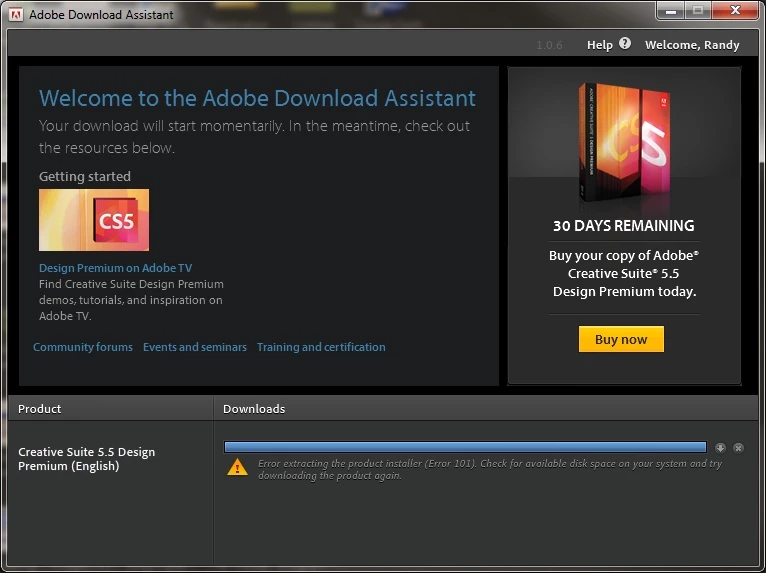
Error 101 when trying to download using the Adobe Download Assistant

  • January 26, 2012
  • 1 reply
  • 3483 views

I am having the exact same problem with CS 5.5 Design Premium. 445 Gigs Free, Win 7, Intel i7, loads of ram. "Error 101" "Error extracting the product installer (Error 101). Check fo available disk space on your system and try downloading the product again." - This from Adobe Download Assistant...

I have rebooted twice, downloaded product 4-5 times, always the same error at the end.
    This topic has been closed for replies.

    1 reply

    Jeffrey_A_Wright
    Community Manager
    Community Manager
    January 26, 2012

    Moved this to a new thread as there was insufficient information in the previous thread to determine if this is related or not.

    TerraSpan how much available hard drive space do you have available?

    TerraSpanAuthor
    Participant
    January 27, 2012

    Just an Update.

    It finally installed, don’t know if you guys tweaked something to make it happen but thanks for your time.

    Participant
    February 7, 2012

    I was inquiring because a corporate network would be a lot more complicated than a home network.  There could be proxy servers involved, you might be using a roaming profile, etc.

    I would still be curious to know how much free space there is on your C: drive even though it is a new computer.  In addition you might also try creating a new adminsitrator account to help determine if it is an issue with the permissions on your current user account or not.


    my account i have now is an administrator account. and the free space on my C: drive is 390 GB.